
Richdown
Yo Suzuki Productivity iPhoneiPadiPod touch
Richdown is a free Productivity app for iPhone and iPad by Yo Suzuki. Requires iOS 15.0. Updated July 22, 2026.
- Price
- Free
- on the App Store
- Size
- 7 MB
- Age 17+
- Updated
- Jul 22
- 2026 · v1.2.0
Screenshots


About Richdown
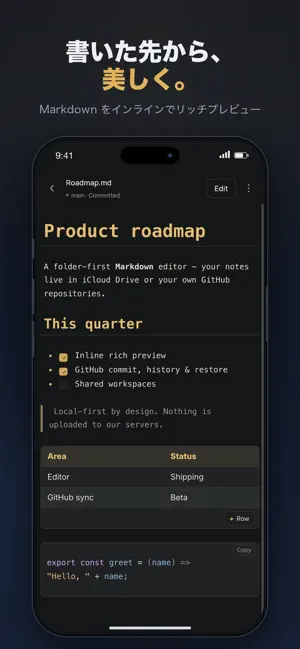
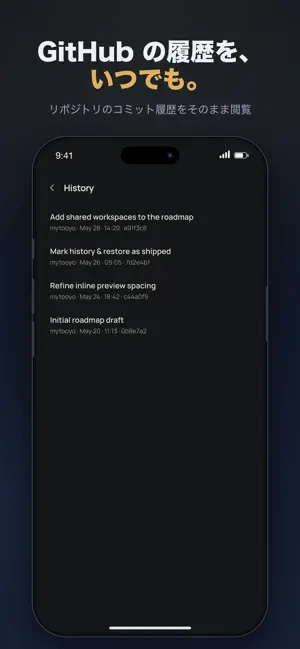
Plain Markdown, beautiful the moment you type it. Richdown is a focused Markdown editor that never makes you switch between "writing" and "reading." Headings, tables, code, quotes, task lists, even Mermaid diagrams render inline as you go — so you stay in the flow and watch the finished page take shape. And Richdown doesn't lock your files inside someone else's cloud. Open folders in iCloud Drive or on your device — or work straight in your own GitHub repositories. — Write — • Inline rich preview that keeps up with your typing • Tables, code blocks, quotes, task lists, Mermaid diagrams and images • Outline view and in-file search to navigate long documents • A Markdown toolbar above the keyboard for quick formatting — Keep — • Open iCloud Drive or on-device folders and edit in place • Browse subfolders; create, rename and delete files; sort by name or date • Pull to refresh. Files are stored on your device (iCloud / local) — nothing is uploaded to our servers — Connect (GitHub, optional) — • Open your own GitHub repositories, edit, and commit in one go • Browse commit history, diff a past version, and restore it • Switch and create branches; open pull requests • Traffic goes straight from your device to GitHub; your access token is kept only in the iOS Keychain Note: commit, history, diff and restore are GitHub-repository features (plain folders support editing and saving). — iPad — • A true two-pane layout: file list on the left, preview on the right Fast, private, and honest about your files. Distributed by StructWorks · Contact: [email protected]
What’s new
Version 1.2.0 · Updated July 22, 2026
Major improvements to tables and content viewing. - Long cell text now wraps to fit the screen width, so tables are readable without horizontal scrolling. - Removed the size cap on image previews—images now scale to the content width. - YAML front matter (metadata between - lines) now renders as a clean card with keys and tag chips. - Collapsible details sections fully render their content, including code, headings, lists, tables, and images. - Mermaid diagrams size to each diagram's aspect ratio for a cleaner preview. - Fixed underscores inside table cells being mistaken for emphasis. Plus smaller rendering fixes and stability improvements.
App privacy
The developer, Yo Suzuki, reported these privacy practices to Apple.
Data Not Linked to You
The following data, which may be collected but is not linked to your identity, may be used for the following purposes:
- Diagnostics: Crash Data, Other Diagnostic Data
Used for: App Functionality
Alternatives to Richdown
Looking for apps like Richdown? Here are 6 similar apps on the App Store. The highest rated is mdTodo (5.0/5), and all 6 are free to download.
-
 Purnote — Plain Markdown Notes
-
 Ashnote: Calendar Diary Notes
-
 mdTodo
5.0
mdTodo
5.0
-
 mdisco - Markdown Discovery
-
 Nocturnum: Markdown Notes
4.5
Nocturnum: Markdown Notes
4.5
-
 Text Editor
5.0
Text Editor
5.0
| App | Rating | Price | Last updated | Compare |
|---|---|---|---|---|
| Richdown | – | Free | July 22, 2026 | |
| Purnote — Plain Markdown Notes | – | Free | Oct 10, 2026 | Compare |
| Ashnote: Calendar Diary Notes | – | Free | Oct 9, 2026 | Compare |
| mdTodo | 5.0 / 5 (1) | Free | Sep 15, 2026 | Compare |
| mdisco - Markdown Discovery | – | Free | Jun 2, 2026 | Compare |
| Nocturnum: Markdown Notes | 4.5 / 5 (2) | Free | May 29, 2026 | Compare |
| Text Editor | 5.0 / 5 (1) | Free | Oct 6, 2026 | Compare |
Compare Richdown with the top alternatives: ratings, updates, ASO score and keyword gaps →