

Air Fryer: Visual Study Timer
JTR Labs LLC Productivity iPhoneiPadiPod touch
Air Fryer: Visual Study Timer is a free Productivity app for iPhone and iPad by JTR Labs LLC. Rated 5.0/5 from 2 ratings. Requires iOS 17.0.
- Rating
- 5.0
- 2 ratings
- Price
- Free
- on the App Store
- Size
- 9 MB
- Age 4+
- Updated
- Oct 14
- 2026 · v1.0.4
Screenshots
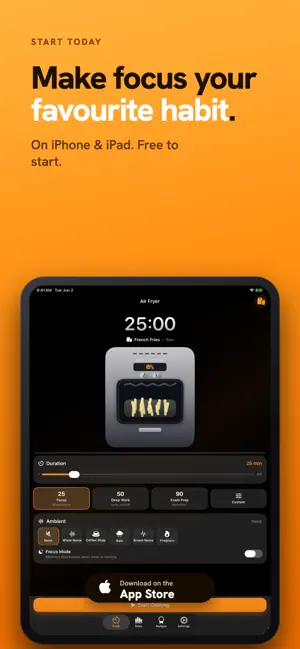


About Air Fryer: Visual Study Timer
Most timers are easy to ignore. This one isn't. Air Fryer: Visual Study Timer turns your focus session into something you can see cooking — set a duration, hit Start, and watch fries go pale, golden, crispy as the minutes tick down. When you're done, the basket slides out, confetti flies, and your stats update. Finishing a session finally feels like finishing a session. Built for students cramming for exams, designers in deep focus, writers who need a soft container for a draft, and anyone in the ADHD community who finds that a tangible, externalized timer is easier to actually use than a number on a screen. — Why visual? A glance at "23:14" tells you very little about how far you are or how long you have left. Your brain has to do the math. Visual timers skip that step — progress is just there, in the shape and color of something familiar. Easier to glance at, harder to ignore, and completion feels like an actual moment. — What's inside • A real-looking air fryer with stainless chassis, glass window, glowing coils, rising steam — built entirely in SwiftUI, no images, all live shapes • 1 to 180 minute sessions with handy presets: 25-min Focus, 50-min Deep Work, 90-min Exam Prep • Five food themes: French fries, chicken wings, cookies, donuts, roasted veggies • Five built-in soundscapes: white noise, rain, coffee shop, brown noise, and fireplace • Focus Mode — one tap hides everything except the fryer and the time • Background-correct timing: keeps perfect time when you lock your phone • Live Activity and Dynamic Island indicator • Local notification when your session completes • Statistics: total focus, current and longest streak, 7-day chart, 12-week heatmap • Five quiet achievements that unlock as you do the work — no streak guilt • iPhone and iPad, light mode and dark mode, adaptive layouts — Your data Your session history, achievements, and preferences live only on your device. JTR Labs never receives them. An occasional interstitial ad after a completed session keeps the app free; iOS lets you decline tracking and the app works exactly the same. Reset All Data wipes everything in one tap. Full details in the in-app Privacy Policy. — Not a medical device This is a focus tool, not a clinical product. Many people in the ADHD community find visual timers helpful in general, but that's an observation about a tool — not a medical claim. If you're working with a clinician, this app is one of many things you might find useful (or not). — Designed and built by JTR Labs A small independent studio. We design and build apps for focus, learning, and curiosity — quietly opinionated, free of dark patterns, made to be kept. Questions or feedback? [email protected]
What’s new
Version 1.0.4 · Updated October 14, 2026
Fixes and polish: • Your session now survives if iOS closes the app in the background • The Live Activity countdown pauses correctly and stops at zero • The completion ding now plays in full • Notifications arrive for your very first session, without doubling up when the app is open • Streaks count through yesterday until you study today • Fewer ads, and none after you quit a session early • New Privacy Choices setting for users in Europe • Rising steam, stats and translation fixes
App privacy
The developer, JTR Labs LLC, reported these privacy practices to Apple.
Data Used to Track You
The following data may be used to track you across apps and websites owned by other companies:
- Location: Coarse Location
- Identifiers: Device ID
- Usage Data: Product Interaction, Advertising Data
Data Linked to You
The following data, which may be collected and linked to your identity, may be used for the following purposes:
- Location: Coarse Location
- Identifiers: Device ID
- Usage Data: Product Interaction, Advertising Data
- Diagnostics: Performance Data
Used for: Third-Party Advertising, Analytics, App Functionality
Data Not Linked to You
The following data, which may be collected but is not linked to your identity, may be used for the following purposes:
- Diagnostics: Crash Data, Other Diagnostic Data
Used for: Analytics, App Functionality
Alternatives to Air Fryer: Visual Study Timer
Looking for apps like Air Fryer: Visual Study Timer? Here are 6 similar apps on the App Store. The highest rated is FocusOven (5.0/5), and all 6 are free to download.
-
 FocusPiece: Art Study Timer
-
 BunnyTime
-
 FocusOven
5.0
-
 Tomatoro: Focus Timer
-
 Habit tracker: HabitsFlow
5.0
-
 3Things - Daily Todo List
3.0
| App | Rating | Price | Last updated | Compare |
|---|---|---|---|---|
| Air Fryer: Visual Study Timer | 5.0 / 5 (2 ratings) | Free | October 14, 2026 | |
| FocusPiece: Art Study Timer | – | Free | Aug 31, 2026 | Compare |
| BunnyTime | – | Free | Nov 12, 2025 | Compare |
| FocusOven | 5.0 / 5 (1) | Free | Apr 19, 2026 | Compare |
| Tomatoro: Focus Timer | – | Free | Oct 18, 2026 | Compare |
| Habit tracker: HabitsFlow | 5.0 / 5 (1) | Free | Oct 8, 2026 | Compare |
| 3Things - Daily Todo List | 3.0 / 5 (2) | Free | Nov 10, 2025 | Compare |