

CueStack
Upload Studio Ltd. Music iPad
CueStack is a free Music app for iPad by Upload Studio Ltd. Requires iOS 17.0. Updated August 17, 2026.
- Price
- Free
- on the App Store
- Size
- 16 MB
- Age 4+
- Updated
- Aug 17
- 2026 · v1.0.2
Screenshots
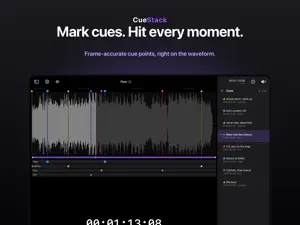
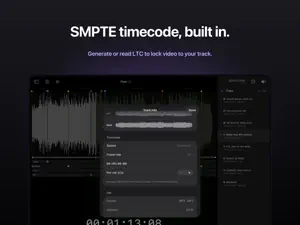

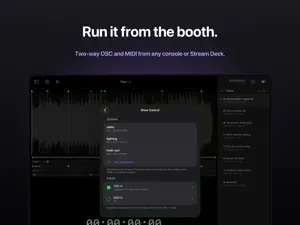
About CueStack
CueStack marks cue points on an audio track and replays any section on demand, so you can time lighting, video, and effects to the music. Set your points once, then tap any of them to jump there and replay that section live. Built for live-event operators, video programmers, theatre and AV techs, and worship teams. MARK & REPLAY • Place cue points on the waveform and give each one a type • Use the built-in types (Audio, Video, Lighting, Pyro, SFX) or create your own with a name, color, and shape • Tap a cue to jump to it and replay that section • Drag a cue along the waveform to adjust its timing • Pinch to zoom for precise placement ORGANIZE YOUR SHOW • Group tracks into projects and setlists • Reorder, rename, and manage everything on the iPad • Import and export show bundles to back up a show or move it between iPads TIMECODE (Full Version) • Generate SMPTE/LTC linear timecode for any track • Stripe and read timecode to lock CueStack to the rest of your rig • Read running timecode on an in-app SMPTE clock, in frames or milliseconds SHOW CONTROL (Full Version) • Send and receive cues over OSC and MIDI • Drive lighting and video consoles, media servers, and stream controllers, or let them drive CueStack • MIDI Learn, MMC and MSC, and a fixed OSC address scheme AUDIO ROUTING (Full Version) • Send music and timecode to separate outputs through a USB interface or a headphone splitter • Keep music on the PA while timecode goes to your media server NO ACCOUNT, NO CLOUD • Everything runs on the iPad. No sign-in, no tracking. • Your audio and your shows never leave the device. FREE TO TRY Download free and work with one project and three tracks. A one-time Full Version unlock removes the limits and adds timecode, show control, audio routing, and import and export.
What’s new
Version 1.0.2 · Updated August 17, 2026
Three playback fixes. Timecode: when a track with generated timecode played to its end, the LTC output kept counting past the end of the song until you pressed play, scrubbed, or switched tracks. It now stops on the last frame, the same way it does when you pause. Interruptions: if a call, alarm, or Siri interrupted the app while a track was paused, playback could start on its own when the interruption ended. A paused track now stays paused. A playing track still resumes. Stability: pressing play right after an audio output was unplugged, re-plugged, or interrupted could crash the app. It no longer does; playback simply resumes once the output is back. Found a bug or have a request? Email [email protected]
App privacy
The developer, Upload Studio Ltd., reported these privacy practices to Apple.
Data Not Collected
The developer does not collect any data from this app.
Alternatives to CueStack
Looking for apps like CueStack? Here are 6 similar apps on the App Store.
-
 Approvl
-
 ShowTap – Live Soundboard
-
 CueSuite
-
 SoundBoard Pro+
-
 Musical Demon's Player
-
 ImmerGround: Music Visualizer
| App | Rating | Price | Last updated | Compare |
|---|---|---|---|---|
| CueStack | – | Free | August 17, 2026 | |
| Approvl | – | Free | Oct 14, 2026 | Compare |
| ShowTap – Live Soundboard | – | Free | Oct 4, 2026 | Compare |
| CueSuite | – | Free | Jul 24, 2026 | Compare |
| SoundBoard Pro+ | – | Free | Oct 13, 2026 | Compare |
| Musical Demon's Player | – | Free | May 19, 2026 | Compare |
| ImmerGround: Music Visualizer | – | Free | Oct 10, 2026 | Compare |
Compare CueStack with the top alternatives: ratings, updates, ASO score and keyword gaps →