
Ferrion
Aubrey Goodman Education iPadMac
Ferrion is a free Education app for iPad and Mac by Aubrey Goodman. Requires iOS 17.0. Updated September 5, 2026.
- Price
- Free
- on the App Store
- Size
- 78 MB
- Age 4+
- Updated
- Sep 5
- 2026 · v1.1
Screenshots


About Ferrion
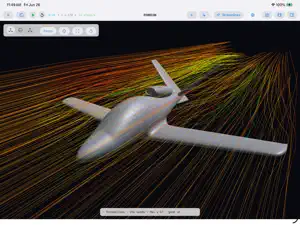
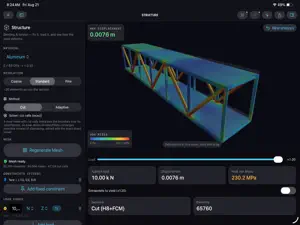
Engineering simulation that runs on your own Mac or iPad. Ferrion answers the questions you would otherwise guess at. Pick a workspace, start with an example, run it, then read the numbers. The solvers run on the device in front of you, several of them on its GPU. No account, no upload, no cloud queue, and nothing to wait on but the machine you already own. THIRTEEN WORKSPACES Each one asks a different question, and shows only the controls that question needs. • Studio - the full toolset: every solver, view and control • Hobby - wings and bodies: lift and drag at a glance • Pipe - internal flow in a round pipe: developed velocity profiles • Network - enclosures and manifolds: ports, flow split, balance • Structure - bending and torsion: fix it, load it, and see how the solid deforms • Buoyancy - import a hull, set its mass and centre of gravity: find how it floats, and when it capsizes • Rotor Wake - set rotor axes and RPM: see where the tip vortices go and how they interact • Rotor Loading - spin a rotor and watch the blades bend: how much of your design pitch survives the load Four more are marked Experimental in the app. Useful today, still being validated, and these results may change between releases: • Plasma - ionic wind and EHD: electrodes, charge and electric fields • Heat Exchanger - two fluid circuits trading heat through solid walls • Cavitation - find the RPM where a propeller starts to cavitate, and where on the blade • Propeller - thrust, torque and power against RPM, in air or water • Surface Duct - compare NACA submerged-inlet designs: ramp angle, size, and how much air they flow IS IT RIGHT? The question worth asking of any simulation. Here is what we can defend: • Sphere drag lands within 0-3% of the Schiller-Naumann correlation, which itself sits within about 2% of experiment across that range. • Structure's cut-cell stress is gated against the analytic Kirsch factor, Kt = 3.3. • Rotor wake geometry is gated against Landgrebe and Caradonna-Tung to 0.013 rotor radii. • Buoyancy clips the hull against the waterplane exactly, with no grid and no cells. Given a watertight mesh there is no discretisation error in the answer at all. • Propeller shaft power lands within about 3% of published data. Thrust currently reads 20-25% low, which is a leading-edge resolution limit rather than a physics one. Use it for trends and for comparing two props, not as an absolute design number. It is marked Experimental for exactly that reason. We would rather tell you than have you find out. FREE, AND FREE IS NOT A DEMO Every workspace runs at full fidelity on its bundled examples. Nothing is resolution-capped, time-limited or watermarked, so a free user's numbers are the same numbers. Every export is unrestricted: CSV data, Markdown reports, photos and video. USE YOUR OWN GEOMETRY One optional in-app purchase adds the one thing held back - your own geometry: • Import your own STL, binary or ASCII, into any workspace • Synthesize parametric rotors from a section, blade count, radii, taper and twist One purchase, no subscription, and it works in every workspace. Family Sharing supported. If you bought Ferrion before it became free, it is already yours. REQUIREMENTS macOS 14 or later, or an iPad running iPadOS 17 or later. There is no iPhone version.
What’s new
Version 1.1 · Updated September 5, 2026
Ferrion 1.1. A new workspace, a heat exchanger that finally earns its numbers, and 2-D views that look like the resolution you are actually running. SURFACE DUCT (Experimental) Design a NACA submerged inlet — the flush scoop on the side of a car, a cowling or a fuselage — and find out how much air it really swallows. • Single mode. Set ramp angle, length, throat width and mouth shape; the duct redraws as you drag, because geometry costs nothing. Run it and read mass flow through the throat, with a measured "settled" indicator instead of a fixed step budget, and an optional stop-when-settled so a flat solve does not keep a GPU busy. • Optimize mode. Pin the throat — the hole you are allowed to cut — let every other parameter search, and a Bayesian campaign hunts for the design that flows the most air. Trials stream in as they finish, the convergence curve says whether the budget was big enough, "Search 20 more" resumes the campaign rather than starting a second one, and "Use this design" adopts the winner. • See the flow. 3-D streamlines seeded at the throat, colored either by speed or by whether that air is ingested or passes over. Velocity, vorticity and pressure maps on a centerline or cross-section cut plane. Experimental means useful today and still being validated. This one is deliberately a comparative tool: it reproduces the published behaviors — recovery falling as you demand more flow, its dependence on boundary-layer thickness, and an interior best ramp angle at 7° — and it says so in the app rather than offering an absolute number it cannot yet defend. HEAT EXCHANGER (Experimental) • A new bundled example: a plate-style counterflow exchanger. Two water circuits, 13 °C and 70 °C, trading heat across a copper separator and running in opposite directions the way a real one does. • Heat crossing a solid wall is measurably better resolved. Cells the wall cuts through now carry a blended heat capacity and a directional conductivity, and a new sub-cell wall model takes the wall heat flux from about 4% error to a few tenths of a percent against a closed-form reference. • Fluid viscosity now follows temperature, so the hot circuit stops running at cold-water viscosity. • Faster to work with: Reset on these scenarios is about 30× quicker, and a port pressure or flow rate is now a live text field rather than a pencil-and-confirm dialog. • Video export runs to 30 seconds of simulated time, up from 5, because conduction through a solid needs longer to settle than a wake does to shed. CLEARER 2-D VIEWS • The slice views were rendering at half resolution on Retina displays. They are not any more. • A new smoothing control — None, Bilinear or Bicubic, with an amount slider — applied to every slice view. "None" is the honest picture of the grid the solver ran on; the smoothed modes read better. • Thermal slices were blending colors instead of temperatures, inventing bands that were never in the field. Fixed, in the viewport and in exports. RESOLUTION, DOMAIN AND INTERNAL FLOW • Grids up to 144, and the resolution list is now derived from what your device can actually fit — with the cell dimensions, the cell size in millimeters, and a warning before you choose something that will not run. • Adaptive refinement now appears in the 2-D views, where it had always run but never drawn, and the domain panel reports whether the refined patch really built instead of falling back in silence. • Pipe and Network got a thorough repair: the domain is fitted to your geometry, ports open the cells they should, port mass flow is measured on the faces that carry it, and streamlines trace the passage. • Hobby and the beginner path now pin the domain-sizing rule the accuracy calibration was validated against, instead of inheriting whatever the last session left behind. If something looks wrong, tell us. There is a link in the app.
App privacy
The developer, Aubrey Goodman, reported these privacy practices to Apple.
Data Not Collected
The developer does not collect any data from this app.
Alternatives to Ferrion
Looking for apps like Ferrion? Here are 6 similar apps on the App Store. The highest rated is NagareVisualizer (2.0/5), and 5 of the 6 are free to download.
-
 FlatSixDynamics
-
 WingFlow
-
 NeuraFOIL
-
 NagareVisualizer
2.0
NagareVisualizer
2.0
-
 Pixel Wind Tunnel
-
 FACTS: St. Petersburg Primary
| App | Rating | Price | Last updated | Compare |
|---|---|---|---|---|
| Ferrion | – | Free | September 5, 2026 | |
| FlatSixDynamics | – | Free | Oct 8, 2026 | Compare |
| WingFlow | – | Free | May 28, 2026 | Compare |
| NeuraFOIL | – | Free | Aug 27, 2026 | Compare |
| NagareVisualizer | 2.0 / 5 (1) | 0.99 USD | Sep 20, 2025 | Compare |
| Pixel Wind Tunnel | – | Free | Mar 29, 2026 | Compare |
| FACTS: St. Petersburg Primary | – | Free | Jun 18, 2026 | Compare |
Compare Ferrion with the top alternatives: ratings, updates, ASO score and keyword gaps →