

B&W Budget
Juan Pierre Lotter Finance iPhoneiPadiPod touchMacApple Watch
B&W Budget is a free Finance app for iPhone and iPad by Juan Pierre Lotter. Requires iOS 18.0. Updated October 24, 2026.
- Price
- Free
- on the App Store
- Size
- 10 MB
- Age 4+
- Updated
- Oct 24
- 2026 · v1.3.25
Screenshots



About B&W Budget
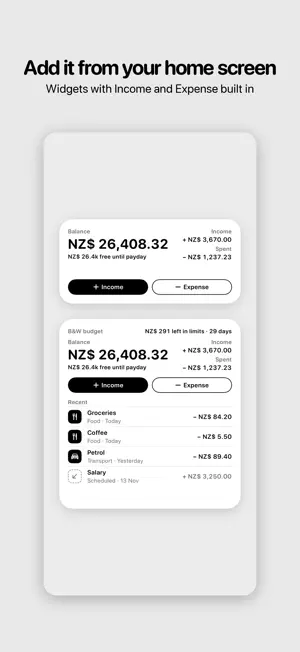
Black & White Budget — opinionated, monochrome, beautifully simple personal budgeting. Built around one idea: see exactly what's coming in, what's going out, and what's left to spend. No rainbow charts. No category overload. No subscription. THE DESIGN • Strict monochrome — no green, no red, no opinion-by-colour. Hierarchy comes from typography and weight, the way good print does. • Every interaction respects the same 4pt grid. SF Rounded everywhere. • Private by design — no login, no account, no telemetry. Your data lives on your device, or in your private iCloud with optional sync (Pro). THE BASICS • Add income and expense in seconds. • Create categories and sub-categories with built-in icons. • Set a monthly spending limit on any category. When you cross it, the app offers a "split" — push the overage into another category, cascading until everything fits, or choose to go over. RECURRING • Rent, salary, subscriptions — set them once, let them fire on their schedule. • Upcoming view shows the next 30 days of expected income and expense, with a "balance after" line so you know what's actually free to spend. INSIGHTS • Monochrome donut breaking down spend by category for the focused period. • Trend chart of income vs expense over days, weeks, months, or years. • Plain-English deltas: "$120 less spent than last month." NOTIFICATIONS • Reminders when recurring transactions fire. • "Due tomorrow" reminders before they fire. • Low-balance alert when your total drops below your threshold. SHARING & EXPORT • Export everything to CSV or JSON via the native share sheet. • Home-screen widget shows Capital + this-month flow at a glance. • Long-press the app icon for "Add income" / "Add expense" quick actions. OTHER • Multiple budgets — Personal, Work, Family — switch with one tap. • Two app icon variants — default and inverted. • Replay the walkthrough any time from Settings. Free. No ads. No subscription. A single one-time purchase unlocks Pro — iCloud sync across iPhone, iPad, and Mac.
What’s new
Version 1.3.25 · Updated October 24, 2026
• The calculator now gets division right: 7 ÷ 2 is 3.50, and amounts use your currency’s own decimals. • Repeat stays on when an expense goes over its limit, and resuming a paused recurring item no longer adds the ones you missed. • App lock now covers open sheets, and no longer asks for Face ID after you open Control Center. • Swiping away an edited sheet asks before throwing your changes away. • A starting balance can be negative, and an uncategorised transaction stays uncategorised when you edit it. • Imports file categories under the right kind, and search totals leave transfers out. • Many smaller fixes across Home, Activity, Limits, Insights and Settings.
App privacy
The developer, Juan Pierre Lotter, reported these privacy practices to Apple.
Data Not Collected
The developer does not collect any data from this app.
Alternatives to B&W Budget
Looking for apps like B&W Budget? Here are 6 similar apps on the App Store. The highest rated is Simple Finance: Budget Planner (5.0/5), and all 6 are free to download.
-
 Finl
-
 Tallyra: Expense Tracker
-
 Compound: Wealth Calculator
-
 BudgetJar: Bill & Expense
4.3
-
 Payvora
-
 Simple Finance: Budget Planner
5.0
| App | Rating | Price | Last updated | Compare |
|---|---|---|---|---|
| B&W Budget | – | Free | October 24, 2026 | |
| Finl | – | Free | Nov 19, 2025 | Compare |
| Tallyra: Expense Tracker | – | Free | Aug 19, 2026 | Compare |
| Compound: Wealth Calculator | – | Free | Jul 8, 2026 | Compare |
| BudgetJar: Bill & Expense | 4.3 / 5 (3) | Free | Apr 12, 2026 | Compare |
| Payvora | – | Free | Oct 15, 2026 | Compare |
| Simple Finance: Budget Planner | 5.0 / 5 (7) | Free | Oct 14, 2026 | Compare |
Compare B&W Budget with the top alternatives: ratings, updates, ASO score and keyword gaps →