

Murmur: Voice to Text Recorder
Bin Yang Productivity iPhoneiPadiPod touch
Murmur: Voice to Text Recorder is a free Productivity app for iPhone and iPad by Bin Yang. Rated 4.0/5 from 4 ratings. Requires iOS 18.0.
- Rating
- 4.0
- 4 ratings
- Price
- Free
- on the App Store
- Size
- 16 MB
- Age 4+
- Updated
- Oct 5
- 2026 · v2.3.0
Screenshots

About Murmur: Voice to Text Recorder
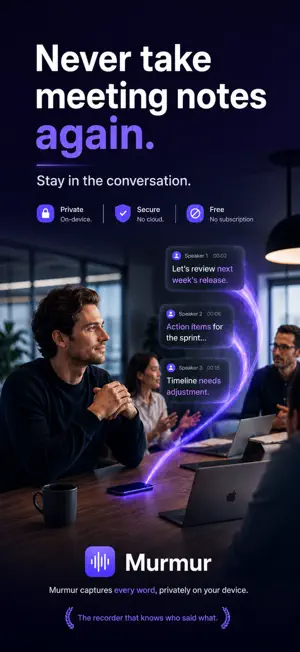
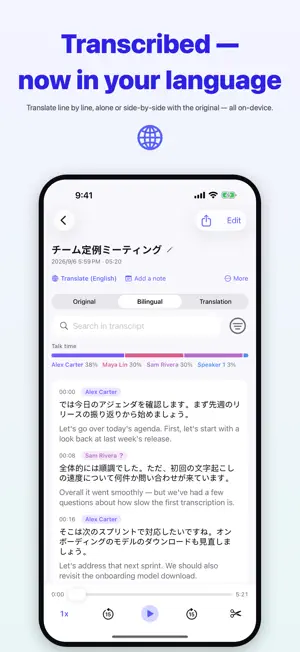
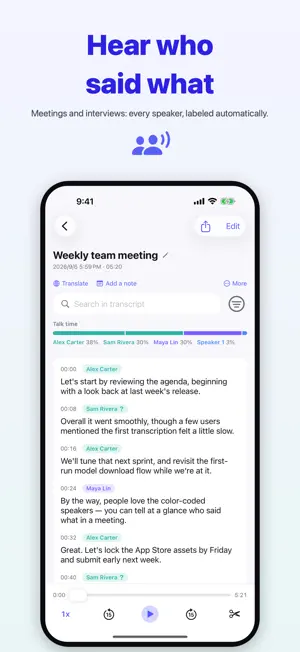
Privacy first: everything is transcribed on your device. Recordings are never uploaded, no account is needed, and your voice stays on the phone that recorded it. Murmur is the recorder that knows who said what. Meetings, lectures, interviews — the text is there as soon as you stop, with every line labeled by speaker. Transcription and speaker identification both run on your iPhone. WHAT MURMUR DOES ON DEVICE, NEVER UPLOADED Transcription, speaker identification and translation all run on your iPhone. No servers, no sign-up, no account. It works on a plane, in a basement meeting room, anywhere with no signal. KNOWS WHO SAID WHAT Every line is labeled with its speaker and color-coded, so a conversation with several people is easy to follow. Name someone once, and Murmur recognizes them in later recordings. TALK, AND GET THE TEXT Hit record, and the words are waiting when you stop. The spoken language is detected automatically — around 100 of them. IMPORT WHAT YOU ALREADY HAVE A voice memo, a meeting recording, a lecture, any audio or video file. Transcribed and labeled exactly like something recorded in the app. TRANSLATE LINE BY LINE Turn a transcript into another language inside the recording. Read the translation alone, or side by side with the original. On device, as always. EXPORT, OR HAND IT TO YOUR AI Export as plain text, Markdown, PDF or Word, with speakers, timestamps and your translation. Send it to Notes, to an email, or to whichever AI you already use. TAP A LINE, HEAR THAT LINE Read the transcript against the timestamps, and tap any sentence to replay just that one. Many people use it to learn a language a sentence at a time. CUT WHAT YOU DO NOT NEED Open the waveform editor: select and cut, keep only one stretch, append another recording, or remove every silence in one tap. The transcript re-times itself, so nothing needs transcribing again. SEARCH WHAT YOU SAID Find any phrase across every recording, highlighted where it appears. RECORD WITHOUT OPENING THE APP Put the widget on the Home or Lock Screen, add "Record with Murmur" to Control Center, or just ask Siri. One tap and you are recording. ICLOUD SYNC Turn it on and your recordings and transcripts follow you across devices through your own private iCloud. The data stays in your iCloud, where we cannot see it. SAVES SPACE ON ITS OWN Once a recording is transcribed, its audio is compressed in the background. Transcript and playback are untouched; the space comes back to your device and iCloud. IPAD AND IPHONE A universal app, with a roomier layout on iPad and larger screens. ABOUT MURMUR PRO FREE FOREVER: recording, playback, search, export, and everything already in your library. THE ONE LIMIT: without Pro, each recording is transcribed for up to 20 minutes. The audio itself is untouched. MURMUR PRO: lifts that limit. One purchase, kept forever, not a subscription, and it works with Family Sharing. ABOUT PRIVACY RECORDINGS AND TRANSCRIPTS: on your device only, never sent to our servers. ACCOUNT: not needed, and there is no sign-up. ANONYMOUS ANALYTICS: we collect anonymous usage statistics and crash diagnostics to improve the app. They contain no audio and no transcript text. ICLOUD SYNC: optional, through your own private iCloud, accessible only to you. Privacy policy: https://www.murmur-recorder.com/legal/ios/privacy.html More: https://www.murmur-recorder.com Download a model, hit record, and start talking.
What’s new
Version 2.3.0 · Updated October 5, 2026
Bug fixes and stability improvements. Your recordings and transcripts still never leave your device. No account needed.
App privacy
The developer, Bin Yang, reported these privacy practices to Apple.
Data Not Linked to You
The following data, which may be collected but is not linked to your identity, may be used for the following purposes:
- Identifiers: Device ID
- Usage Data: Product Interaction
- Diagnostics: Crash Data
Used for: Analytics, App Functionality
Alternatives to Murmur: Voice to Text Recorder
Looking for apps like Murmur: Voice to Text Recorder? Here are 6 similar apps on the App Store.
-
 RecordMind: Voice Notes
-
 BloopBrowser
-
 AI Note Taker & Voice Memo
-
 Text Pro: Word Counter
-
 LifeCalendar: Places & Visits
-
 PDFConverter:Local PDF Export
| App | Rating | Price | Last updated | Compare |
|---|---|---|---|---|
| Murmur: Voice to Text Recorder | 4.0 / 5 (4 ratings) | Free | October 5, 2026 | |
| RecordMind: Voice Notes | – | Free | Oct 5, 2026 | Compare |
| BloopBrowser | – | 1.99 USD | Jun 3, 2026 | Compare |
| AI Note Taker & Voice Memo | – | Free | Jun 24, 2026 | Compare |
| Text Pro: Word Counter | – | 9.99 USD | Sep 29, 2026 | Compare |
| LifeCalendar: Places & Visits | – | Free | Sep 29, 2026 | Compare |
| PDFConverter:Local PDF Export | – | Free | May 27, 2026 | Compare |