

Curvo AI
Curvo AI Business iPhoneiPadiPod touchApple Watch
Curvo AI is a free Business app for iPhone and iPad by Curvo AI. Requires iOS 26.0. Updated September 30, 2026.
- Price
- Free
- on the App Store
- Size
- 6 MB
- Age 4+
- Updated
- Sep 30
- 2026 · v2.3.1
Screenshots


About Curvo AI
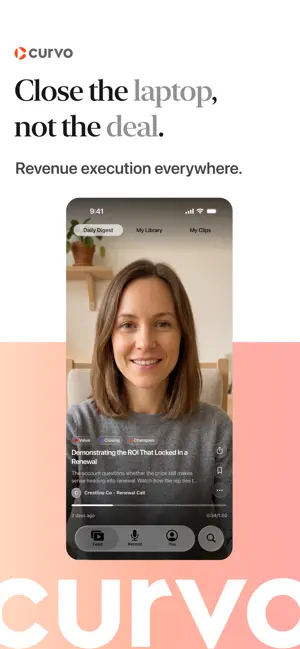
Curvo turns the meetings you are already in into something you can actually use afterwards. Tap record, put your phone face down, and stay in the conversation. When you stop, Curvo transcribes the call, works out who said what, and writes the summary for you. By the time you have left the room, the write-up is waiting. RECORDING THAT STAYS OUT OF THE WAY One tap to start. Recording keeps going while you use other apps or lock your screen, so you are never watching a timer instead of the person in front of you. Give the meeting a title, add a tag, and it files itself. SUMMARIES, NOT JUST TRANSCRIPTS Every meeting comes back with a clear summary and the questions that came up, alongside the full transcript with each speaker separated out. Rename a speaker once and it updates across the whole conversation. Add your own notes wherever the summary needs your context. MOMENTS The parts of a call worth revisiting are cut into short clips you can swipe through one after another. React to them, save the ones you want to keep, and send a colleague the thirty seconds that matter instead of the hour that surrounds it. DAILY DIGEST Open Curvo and the moments worth your morning are already picked out for you, across every meeting you were in. Work through them, then get on with your day. SEARCH EVERYTHING YOU HAVE SAID Search across your meetings, moments and tags. Find the call where pricing came up, the objection you half remember, or the commitment someone made three weeks ago. YOUR LIBRARY Clips you save stay in one place, so the moments you keep returning to are always a tap away. SIGN IN THE WAY YOUR TEAM ALREADY DOES Google, Microsoft, or a six digit code sent to your work email. No new password to remember. Curvo requires an account. Recordings and summaries sync with your team's Curvo workspace, so what you capture on your phone is there on the web too.
What’s new
Version 2.3.1 · Updated September 30, 2026
Curvo has been rebuilt from the ground up as a native app for iPhone, iPad and Apple Watch. Recording • Record a meeting from your Apple Watch. It uploads straight to Curvo, even if your phone is in another room. • Start a recording from a Home Screen widget or from the Smart Stack on your Watch. • Pause, resume and stop from the Lock Screen and Dynamic Island with Live Activities. • The screen stays awake while you record. • Native live transcription on device with the iOS 27 speech model. • Set a meeting to Private or Team before recording, on the review screen, or at any time afterwards. Uploads • Uploads keep going in the background, even if you leave the app. • The "Upload over cellular" setting now works. When it's off, uploads wait for Wi-Fi. • Recover recordings in Settings finds any recording that didn't upload and adds it back to your drafts. • You'll get a notification when a meeting you recorded has finished processing. Meetings • The Record tab is split into In person and All meetings, with filters. • Failed meetings are hidden by default. Turn on the filter to show them. • Deals now show on each meeting and stay attached after a refresh. • Each meeting links to its own page in the Curvo web app. • Recordings are tagged with the device they came from: iOS, iPadOS or watchOS. Moments • Swipe between Daily Digest, My Library and My Clips. • Daily Digest carries on day by day, with each day's top moments first. • Moment links from app.curvo.ai now open directly in the app. Also • Sign in with Google. • Improved layouts on iPad, including the recording pill and category headers. • General fixes and performance improvements.
App privacy
The developer, Curvo AI, reported these privacy practices to Apple.
Data Linked to You
The following data, which may be collected and linked to your identity, may be used for the following purposes:
- Contact Info: Email Address, Name
Used for: App Functionality
Data Not Linked to You
The following data, which may be collected but is not linked to your identity, may be used for the following purposes:
- Diagnostics: Crash Data
Used for: App Functionality
Alternatives to Curvo AI
Looking for apps like Curvo AI? Here are 6 similar apps on the App Store.


| App | Rating | Price | Last updated | Compare |
|---|---|---|---|---|
| Curvo AI | – | Free | September 30, 2026 | |
| T-Pro Scribe | – | Free | Oct 14, 2026 | Compare |
| Investnet | – | Free | Sep 18, 2026 | Compare |
| EventHex: Event App | – | Free | Oct 1, 2026 | Compare |
| T-Pro Speech | – | Free | Sep 3, 2026 | Compare |
| Ramsay Dictate | – | Free | Sep 16, 2026 | Compare |
| HealthTechX Asia Connect | – | Free | Apr 7, 2026 | Compare |
Compare Curvo AI with the top alternatives: ratings, updates, ASO score and keyword gaps →