

Focusora: Screen Control
ENRG SYSTEMS, SRL Productivity iPhoneiPadiPod touch
Focusora: Screen Control is a free Productivity app for iPhone and iPad by ENRG SYSTEMS, SRL. Requires iOS 16.0. Updated August 28, 2026.
- Price
- Free
- on the App Store
- Size
- 22 MB
- Age 4+
- Updated
- Aug 28
- 2026 · v1.0.0
Screenshots
About Focusora: Screen Control
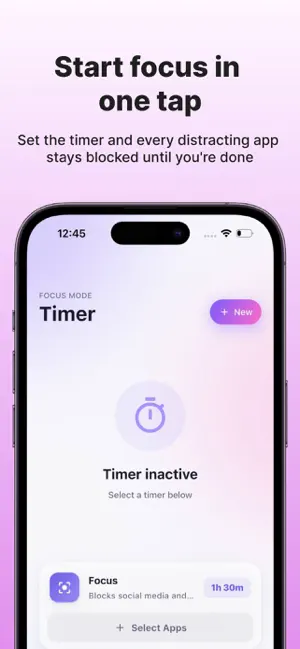
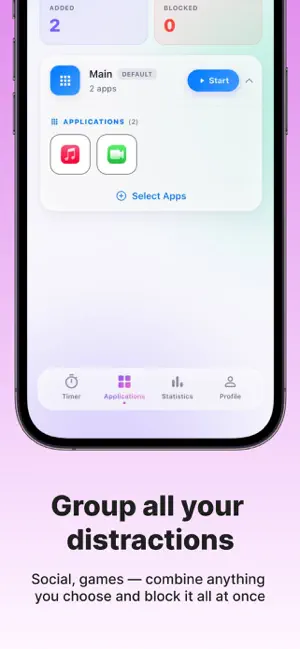
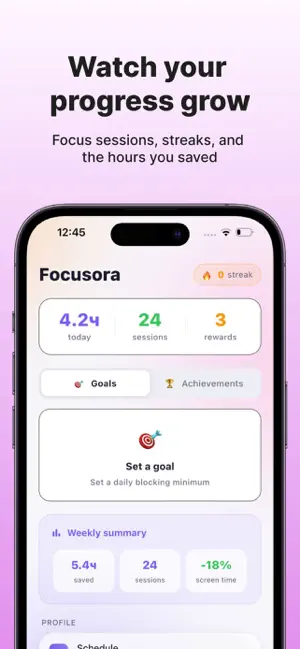
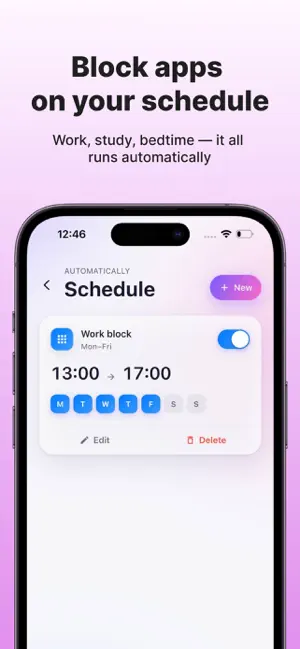
Your phone isn't the problem. A handful of apps are. Focusora blocks exactly those — for a focus session right now, or automatically on a schedule. Everything else keeps working. BLOCK WHAT ACTUALLY DISTRACTS YOU • Group the apps that eat your evenings: social media, games, news — your list, your rules • One tap starts a timer; the group stays blocked until the session ends • Schedules handle the routine: deep-work mornings, phone-free dinners, screenless nights • Strict mode, for days when Future You shouldn't negotiate with Present You A BREATH INSTEAD OF A WALL Tap a blocked app and Focusora doesn't just say no. It offers a mindful pause: one slow breath first, then — if you still need it — a short window in. Most of the time, the breath is enough. SEE WHAT YOU GET BACK • The time calculator turns blocked minutes into meaning: hours per year, books read, movies watched, workouts done • Every Monday, your Weekly Recap: time reclaimed, best day, how it compares to last week — with a card worth sharing • Goals, streaks and achievements keep the score WHEN THE URGE HITS The idea jar suggests something to do instead of the phone: a walk, a call, a page of a book. Seeded from your own goals, fully editable. PRIVATE BY DESIGN Focusora is built on Apple's Screen Time te on your device. Here's the part most appscan't say: Focusora technically cannot know which apps you picked — Apple hands it anonymous tokens, and even the app names on screen are drawn by the system, not by us. • No account, no sign-up • No ads, no tracking, no analytics • Nothing ever leaves your iPhone YOU STAY IN CONTROL Every block you create, you can remove. RevSettings at any time — all blocks lift instantly. THE DETAILS • Works fully offline • English, German, Spanish, French, Italian, Japanese, Portuguese, Russian • Requires iOS 16 or later. On first launchTime permission — the only way an app canblock other apps on iOS.
App privacy
The developer, ENRG SYSTEMS, SRL, reported these privacy practices to Apple.
Data Not Collected
The developer does not collect any data from this app.
Alternatives to Focusora: Screen Control
Looking for apps like Focusora: Screen Control? Here are 6 similar apps on the App Store. The highest rated is Tiimer: Focus Timer & Pomodoro (5.0/5), and all 6 are free to download.
-
 GoldTime Shield: App Blocker
-
 Frost Lock: Screen Time
-
 Whered - Track Belongings
-
 Tiimer: Focus Timer & Pomodoro
5.0
Tiimer: Focus Timer & Pomodoro
5.0
-
 CC Cleaner - Clean Up Storage
-
 Everyone's Timer - Study timer
5.0
Everyone's Timer - Study timer
5.0
| App | Rating | Price | Last updated | Compare |
|---|---|---|---|---|
| Focusora: Screen Control | – | Free | August 28, 2026 | |
| GoldTime Shield: App Blocker | – | Free | Sep 11, 2026 | Compare |
| Frost Lock: Screen Time | – | Free | Oct 1, 2026 | Compare |
| Whered - Track Belongings | – | Free | Apr 8, 2026 | Compare |
| Tiimer: Focus Timer & Pomodoro | 5.0 / 5 (2) | Free | Sep 23, 2026 | Compare |
| CC Cleaner - Clean Up Storage | – | Free | Feb 20, 2026 | Compare |
| Everyone's Timer - Study timer | 5.0 / 5 (2) | Free | Dec 12, 2025 | Compare |