

iDoctor MusicBand Pro
Juan Gomez Company Music iPhoneiPadiPod touch
iDoctor MusicBand Pro is a free Music app for iPhone and iPad by Juan Gomez Company. Requires iOS 17.0. Updated October 4, 2026.
- Price
- Free
- on the App Store
- Size
- 38 MB
- Age 4+
- Updated
- Oct 4
- 2026 · v5.0
Screenshots
About iDoctor MusicBand Pro
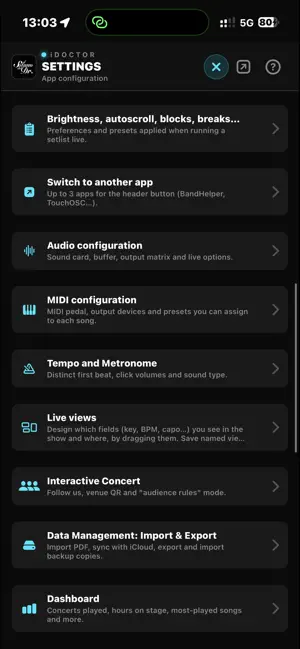
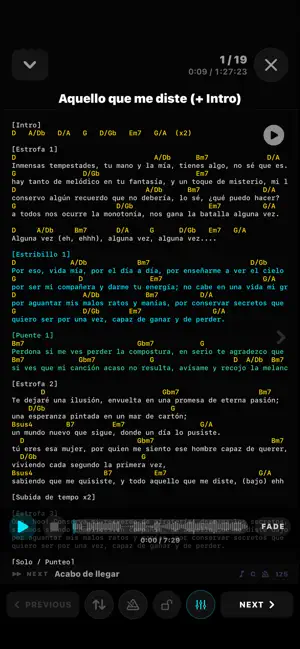
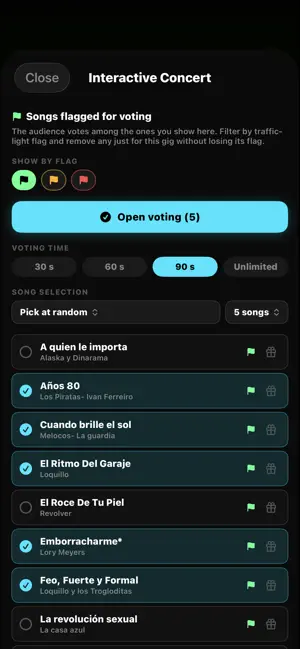
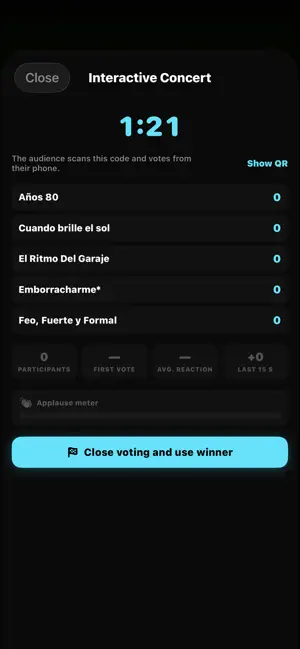
iDoctor MusicBand is the live performance tool for musicians and bands who actually gig: your whole repertoire, your setlists and your backing tracks in one place, ready for the stage. ON STAGE Full-screen lyrics and chords, with autoscroll speed saved per song. On-the-fly transposition and capo, so every musician reads the song their own way. Configurable live views: place key, BPM, capo or the timer exactly where you want them. Apple Pencil annotations in two layers: the band's and your own. Offline mode: on stage the app never depends on the venue's signal. Pre-gig checklist so you walk on stage with everything verified. YOUR REPERTOIRE Songs with lyrics, chords, key, BPM, duration, notes and tags. Setlists with blocks, breaks and total running time. AI-assisted setlist building with concert flow analysis. Import songs from a PDF or by pasting text. BACKING TRACKS AND AUDIO Play multitrack stems locked to the click. Mixer with levels, panning, mutes and saved scenes. Multichannel output through a USB interface: tracks, click and cues separately. Change key and tempo on the fly, with no reloading. Share the tracks with the whole band through a shared folder. MIDI Per-song presets sent automatically when the song changes. Bluetooth pedal to move through songs or fire changes without putting your instrument down. TouchMidi pad panel and MIDI Clock output. YOUR BAND Add your musicians with a name and password, no new accounts needed. Per-member permissions: who edits and who only reads. Everything syncs: if the guitarist fixes a chord, the whole band sees it. And every musician keeps their own: their lyrics, their capo and their annotations. INTERACTIVE SHOW The audience scans a QR code and votes for the next song from their phone. Live applause meter and karaoke lyrics on every attendee's phone. Voting podium and a recap of the night when you finish. ALSO INCLUDED Metronome, tuner, player with markers, gig and rehearsal calendar, external screen projection and a band-wide teleprompter. SUBSCRIPTION iDoctor MusicBand Pro subscription · Monthly: €3.99/month · Annual: €44.99/year, with a 14-day free trial. Prices may vary by region. The subscription renews automatically unless it is cancelled at least 24 hours before the end of the current period. Payment is charged to your Apple ID account upon confirmation of purchase. You can manage or cancel it in your Apple ID settings. Terms of Use (EULA): https://www.apple.com/legal/internet-services/itunes/dev/stdeula/ Privacy Policy: https://idoctormusicband.web.app/privacidad.html
What’s new
Version 5.0 · Updated October 4, 2026
ONE SMALL STEP FOR MAN, ONE GIANT LEAP FOR THE iDOCTOR MUSICBAND COMMUNITY Stop spending your iCloud space on your tracks. iDoctor MusicBand launches its own cloud: we store your songs' audio and take care of all the file management, for you and your whole band. No shared folders, no iCloud quotas, no manual steps. • It syncs by itself: what you edit uploads when you close the editor, and new material downloads when you open a setlist, when the network is back or when you open the app. On mobile data, only the open setlist ("Wi-Fi only" option). Plus a "Sync now" button, just in case. • Names, order, outputs and mix reach every device. "Band" and "Mine" are two complete setups per device, with "Mine only" tracks that never leave your device. • "Free up iCloud": audio stops taking space in your iCloud. Stems health tells apart what is waiting to download, what has no audio anywhere and ghost copies. • Importing or fetching songs no longer freezes the app. MATCHED LOUDNESS BETWEEN SONGS • Loudness (LUFS) measured once per file and a per-song correction applied on load, without touching your mix. Click and cues are each matched to their own level. Legend with recommended levels for the desk and PA. A FASTER, MORE FAITHFUL PEDAL • Tracks start in parallel with an anchor that adapts to the device: the wait drops to 40 ms. • Play silences the app metronome instantly (switch in Settings) and no longer starts it by itself on stop. The click button shows what is really sounding. • The built-in click uses the same sounds as the metronome, and the "count-in track" renders them at the song's tempo. • AirTurn 4.10.1: reconnection is handled by the system, no scanning windows. Pedal battery without false readings. Voice cues always go out. TIMELINE WITH ACTIONS • Beyond MIDI presets: start and stop the click, change the tempo, start and stop a track at the instant you choose, with a precision timer. Grid, zoom, landscape screen and a preset picker with search per device. TOUCHMIDI • Shaped buttons (pill, hexagon, circle…), flat, gradient and neon finishes, custom colours, decorations (embossed panels, frames, notes, watermark), custom grid and a "Canvas" tool to move in bulk. Same layout on every iPad; one tap from the header and from the app icon. • BeatBuddy: "Part 1-4" controls, mix and headphone faders, a display with rhythm, part and kit, kit per song and import the SD card from the iPad. When off, nothing reaches the pedal. JUKEBOX AND SHOW MODE • Jukebox with its own icon in the library, setlists and song sheet, and as a button in live views: it opens in a floating window over the lyrics, without starting by itself. • Live header with 8 icons, full "Edit song" without leaving the Show, and redesigned View options. On iPhone, the setlist closes below the island and there is no pencil. LIVE VIEWS • Full canvas, fixed controls and info footer belong to each view; full canvas enters with no flash. Protected zone in the designer, bulk selection, "Try in Show" with the selected view. • New elements: "Button: Band / Mine setup" (switches and reloads the tracks while audio is stopped) and "BeatBuddy status". Several roles per musician, views per instrument and propose views to the app. LIBRARY AND SETLISTS • Interactive concert pools as setlists, with arrows between songs. Keys with both spellings (C# / Db). Video filter next to the sequence filter. Filters in the pool song picker. • Live checklist trimmed down: only what needs checking right before the show. Plus: delete account from Settings, diagnostics report with the full log of this session and the previous one, English, German and French up to date, and stability fixes.
App privacy
The developer, Juan Gomez Company, reported these privacy practices to Apple.
Data Linked to You
The following data, which may be collected and linked to your identity, may be used for the following purposes:
- Contact Info: Email Address
- User Content: Emails or Text Messages, Photos or Videos, Other User Content, Audio Data
- Identifiers: User ID, Device ID
- Diagnostics: Other Diagnostic Data
Used for: Product Personalization, App Functionality, Other Purposes
Alternatives to iDoctor MusicBand Pro
Looking for apps like iDoctor MusicBand Pro? Here are 6 similar apps on the App Store. The highest rated is GigStand: Charts & Setlists (5.0/5), and 5 of the 6 are free to download.
-
 GigStand: Charts & Setlists
5.0
GigStand: Charts & Setlists
5.0
-
 StageLyrics
-
 NSM Groove Metronome
-
 OverDrive Chords & Stems
-
 SimpleSampler: Loop Station
-
 Nostalgia FX
5.0
Nostalgia FX
5.0
| App | Rating | Price | Last updated | Compare |
|---|---|---|---|---|
| iDoctor MusicBand Pro | – | Free | October 4, 2026 | |
| GigStand: Charts & Setlists | 5.0 / 5 (1) | Free | Sep 25, 2026 | Compare |
| StageLyrics | – | Free | Jul 17, 2026 | Compare |
| NSM Groove Metronome | – | Free | Jul 3, 2026 | Compare |
| OverDrive Chords & Stems | – | Free | Oct 8, 2026 | Compare |
| SimpleSampler: Loop Station | – | Free | Oct 1, 2026 | Compare |
| Nostalgia FX | 5.0 / 5 (1) | 9.99 USD | Sep 23, 2025 | Compare |