

Conduit: AI Coding Remote
Nikhil Sharma Developer Tools iPhoneiPadiPod touch
Conduit: AI Coding Remote is a free Developer Tools app for iPhone and iPad by Nikhil Sharma. Requires iOS 26.0. Updated October 12, 2026.
- Price
- Free
- on the App Store
- Size
- 33 MB
- Age 4+
- Updated
- Oct 12
- 2026 · v1.3.5
Screenshots


About Conduit: AI Coding Remote
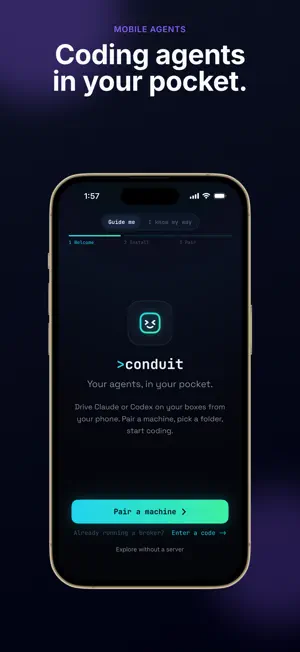
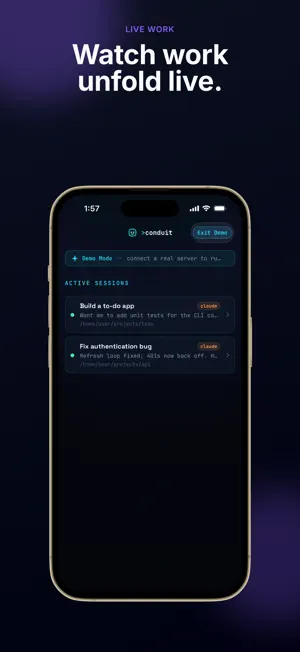
Keep coding when you leave your desk. Start and supervise Claude and Codex sessions on your own development machine from your iPhone or iPad. YOUR CODING AGENTS, ANYWHERE Send instructions, follow progress, review diffs, and respond to approval requests from your phone. Keep a live terminal and browser preview close by to check the work as it happens. CONNECT YOUR OWN MACHINE Conduit requires the Conduit broker running on your development machine, with your coding tools configured there. Pair your iPhone or iPad to get started. You can explore the app without a server using the built-in demo. SELF-HOSTED BY DESIGN Your session content flows between your device and your broker. Conduit does not operate a cloud service that stores your terminal output, chat, or browser content. CONDUIT PLUS (OPTIONAL) Chat, terminal, session reliability, and Flows are free. The free tier includes one paired machine, two concurrent sessions, two automations, and two agent CLIs. Conduit Plus lifts these limits and adds extra theme palettes, chat font pairings, and alternate app icons. Choose an auto-renewable monthly subscription or a one-time lifetime unlock. See in-app pricing for your region. Payment is charged to your Apple Account at confirmation of purchase. The subscription renews automatically unless cancelled at least 24 hours before the end of the current period. Manage or cancel it in your App Store account settings. Terms of Use (EULA): https://conduit.kaopeh.com/terms.html Privacy Policy: https://conduit.kaopeh.com/privacy.html
What’s new
Version 1.3.5 · Updated October 12, 2026
Smoother chats, easier setup for new agents, and box switching that sticks. • Chats no longer jump around or open with your conversation hidden behind the message box, and scrolling up to read while a reply streams no longer pulls you back down. • Starting a session with an agent that isn't installed on your box now offers to install it first. Conduit shows the exact command and only runs it when you tap. If the agent needs signing in, Start takes you through that too. • When an agent like Kimi needs signing in, the chat banner names it and opens its sign-in directly. • The chat you last opened stays highlighted on Home after you relaunch the app. • Switching boxes now carries through everywhere: the Start sheet, its folder browser, and new sessions all use the box you picked. Box health shows Connect, Make primary, or Reconnect depending on the box's state, and Shell opens on the box you're looking at. Some improvements live in the broker on your machine. Update it to get them.
App privacy
The developer, Nikhil Sharma, reported these privacy practices to Apple.
Data Not Linked to You
The following data, which may be collected but is not linked to your identity, may be used for the following purposes:
- Usage Data: Other Usage Data
- Diagnostics: Crash Data, Performance Data
Used for: Analytics, App Functionality
Alternatives to Conduit: AI Coding Remote
Looking for apps like Conduit: AI Coding Remote? Here are 5 similar apps on the App Store. The highest rated is devtools (5.0/5), and all 5 are free to download.


| App | Rating | Price | Last updated | Compare |
|---|---|---|---|---|
| Conduit: AI Coding Remote | – | Free | October 12, 2026 | |
| codeXtract | – | Free | Feb 6, 2026 | Compare |
| Local Inspect | – | Free | Jul 9, 2026 | Compare |
| devtools | 5.0 / 5 (1) | Free | Dec 15, 2025 | Compare |
| VVTerm: Native SSH Client | 5.0 / 5 (10) | Free | Oct 22, 2026 | Compare |
| Terminux: SSH Client | 4.4 / 5 (83) | Free | Sep 20, 2026 | Compare |