

Side A: Cassette Player
FREDERICK AARON GOODIN Music iPhoneiPadiPod touch
Side A: Cassette Player is a paid Music app for iPhone and iPad by FREDERICK AARON GOODIN. Rated 5.0/5 from 2 ratings. Requires iOS 15.6.
- Rating
- 5.0
- 2 ratings
- Price
- 2.99 USD
- on the App Store
- Size
- 69 MB
- Age 4+
- Updated
- Oct 14
- 2026 · v1.0.6
Screenshots
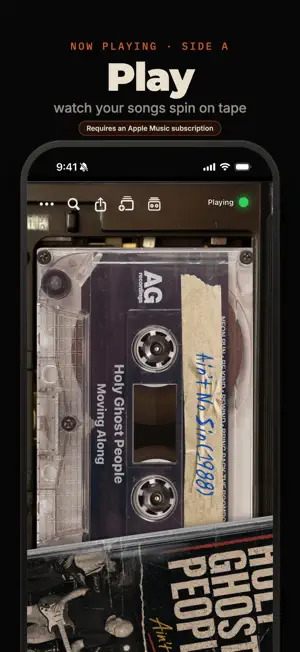


About Side A: Cassette Player
Side A plays your music as cassettes. **Requires an Apple Music subscription.** See what's playing right now on a beautifully detailed cassette tape: spinning reels, worn labels, and a cassette player frame around it, powered by your Apple Music. But Side A isn't just a pretty player. It's a full tape deck. DESIGN YOUR OWN TAPES Pick a shell, write on the label in retro fonts, choose your ink color, and drop a photo behind the jewel case. Every tape is yours. MAKE MIXTAPES Build a mixtape from your Apple Music, name it, add handwritten liner notes, and give it a cover. Just like the old days. SEND A TAPE TO A FRIEND Text someone a mixtape. If they have Side A it opens right up and plays; if they don't, they get a gorgeous web page with the tracklist and your liner notes. "I made you a tape". SHARE THE SONG YOU'RE ON One tap turns your now-playing song into a clean, tappable card you can send anywhere. RECORD OFF THE RADIO Tape songs as they play: grab the last few tracks and turn them into a mixtape, just like catching a song off the radio. A note from us: We're a small team of Gen X kids who grew up on cassette tapes and Walkmans. Instead of lugging an actual tape deck to the gym, we wanted to glance at our phones and see our music spinning on cassettes again. Side A is our love letter to that era. It's a passion project, and we hope you enjoy it. If you have feedback, issues, or ideas, we'd genuinely love to hear them. Rewind your music. — Your tapes, mixtapes, and recordings are stored on your device — content is only uploaded when you choose to share it.
What’s new
Version 1.0.6 · Updated October 14, 2026
Now it sounds like a tape, too. • New: deck sounds. Hear the keys click, the fast-forward whir, the cassette sliding in and out, and a rewind back to the start when a tape is on repeat • New: tape hiss. A quiet hiss under your music, off until you turn it on. Find both in Settings > Tape Sounds • Search your own library: songs you've synced or uploaded to Apple Music now turn up in search, ready to play or put on a tape • Fixed: a tape sometimes stopped a few seconds in, or took two or three tries to start • Fixed: pause sometimes did nothing on the first tape after opening Side A
App privacy
The developer, FREDERICK AARON GOODIN, reported these privacy practices to Apple.
Data Not Linked to You
The following data, which may be collected but is not linked to your identity, may be used for the following purposes:
- Contact Info: Name
- User Content: Photos or Videos, Other User Content
Used for: App Functionality
Alternatives to Side A: Cassette Player
Looking for apps like Side A: Cassette Player? Here are 6 similar apps on the App Store. The highest rated is KnowYourNeck (5.0/5), and 5 of the 6 are free to download.
-
 Funderbird Cassette
-
 KnowYourNeck
5.0
-
 Vinyl Tracker - Whats Spinning
5.0
-
 MixTape: Retro Music Player
-
 REWIND Cassette
1.0
-
 Bionic Tape
2.0
| App | Rating | Price | Last updated | Compare |
|---|---|---|---|---|
| Side A: Cassette Player | 5.0 / 5 (2 ratings) | 2.99 USD | October 14, 2026 | |
| Funderbird Cassette | – | Free | Oct 8, 2026 | Compare |
| KnowYourNeck | 5.0 / 5 (3) | Free | Jul 16, 2026 | Compare |
| Vinyl Tracker - Whats Spinning | 5.0 / 5 (2) | Free | Oct 3, 2026 | Compare |
| MixTape: Retro Music Player | – | Free | Aug 4, 2026 | Compare |
| REWIND Cassette | 1.0 / 5 (1) | Free | Jul 16, 2026 | Compare |
| Bionic Tape | 2.0 / 5 (1) | 4.99 USD | Oct 21, 2026 | Compare |