

Flick - Swipe Photo Cleaner
荟 马 Utilities iPhoneiPadiPod touchMac
Flick - Swipe Photo Cleaner is a free Utilities app for iPhone and iPad by 荟 马. Rated 5.0/5 from 1 ratings. Requires iOS 17.0. Updated October 16, 2026.
- Rating
- 5.0
- 1 ratings
- Price
- Free
- on the App Store
- Size
- 6 MB
- Age 4+
- Updated
- Oct 16
- 2026 · v2.0.0
Screenshots

About Flick - Swipe Photo Cleaner
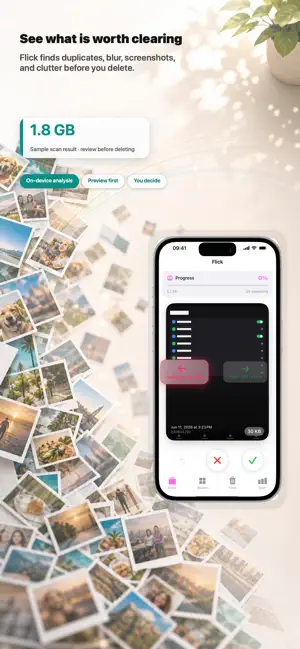
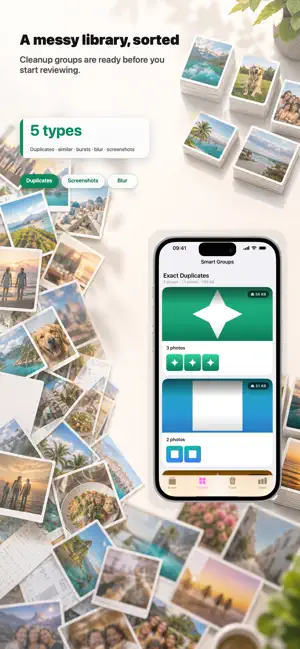
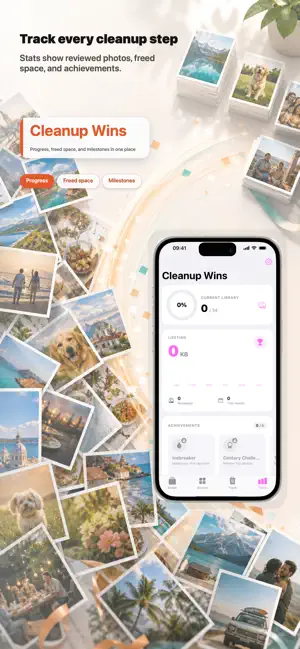
Organize photos and videos with Flick on iPhone, iPad and Mac. Swipe through photos, find large videos and play them before deciding what to delete. On-device analysis, one lifetime purchase and no subscription. → START WITH LARGE VIDEOS The Videos tab lists clips by size, with duration, date and iCloud status. Sort by date or duration, or switch to a grid. Open a clip, play it and scrub through it before moving it to Trash. → SWIPE THROUGH PHOTOS Swipe right to keep, left to move to Trash. Review one month or your whole photo library. Open a photo for a closer look, and choose Show the Whole Photo in Settings to see its edges while swiping. → START WITH A SMALL GOAL After onboarding, start with your latest 20 photos, possible duplicates or one large video. Pick a month or all photos whenever you want. Flick only sees the library items you authorize. → REVIEW SMART GROUPS Find possible duplicates, visually similar photos, bursts, screenshots and possibly blurry shots. Compare up to four photos with shared zoom and pan. Keeper recommendations explain the available sharpness, resolution and other signals; uncertain matches are candidates, not proof of identical files. Favorites, Live Photos and RAW are excluded from automatic deletion suggestions. Change any selection, check the count and approximate media size, then move items to Trash. Undo the latest batch after adding it. → CONFIRM BEFORE DELETING Trash is a review queue inside Flick. Adding an item does not delete it from Photos. Preview photos and videos, remove anything you want to keep and confirm the final selection. After deletion, Apple's Photos app manages Recently Deleted; if you use iCloud Photos, deletions also sync to your other devices. Media sizes are approximate and do not measure immediately recovered storage. Photos controls when available storage updates. The deletion result includes a guide to recovery in Recently Deleted. → SEE YOUR PROGRESS Track your review progress, cleanup history and monthly totals. Widgets show a Trash summary, and Siri and Shortcuts help you check Trash or open a month to review. VoiceOver and light and dark appearances are supported. → ON-DEVICE ANALYSIS Flick analyzes photos on your device and does not upload your photos or videos to a Flick server. You control whether originals can load from your own iCloud library. Free-allowance counters can sync through your own iCloud account across Apple devices. → FREE TO TRY, ONE PURCHASE TO CONTINUE Scanning, grouping, previewing and moving items to Trash are free. The cumulative photo allowance is up to 20 photos and 100 MB of known photo media size; each deletion batch must fit both limits. Estimated sizes do not count toward the capacity limit. You can also delete one video free, whatever its size. Videos do not use the photo count or capacity allowance. These allowances do not reset daily or monthly. Trash shows the remaining allowance before you confirm. One lifetime purchase unlocks unlimited photo and video cleanup on iPhone, iPad and Mac. No subscription or automatic renewal. Family Sharing supported. Available in English, Simplified Chinese, Traditional Chinese, Japanese and Korean. Contact: [email protected] Privacy: https://flick.app.mahui.me/privacy Terms: https://flick.app.mahui.me/terms
What’s new
Version 2.0.0 · Updated October 16, 2026
- Start with large videos. The new Videos tab sorts your accessible clips by size, with duration, date and iCloud status. Play and scrub through a clip before moving it to Trash; playback stops when you leave or change items. - Try deleting one video free, whatever its size. It has a separate cumulative allowance. Trash shows your remaining photo and video allowance, explains over-limit selections and can select items within the remaining allowance. Estimated sizes do not use the photo capacity allowance. - Compare before choosing. View up to four photos together with shared zoom and pan. Smart Groups now explains keeper recommendations and labels uncertain matches as Possible Duplicates. Favorites, Live Photos and RAW are excluded from automatic deletion suggestions; you still make the final choice. - Review batches in Trash. See the selected count and approximate media size, undo the latest batch or remove items you want to keep. Confirmed deletions go to Photos' Recently Deleted. A recovery guide explains how to restore them; available storage updates are controlled by Photos. - Begin with a small goal. After onboarding, choose the latest 20 photos, suspected duplicates or one large video. You can also pick a month or review all photos without waiting for analysis to finish. - More reliable progress and previews. Improved edited-photo refreshes, image loading, month-by-month counts and batch undo. Limited Photos access preserves hidden selections and reviewed history for when access returns. Large groups and video discovery cover the full authorized library. - A deeper pink-purple look, clearer buttons and localized swipe stamps. Swipe and selection feedback is more consistent on iPhone, with fewer repeated animations when Reduce Motion is on. Settings is easier to reach on iPhone, iPad and Mac.
App privacy
The developer, 荟 马, reported these privacy practices to Apple.
Data Not Collected
The developer does not collect any data from this app.
Alternatives to Flick - Swipe Photo Cleaner
Looking for apps like Flick - Swipe Photo Cleaner? Here are 6 similar apps on the App Store. The highest rated is Flick (5.0/5), and all 6 are free to download.
-
 Flick
5.0
Flick
5.0
-
 Swipe Clean Photos
-
 Life Protector
-
 面了个试
面了个试
-
 Photo Clean Sweep:Free Cleaner
-
 Glance : Your Photo Memoir
| App | Rating | Price | Last updated | Compare |
|---|---|---|---|---|
| Flick - Swipe Photo Cleaner | 5.0 / 5 (1 rating) | Free | October 16, 2026 | |
| Flick | 5.0 / 5 (1) | Free | Oct 9, 2026 | Compare |
| Swipe Clean Photos | – | Free | Dec 11, 2025 | Compare |
| Life Protector | – | Free | Sep 11, 2025 | Compare |
| 面了个试 | – | Free | Aug 6, 2026 | Compare |
| Photo Clean Sweep:Free Cleaner | – | Free | May 20, 2026 | Compare |
| Glance : Your Photo Memoir | – | Free | Jul 16, 2026 | Compare |