

Let’s Build It!
Michael Cann Education iPhoneiPadiPod touch
Let’s Build It! is a free Education app for iPhone and iPad by Michael Cann. Requires iOS 17.0. Updated October 22, 2026.
- Price
- Free
- on the App Store
- Size
- 68 MB
- Age 9+
- Updated
- Oct 22
- 2026 · v1.0.11
Screenshots


About Let’s Build It!
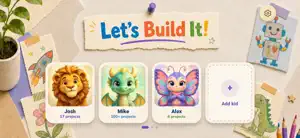
Create something your family can play together. Describe a game, story, quiz or creative app by voice or text, talk through the idea with the AI helper, and turn it into a playable project. Let’s Build It! is a parent-managed family creativity tool. A parent owns the account, sets up profiles and supervises children using the creation tools. Families can ask for a new ending, another level or a different character, then play the result together. Everything you make lives on your family’s private project shelf. Projects are not publicly shared. PARENTS STAY IN CONTROL • You create the account and manage family profiles • You choose interests, reading levels and content boundaries • An optional 4-digit parent PIN protects parent-only screens • No advertising or cross-app tracking • Saved versions let your family return to an earlier take on an idea HOW IT WORKS 1. Describe an idea together by voice or text 2. Talk it through with the AI helper and build it 3. Play the result and ask for changes CREDITS AND PLANS Every account gets 30 free credits every 30 days. Unused free credits roll over up to a free balance of 60. Optional monthly subscriptions add paid credits: • Starter: 100 paid credits each month • Maker: 230 paid credits each month • Studio: 660 paid credits each month A one-time 30-credit top-up is also available. Prices are shown in the App Store before purchase. Free credits are used first. Paid credits do not expire or get capped. Subscriptions renew automatically each month until cancelled in App Store settings. Restore Purchases is available in the app. PRIVACY AND SUPPORT Before using AI features, a parent chooses whether to permit sharing with the named AI services. The notice explains the information sent, including microphone audio, conversation text, profile context and project content. Permission can be withdrawn in Settings > Account. Work already started may finish. Withdrawal keeps your account and saved projects and does not cancel an Apple subscription. Privacy Policy: https://letsbuildit.app/privacy Support: https://letsbuildit.app/support Terms of Use: https://www.apple.com/legal/internet-services/itunes/dev/stdeula/
What’s new
Version 1.0.11 · Updated October 22, 2026
Our little robot helper is now 3D! It moves its mouth as it talks to your kid, and leans in and nods along while they tell it their ideas. Plus a few little fixes and improvements. Hope you like it!
App privacy
The developer, Michael Cann, reported these privacy practices to Apple.
Data Linked to You
The following data, which may be collected and linked to your identity, may be used for the following purposes:
- Identifiers: User ID, Device ID
- Usage Data: Product Interaction
- Diagnostics: Crash Data, Performance Data, Other Diagnostic Data
- Contact Info: Name, Email Address
- User Content: Photos or Videos, Audio Data, Gameplay Content, Other User Content, Customer Support
- Other Data: Other Data Types
- Purchases: Purchase History
- Location: Coarse Location
Used for: Analytics, Product Personalization, App Functionality
Alternatives to Let’s Build It!
Looking for apps like Let’s Build It!? Here are 6 similar apps on the App Store. The highest rated is AMAU Academy (5.0/5), and all 6 are free to download.
-
 Tilawa App
-
 Toothbrush Timer: Monster Hunt
4.0
Toothbrush Timer: Monster Hunt
4.0
-
 Congress - 39C3
4.8
Congress - 39C3
4.8
-
 Knot Tying 3D: Animated Guide
4.0
Knot Tying 3D: Animated Guide
4.0
-
 NoSheet: Speak Music!
4.2
NoSheet: Speak Music!
4.2
-
 AMAU Academy
5.0
AMAU Academy
5.0
| App | Rating | Price | Last updated | Compare |
|---|---|---|---|---|
| Let’s Build It! | – | Free | October 22, 2026 | |
| Tilawa App | – | Free | Oct 20, 2026 | Compare |
| Toothbrush Timer: Monster Hunt | 4.0 / 5 (1) | Free | Mar 3, 2026 | Compare |
| Congress - 39C3 | 4.8 / 5 (30) | Free | Dec 12, 2025 | Compare |
| Knot Tying 3D: Animated Guide | 4.0 / 5 (303) | Free | Aug 11, 2025 | Compare |
| NoSheet: Speak Music! | 4.3 / 5 (28) | Free | Sep 28, 2026 | Compare |
| AMAU Academy | 5.0 / 5 (133) | Free | Oct 22, 2026 | Compare |
Compare Let’s Build It! with the top alternatives: ratings, updates, ASO score and keyword gaps →