

Replr: AI Texting Keyboard
Ihsan Sengun Productivity iPhoneiPadiPod touch
Replr: AI Texting Keyboard is a free Productivity app for iPhone and iPad by Ihsan Sengun. Rated 5.0/5 from 1 ratings. Requires iOS 16.6.
- Rating
- 5.0
- 1 ratings
- Price
- Free
- on the App Store
- Size
- 35 MB
- Age 12+
- Updated
- Sep 25
- 2026 · v1.0.9
Screenshots

About Replr: AI Texting Keyboard
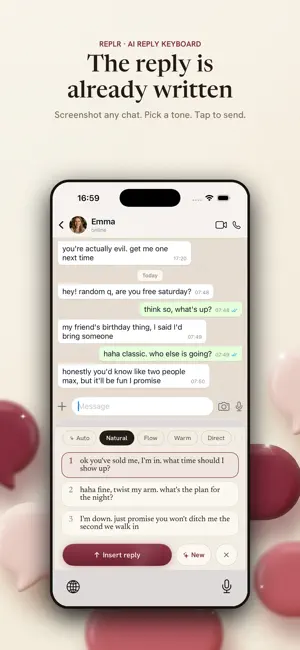
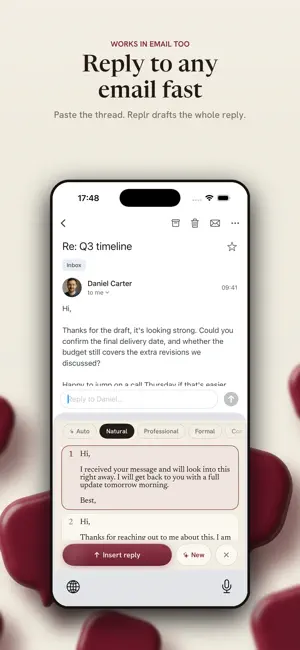
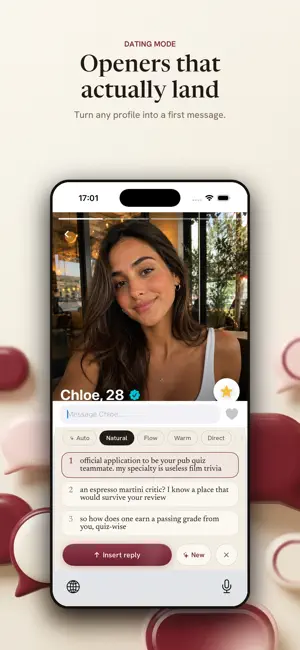
Never stare at a blank reply again. Screenshot any chat and Replr writes your response in seconds: casual, warm, flirty, or straight to the point. How it works: 1. Open a chat and switch to the Replr keyboard. 2. Tap Start, then screenshot the conversation. 3. Tap to generate, then pick one of three replies and send. Works everywhere you message: texts, DMs, dating apps, and email. Switch the tone to match the moment, or steer the reply by telling Replr what you want to say first. Replies that sound like you, not a robot. Your screenshot isn't kept on Replr's servers, and anything you've typed in the message box is used only to steer your replies. Each new device gets 10 free replies, with no card and no sign-up. After that, Premium unlocks unlimited replies across every chat (fair use applies), and eligible new subscribers start with a 3-day free trial. Cancel anytime. The reply is already written. Terms of Use (EULA): https://replr.app/terms Privacy Policy: https://replr.app/privacy
What’s new
Version 1.0.9 · Updated September 25, 2026
Choose how you use Replr. Setup now asks: keyboard, or in the app? The keyboard is still the way to get replies inside any chat with no copy-paste. If you would rather not give it permissions, pick "In the app": choose a screenshot in Replr (or paste an email), get three replies, and copy one. In Email mode it can also write a new email from a few words. No permissions needed. You can switch any time in Settings. If setup gets interrupted partway through, for example right after you turn on Full Access, opening Replr again picks up where you left off. Keyboard users get the same screen from Home for the moments the keyboard is not handy.
App privacy
The developer, Ihsan Sengun, reported these privacy practices to Apple.
Data Linked to You
The following data, which may be collected and linked to your identity, may be used for the following purposes:
- Usage Data: Advertising Data, Product Interaction
- Location: Coarse Location
- Identifiers: Device ID, User ID
- Diagnostics: Performance Data, Other Diagnostic Data
- Other Data: Other Data Types
- Purchases: Purchase History
- User Content: Other User Content
Used for: Developer’s Advertising or Marketing, Analytics, App Functionality
Data Not Linked to You
The following data, which may be collected but is not linked to your identity, may be used for the following purposes:
- User Content: Emails or Text Messages, Photos or Videos
Used for: App Functionality
Alternatives to Replr: AI Texting Keyboard
Looking for apps like Replr: AI Texting Keyboard? Here are 6 similar apps on the App Store. The highest rated is AI Dating Chat Keyboard (5.0/5), and all 6 are free to download.
-
 ReplyKey - AI Reply Keyboard
-
 AI Dating Chat Keyboard
5.0
AI Dating Chat Keyboard
5.0
-
 AI Keyboard: Writing Assist
5.0
AI Keyboard: Writing Assist
5.0
-
 Timbo: AI Calendar, To Do List
5.0
Timbo: AI Calendar, To Do List
5.0
-
 Voxkey - AI Keyboard
-
 Mast: Commitment App Blocker
| App | Rating | Price | Last updated | Compare |
|---|---|---|---|---|
| Replr: AI Texting Keyboard | 5.0 / 5 (1 rating) | Free | September 25, 2026 | |
| ReplyKey - AI Reply Keyboard | – | Free | Sep 1, 2026 | Compare |
| AI Dating Chat Keyboard | 5.0 / 5 (1) | Free | Aug 13, 2026 | Compare |
| AI Keyboard: Writing Assist | 5.0 / 5 (1) | Free | Jun 19, 2026 | Compare |
| Timbo: AI Calendar, To Do List | 5.0 / 5 (13) | Free | Oct 20, 2026 | Compare |
| Voxkey - AI Keyboard | – | Free | May 3, 2026 | Compare |
| Mast: Commitment App Blocker | – | Free | Aug 18, 2026 | Compare |