

Proc: Procrastination Blocker
Soro Development LLC Productivity iPhoneiPadiPod touch
Proc: Procrastination Blocker is a free Productivity app for iPhone and iPad by Soro Development LLC. Rated 5.0/5 from 6 ratings. Requires iOS 17.6.
- Rating
- 5.0
- 6 ratings
- Price
- Free
- on the App Store
- Size
- 15 MB
- Age 4+
- Updated
- Jul 8
- 2026 · v1.1
Screenshots
About Proc: Procrastination Blocker
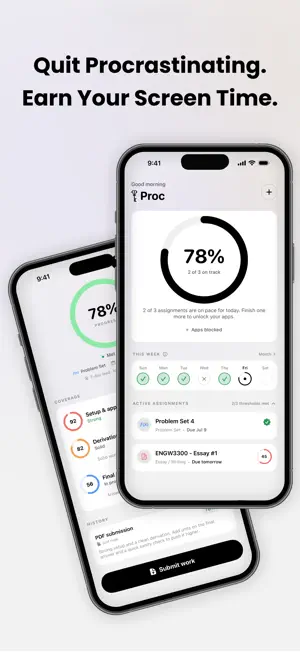
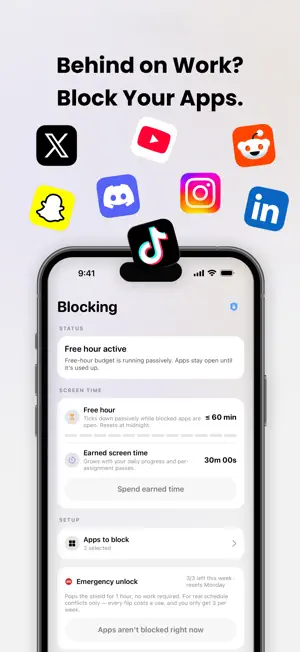
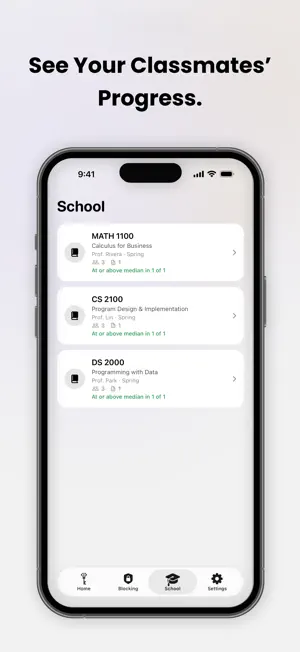
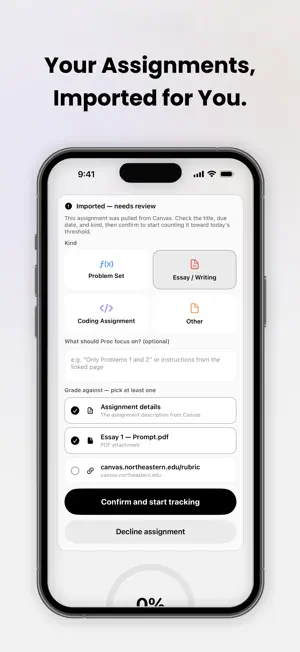
Proc turns "I'll study later" into "I studied." Pick the apps that derail you, set your assignments, and Proc keeps those apps locked until you've actually made progress on your work — checked by AI, not the honor system. HOW IT WORKS 1. Add your assignments — type them in or import them straight from Canvas. 2. Choose the apps to block (social media, short-video apps, games — your call). 3. Do the work and submit it. Proc's AI reads your submission and scores how complete it is against the assignment. 4. Hit your daily progress goal and your apps unlock. Fall behind and they stay locked. AI-VERIFIED PROGRESS, NOT A HONOR SLIDER Your progress isn't a number you drag — it's earned. Proc uses Google's Gemini AI to judge how far along your real work is, so the apps you unlock reflect work you actually did. It checks completeness and whether you're on-topic; it never just hands you the answers. A DAILY PACE THAT'S ACTUALLY DOABLE Proc spreads each assignment across the days you have before it's due, so you get a fair daily target instead of a last-minute wall. Work ahead one day and you bank breathing room for the next. CANVAS, BUILT IN Connect Canvas once and your current-semester courses and assignments flow in automatically — no retyping due dates. SEE HOW YOUR CLASS IS DOING Verify your school email and the School tab shows how classmates are progressing on the same assignments — completely anonymous. No names, no leaderboards-as-shame, just a sense of where you stand. Report and block controls keep it safe. STICK TO YOUR WORD Set a commitment — how many days ahead you want to stay, whether weekends count — and Proc holds you to it. Making your blocking harder is instant; easing it takes a cooling- off period, so a moment of weakness doesn't undo your week. PRIVATE BY DESIGN Most of your data lives on your device. We don't use analytics or advertising SDKs and we don't track you across other apps. Your Canvas token stays in your device's Keychain. See our full Privacy Policy at theprocapp.com/privacy. Blocking uses Apple's Screen Time (Family Controls) on your own device — Proc never manages anyone else's phone. Stop doomscrolling your deadlines away. Get Proc. *All features described above require a subscription.* Privacy Policy: https://theprocapp.com/privacy Terms of Use (EULA): https://theprocapp.com/terms
Ratings & reviews
5.0
6 ratings
What’s new
Version 1.1 · Updated July 8, 2026
A cleaner, redesigned look — a refined monochrome interface plus a new Light Mode you can pick under Settings → Appearance. Plus performance and reliability improvements.
App privacy
The developer, Soro Development LLC, reported these privacy practices to Apple.
Data Linked to You
The following data, which may be collected and linked to your identity, may be used for the following purposes:
- Purchases: Purchase History
- Contact Info: Email Address
- User Content: Other User Content
- Identifiers: User ID, Device ID
Used for: App Functionality
Alternatives to Proc: Procrastination Blocker
Looking for apps like Proc: Procrastination Blocker? Here are 6 similar apps on the App Store. The highest rated is readlock - read to unlock (5.0/5), and all 6 are free to download.
-
 Octoscroll
-
 readlock - read to unlock
5.0
readlock - read to unlock
5.0
-
 Nudge - Daily Habits
5.0
Nudge - Daily Habits
5.0
-
 LocknLearn - Focus & Study
-
 Daily Quote - Spiritual Quotes
5.0
Daily Quote - Spiritual Quotes
5.0
-
 AlarMe: Alarm Clock to Wake Up
4.7
AlarMe: Alarm Clock to Wake Up
4.7
| App | Rating | Price | Last updated | Compare |
|---|---|---|---|---|
| Proc: Procrastination Blocker | 5.0 / 5 (6 ratings) | Free | July 8, 2026 | |
| Octoscroll | – | Free | Oct 15, 2026 | Compare |
| readlock - read to unlock | 5.0 / 5 (2) | Free | Apr 17, 2026 | Compare |
| Nudge - Daily Habits | 5.0 / 5 (1) | Free | Mar 17, 2026 | Compare |
| LocknLearn - Focus & Study | – | Free | Oct 17, 2026 | Compare |
| Daily Quote - Spiritual Quotes | 5.0 / 5 (1) | Free | Sep 22, 2026 | Compare |
| AlarMe: Alarm Clock to Wake Up | 4.7 / 5 (22) | Free | Apr 30, 2026 | Compare |