

Lightstead: Family Management
Daniel Romero Productivity iPhoneiPadiPod touch
Lightstead: Family Management is a free Productivity app for iPhone and iPad by Daniel Romero. Rated 5.0/5 from 2 ratings. Requires iOS 15.1.
- Rating
- 5.0
- 2 ratings
- Price
- Free
- on the App Store
- Size
- 49 MB
- Age 4+
- Updated
- Oct 18
- 2026 · v1.17.2
Screenshots


About Lightstead: Family Management
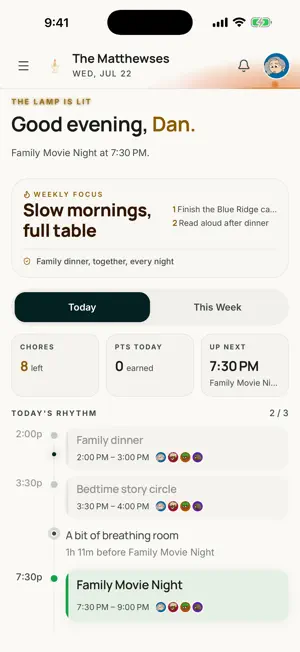
Lightstead is the all-in-one family organizer — your family's calendar, chores, groceries, meal plans, lists, and homeschool records in one calm, private home. ONE HOME FOR YOUR FAMILY'S LIFE • Family Calendar — everyone's schedule in one shared view • Chore Board — assign chores, track completion, and pay allowance automatically • Groceries — shared lists the whole family can add to • Kitchen Table — plan the week's meals and build your shopping list from the plan • Lists — packing lists, gift ideas, books, anything you name • Family Wall — notes and announcements everyone sees • Journal — capture family memories as they happen BUILT FOR HOMESCHOOL FAMILIES The deepest homeschool record-keeping of any family app: log lessons and hours, track attendance, record grades and test scores, and export transcript and portfolio PDFs. Record-keeping guidance adapts to your state's requirements. MADE FOR REAL HOUSEHOLDS • Parent and child profiles with parent-controlled permissions • Family Mode for shared devices • One account for the whole family, on iPhone, iPad, and the web FREE TRIAL & SUBSCRIPTION Lightstead is free to try for 30 days — no payment required to start. After your trial, continued access requires a Lightstead Pro auto-renewing subscription, purchased in the app: • Monthly — $11.99/month (US) • Annual — $99.99/year (US) One subscription covers your whole household. Payment is charged to your Apple ID account at confirmation of purchase. Subscriptions renew automatically unless auto-renew is turned off at least 24 hours before the end of the current period. Manage or cancel anytime in your App Store account settings. Privacy Policy: https://lightsteads.com/privacy Terms of Use (EULA): https://lightsteads.com/terms
What’s new
Version 1.17.2 · Updated October 18, 2026
• Notifications now turn on the first time you sign in on a new phone. • Signing out while Family Mode is on now asks for your PIN and turns Family Mode off, so the next person who signs in gets their notifications. • Signing out stops this phone from getting that account's notifications.
App privacy
The developer, Daniel Romero, reported these privacy practices to Apple.
Data Linked to You
The following data, which may be collected and linked to your identity, may be used for the following purposes:
- Usage Data: Product Interaction
- Diagnostics: Crash Data
- Contact Info: Name
- User Content: Other User Content
- Identifiers: User ID
Used for: Analytics, App Functionality
Data Not Linked to You
The following data, which may be collected but is not linked to your identity, may be used for the following purposes:
- Diagnostics: Performance Data
- Contact Info: Email Address
- User Content: Photos or Videos
Used for: Analytics, App Functionality
Alternatives to Lightstead: Family Management
Looking for apps like Lightstead: Family Management? Here are 6 similar apps on the App Store. The highest rated is Domani - Daily Planner (5.0/5), and all 6 are free to download.
-
 Domani - Daily Planner
5.0
-
 Family-Plan
5.0
-
 Remainder: Timebox To Do List
5.0
-
 StrideFlow AI: Goal Planner
5.0
-
 Norton Family Assistant
4.8
-
 Concairge: AI Family Assistant
4.7
| App | Rating | Price | Last updated | Compare |
|---|---|---|---|---|
| Lightstead: Family Management | 5.0 / 5 (2 ratings) | Free | October 18, 2026 | |
| Domani - Daily Planner | 5.0 / 5 (4) | Free | Sep 18, 2026 | Compare |
| Family-Plan | 5.0 / 5 (1) | Free | Oct 10, 2026 | Compare |
| Remainder: Timebox To Do List | 5.0 / 5 (6) | Free | Oct 17, 2026 | Compare |
| StrideFlow AI: Goal Planner | 5.0 / 5 (5) | Free | Oct 15, 2026 | Compare |
| Norton Family Assistant | 4.8 / 5 (17) | Free | Oct 8, 2026 | Compare |
| Concairge: AI Family Assistant | 4.7 / 5 (14) | Free | Oct 12, 2026 | Compare |