

AWS SCS Security Specialty
CHOI SEONGMIN Education iPhoneiPadiPod touch
AWS SCS Security Specialty is a free Education app for iPhone and iPad by CHOI SEONGMIN. Requires iOS 15.1. Updated October 7, 2026.
- Price
- Free
- on the App Store
- Size
- 171 MB
- Age 4+
- Updated
- Oct 7
- 2026 · v1.0.12
Screenshots


About AWS SCS Security Specialty
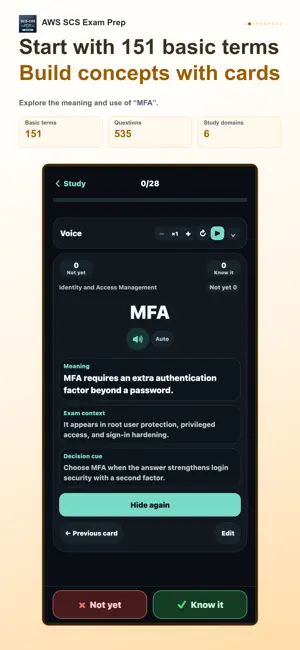
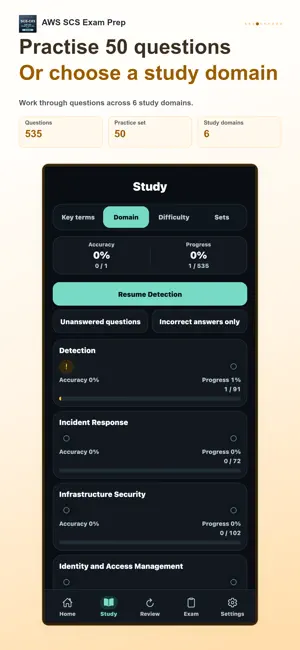
Keep studying across your phone, tablet and desktop. Use your phone on the move and a tablet or desktop when you want more room to study. Connect the same StudyCert account to continue your learning in the app and on the desktop web. Prepare for AWS Certified Security - Specialty (SCS-C03) with 535 practice questions and 151 key terms. Study coverage · 6 areas • Detection • Incident Response • Infrastructure Security • Identity and Access Management • Data Protection • Security Foundations and Governance 1. Build your foundation with key terms Use flashcards to learn meanings, exam context and selection cues. Mark terms as known or not yet known, then revisit unstudied or unfamiliar cards. Edit card content to suit your learning and restore the original when needed. 2. Practice and understand each answer Study in 50-question sets, by domain or by difficulty. Work through single- and multiple-choice questions, then read the explanation for the answer and each option. Choose all, unfinished or wrong questions; shuffle questions and choices; use a study timer; and resume where you left off. 3. Review mistakes and uncertain concepts Collect questions marked for review, recent errors and repeated mistakes. Filter by cumulative wrong-answer count and focus on weaker domains or difficulty levels. The glossary report connects your known/not-yet records with accuracy on related questions. 4. Check your preparation with a mock exam Practice time management with 65 questions in 170 minutes. Change answers before submission, resume a saved exam and receive grading when time expires. Afterwards, see correct, wrong and unanswered counts, your score and domain results, then revisit mistakes. Tools that fit your study routine Optional audio study reads terms and meanings aloud. Choose whether to include exam context and selection cues, set repeats and pauses, and control playback with the mini player. In the mobile app, audio can continue in the background and with the screen locked. A study calendar, learning streaks, weekly goals, reminders for unmet goals and light, dark or system themes support your routine. Learning records are managed for each supported language. Some features require paid access. Check the included features and price on the purchase screen. Purchase restoration is supported. This is an independent study aid, not an official, affiliated or endorsed app of any exam administrator or certification body. Exam names and trademarks belong to their respective owners.
What’s new
Version 1.0.12 · Updated October 7, 2026
Improved the study experience, voice playback, and app stability.
App privacy
The developer, CHOI SEONGMIN, reported these privacy practices to Apple.
Data Not Linked to You
The following data, which may be collected but is not linked to your identity, may be used for the following purposes:
- Purchases: Purchase History
- Usage Data: Product Interaction
Used for: Analytics, App Functionality
Alternatives to AWS SCS Security Specialty
Looking for apps like AWS SCS Security Specialty? Here are 6 similar apps on the App Store.
-
 AWS SAA-C03 Prep | OwlExam
-
 OffSec PenTest Prep: with AI
-
 PassRun Programming Technician
-
 ISC2 SSCP Flashcards 2026
-
 AWS Security Exam Prep
-
 ACCA F1-F3 Entry Prep (+AI)
| App | Rating | Price | Last updated | Compare |
|---|---|---|---|---|
| AWS SCS Security Specialty | – | Free | October 7, 2026 | |
| AWS SAA-C03 Prep | OwlExam | – | Free | Aug 21, 2026 | Compare |
| OffSec PenTest Prep: with AI | – | 6.99 USD | May 14, 2026 | Compare |
| PassRun Programming Technician | – | Free | Oct 8, 2026 | Compare |
| ISC2 SSCP Flashcards 2026 | – | Free | Apr 5, 2026 | Compare |
| AWS Security Exam Prep | – | Free | Sep 17, 2026 | Compare |
| ACCA F1-F3 Entry Prep (+AI) | – | Free | Aug 5, 2026 | Compare |