

Aurora Live
Robert Corbin Graphics & Design iPhoneiPadiPod touch
Aurora Live is a paid Graphics & Design app for iPhone and iPad by Robert Corbin. Requires iOS 17.0. Updated September 14, 2026.
- Price
- 2.99 USD
- on the App Store
- Size
- 3 MB
- Age 4+
- Updated
- Sep 14
- 2026 · v3.0
Screenshots


About Aurora Live
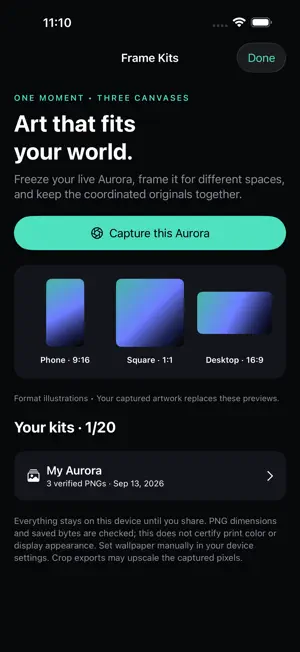
Frame Kits turns a captured moment from your live Aurora into a coordinated set of phone, square and desktop images. HOW IT WORKS 1. Open Frame Kits from the live canvas and capture the current Aurora. The source is frozen for this editing session. 2. Name the kit, inspect each format and adjust the shared crop position. The optional composition guide stays in the preview only. 3. Build the kit, inspect the saved PNGs and share them with the manifest. Set wallpaper manually in system settings. The live Metal canvas, touch and optional sound response, palettes, photo palette extraction, Moments, ambient display, Composition Lab, keyframe sequencer and existing captures remain available. A failed kit build cleans its incomplete output; unreadable library files are preserved. WHAT TO KNOW Choose phone 1440 × 2560, square 2048 × 2048 and desktop 2560 × 1440 PNGs. Cropping preserves proportions and may upscale captured pixels. Each output is reopened to verify dimensions and bytes; saved hashes are checked again before sharing. Verification does not certify print color, display appearance or authorship. The source capture is not separately retained after this editing session. Up to 20 kits are kept locally. iPhone and iPad.
What’s new
Version 3.0 · Updated September 14, 2026
Frame Kits Frame Kits turns a captured moment from your live Aurora into a coordinated set of phone, square and desktop images. 1. Open Frame Kits from the live canvas and capture the current Aurora. The source is frozen for this editing session. 2. Name the kit, inspect each format and adjust the shared crop position. The optional composition guide stays in the preview only. 3. Build the kit, inspect the saved PNGs and share them with the manifest. Set wallpaper manually in system settings. Choose phone 1440 × 2560, square 2048 × 2048 and desktop 2560 × 1440 PNGs. Cropping preserves proportions and may upscale captured pixels. Each output is reopened to verify dimensions and bytes; saved hashes are checked again before sharing. Verification does not certify print color, display appearance or authorship. The source capture is not separately retained after this editing session. Up to 20 kits are kept locally.
App privacy
The developer, Robert Corbin, reported these privacy practices to Apple.
Data Not Collected
The developer does not collect any data from this app.
Alternatives to Aurora Live
Looking for apps like Aurora Live? Here are 6 similar apps on the App Store. The highest rated is DabDab: Fluid Art & Simulation (5.0/5), and 5 of the 6 are free to download.
-
 Emo Haze
-
 Morphon
3.0
Morphon
3.0
-
 DabDab: Fluid Art & Simulation
5.0
DabDab: Fluid Art & Simulation
5.0
-
 Colors AR
4.0
Colors AR
4.0
-
 scanbust 3D
-
 EasyMapper Projection Mapping
1.0
EasyMapper Projection Mapping
1.0
| App | Rating | Price | Last updated | Compare |
|---|---|---|---|---|
| Aurora Live | – | 2.99 USD | September 14, 2026 | |
| Emo Haze | – | Free | Jan 26, 2026 | Compare |
| Morphon | 3.0 / 5 (1) | Free | Apr 24, 2026 | Compare |
| DabDab: Fluid Art & Simulation | 5.0 / 5 (1) | Free | Oct 16, 2026 | Compare |
| Colors AR | 4.0 / 5 (4) | Free | Aug 17, 2026 | Compare |
| scanbust 3D | – | 24.49 USD | Jan 9, 2026 | Compare |
| EasyMapper Projection Mapping | 1.0 / 5 (1) | Free | Oct 28, 2026 | Compare |
Compare Aurora Live with the top alternatives: ratings, updates, ASO score and keyword gaps →