

TimeKeeper - Time Tracker
Ozlem AKBUDAK Productivity iPhoneiPadiPod touch
TimeKeeper - Time Tracker is a free Productivity app for iPhone and iPad by Ozlem AKBUDAK. Requires iOS 26.2. Updated October 9, 2026.
- Price
- Free
- on the App Store
- Size
- 31 MB
- Age 4+
- Updated
- Oct 9
- 2026 · v1.4
Screenshots


About TimeKeeper - Time Tracker
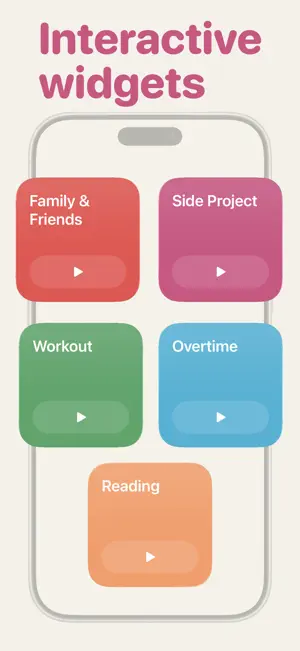
Start... Stop... See where your time goes. Track any activity right from your Home Screen widget Become the master of your time! Choose what to track: - Work and study sessions - Side projects and hobbies - Reading, exercise, chores - Time online and time offline - Anything you want to understand better What you get in just a few taps: + See where your hours actually go + Spot your most (and least) productive habits + Understand how you really spend your day + Make better decisions with honest data + Stay focused on one thing at a time + Feel in control of your schedule Track everything with tags - Create a tag for anything — work, gym, guitar, deep work - Start and stop a session with a single tap - Add a note to any session so you never forget the details See your time in beautiful charts - A pie chart shows which tags take up your time at a glance - A bar chart reveals your distribution across the day, week, month or year - Switch between any week, month or year to compare Search everything you've logged - Capture quick notes on your sessions as you go - Search through all of them in the Details tab to find anything in seconds Powerful Home Screen widgets - Interactive widget — start or stop a session for any tag without opening the app - Weekly widget for a single tag, to watch one habit grow - Weekly widget for all tags, to see the full picture at once Make it yours - Unlock the full widget pack with a single one-time purchase - Personalise the app with 3 beautifully designed backgrounds Scenarios when TimeKeeper works best: - Working out where your work hours really go - Tracking how much you read, study or train - Building a new habit and staying consistent - Cutting back on the activities that eat your day - Checking whether your week matched your priorities - Finally answering "where did all my time go?" You probably don't think about where your time goes that often. The day just happens, right? But paying a little attention to how you actually spend your hours is the first step to spending them on what matters. Time is the one thing you can't get back. TimeKeeper helps you see it clearly — no guilt, no pressure, just simple sessions and honest charts that show the truth of your days and weeks. Start a session, get on with your life, and let TimeKeeper quietly build the picture. Then open the Insights tab to see exactly where it all went. Awareness is the first step to change. Take control of your time with TimeKeeper! TimeKeeper is free to download and use. The widget pack and the background designs are optional one-time purchases — no subscriptions, and no recurring charges, ever. Purchases are linked to your Apple Account and can be restored on your devices at any time. Make every hour count! What's included Free, forever: - Unlimited tags — track as many activities as you like - All charts and insights - Notes on any session - Search across all your session notes - Full editing of sessions and tags Optional one-time purchases: - Widgets — one purchase unlocks them all, the interactive widget and every insight widget together - Backgrounds — one purchase unlocks the entire design collection Just two purchases, both one-time. No subscriptions, no recurring charges, ever. Everything is linked to your Apple Account and restores across your devices anytime. Privacy Policy: https://www.appsupport.com.tr/privacy.html Terms of Use (EULA): https://www.apple.com/legal/internet-services/itunes/dev/stdeula/
What’s new
Version 1.4 · Updated October 9, 2026
TimeKeeper now fits your screen, whatever shape it is, and you can run it with your voice. Built for iPhone Duo TimeKeeper adapts smoothly as you fold and unfold iPhone Duo, in every pose, and works well in Split View alongside your other apps. Fully resizable on iPad The layout now makes the most of any window size, from a narrow window beside another app to full screen. Siri support Start, stop and check your timers without opening the app. Try saying: – "Start tracking READING in TimeKeeper" – "Stop tracking in TimeKeeper" – "What am I tracking in TimeKeeper?" – "How long have I been tracking in TimeKeeper?" – "How much time did I track this week in TimeKeeper?" – "How long did I work on SIDE PROJECT in TimeKeeper?" Thanks for using TimeKeeper. If you enjoy the update, a rating or review helps a great deal. If you’re enjoying the TimeKeeper, please take a moment to leave a review, it really helps!
App privacy
The developer, Ozlem AKBUDAK, reported these privacy practices to Apple.
Data Not Collected
The developer does not collect any data from this app.
Alternatives to TimeKeeper - Time Tracker
Looking for apps like TimeKeeper - Time Tracker? Here are 6 similar apps on the App Store. The highest rated is EasyCount - Event Countdown (5.0/5), and 4 of the 6 are free to download.
-
 EasyCount - Event Countdown
5.0
-
 Timetracker - 24h Life Tracker
5.0
-
 Days: Daily Routine Planner
5.0
-
 Done: Habit Tracker
2.7
-
 Pomodoro Timer: Pixeldoro ADHD
4.9
-
 2Do: To Do List & Task Manager
4.9
| App | Rating | Price | Last updated | Compare |
|---|---|---|---|---|
| TimeKeeper - Time Tracker | – | Free | October 9, 2026 | |
| EasyCount - Event Countdown | 5.0 / 5 (1) | 0.99 USD | Mar 22, 2026 | Compare |
| Timetracker - 24h Life Tracker | 5.0 / 5 (1) | Free | Oct 8, 2026 | Compare |
| Days: Daily Routine Planner | 5.0 / 5 (3) | Free | Aug 26, 2026 | Compare |
| Done: Habit Tracker | 2.7 / 5 (3) | Free | Sep 9, 2026 | Compare |
| Pomodoro Timer: Pixeldoro ADHD | 4.9 / 5 (52) | Free | Oct 14, 2026 | Compare |
| 2Do: To Do List & Task Manager | 4.9 / 5 (124) | 9.99 USD | Oct 15, 2026 | Compare |