

TimeClock-Attendance NFC/Face
cyberstar Business iPhoneiPadiPod touch
TimeClock-Attendance NFC/Face is a free Business app for iPhone and iPad by cyberstar. Requires iOS 15.5. Updated July 16, 2026.
- Price
- Free
- on the App Store
- Size
- 99 MB
- Age 4+
- Updated
- Jul 16
- 2026 · v1.0.6
Screenshots


About TimeClock-Attendance NFC/Face
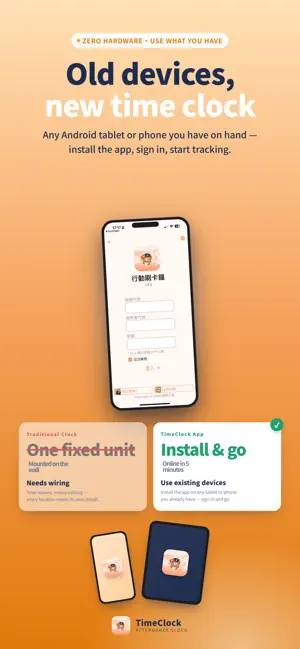
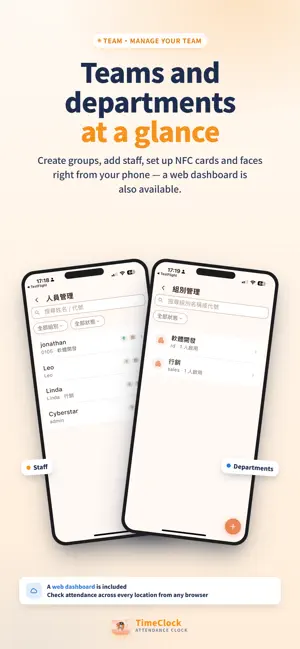
Turn any phone or tablet into a smart time clock. No more expensive dedicated hardware — your phone is the time clock. Tap an NFC card or glance at the camera — clock in under 1 second. Track attendance in real time, export reports, and manage on-site and field staff from one dashboard. Use it fully offline, or sync attendance across devices with the cloud plan. Perfect for small businesses, retail chains, factories, and clinics. Why choose TimeClock? ## Zero Hardware Cost Turn any spare tablet or phone into a punch clock — even an old device works. ## 1-Second Clock-In, No Lines Tap an NFC card, or look up for instant face recognition. No queues, no delays. ## Works on Android & iOS Install on whatever device your team already has — phone or tablet, either platform. ## On-Site + Field Staff, One Dashboard Front-desk staff use NFC or face recognition on a shared tablet. Field staff clock in from their own phone via the companion Mobile Punch Clock app with GPS or WiFi verification. The cloud plan unifies both apps on one dashboard. ## No Internet? No Problem The offline edition works fully without network access. Data stays local — no cloud dependency, no downtime during outages. ## Face Data Stays On Your Device Facial feature vectors are AES-256 encrypted and stored locally on your device. They are never uploaded to our servers. Designed to align with GDPR and Taiwan's Personal Data Protection Act principles. ## Manage Remotely as an Owner or HR The cloud plan includes a web dashboard so you can check attendance from anywhere — spot exceptions before month-end, not after. Core Clock-In Features ※ NFC Tap-to-Clock — Employee badges, student IDs, admin cards. Under 1 second, with duplicate-tap protection. ※ Face Recognition — Fast on-device recognition for badge-free clock-in, fully encrypted. ※ Custom Clock Modes — Clock in/out, overtime, or custom labels with configurable time windows for auto late/early/overtime flagging. ※ Clock-In Animations & Confirmations — Instant, customizable feedback per status. Attendance & Reporting ※ Smart Attendance Detection — Flags late arrivals, early departures, and overtime automatically. ※ Flexible Record Search — Filter by date, department, employee, or clock mode, in-app or via web dashboard. ※ Manual Record Correction — Admins can fix any employee's clock record, from the app or web. ※ One-Tap Report Export — Reports emailed as Excel, ready for payroll processing. Staff & Group Management Add, edit, or remove employee profiles — name, group, card ID, face data. Unrecognized cards prompt a new-employee form with the card ID pre-filled. Supports multiple departments and locations. Settings Built for Real Workplaces Auto-return to the clock screen after idle time. Duplicate-tap cooldown to prevent double clock-ins. Optional GPS logging at clock-in. Independent time windows per mode — supports shift work, fixed and flexible schedules. Multi-Language & Privacy First Available in 13 languages including English, Traditional Chinese, and Simplified Chinese, with more coming. Facial data is AES-256 encrypted and stored locally on your device. If you switch phones, encrypted face data can be transferred only to your own Google Drive with your explicit authorization — the developer never has access. Designed to align with GDPR and Taiwan's Personal Data Protection Act principles. Choose the Plan That Fits Your Business >> Free Trial (Cloud) — Full features, ad-supported (a short ad before exporting reports). >> Cloud Plan — Most Popular — No ads. Web dashboard, multi-device sync, field-staff app. Best for multi-location teams. >> Offline Standard — Up to 30 employees, one-time purchase, no ads. >> Offline Advanced — Unlimited employees, one-time purchase, no ads. Get started now and make attendance management effortless. Support: https://goo.gl/072nH2 Website: http://timeclock.cyberstar.com.tw/
What’s new
Version 1.0.6 · Updated July 16, 2026
Added Face Recognition Settings, Bug Fixes
App privacy
The developer, cyberstar, reported these privacy practices to Apple.
Data Not Linked to You
The following data, which may be collected but is not linked to your identity, may be used for the following purposes:
- Location: Precise Location
- Contact Info: Email Address, Name
Used for: App Functionality
Alternatives to TimeClock-Attendance NFC/Face
Looking for apps like TimeClock-Attendance NFC/Face? Here are 6 similar apps on the App Store. The highest rated is FacialClock (5.0/5), and all 6 are free to download.
-
 FacialClock
5.0
FacialClock
5.0
-
 SmallBiz Attendance-Time Sheet
-
 TimesNow
-
 Timecard: Simple Punch Clock
-
 Work Mind
-
 Smile勤怠
| App | Rating | Price | Last updated | Compare |
|---|---|---|---|---|
| TimeClock-Attendance NFC/Face | – | Free | July 16, 2026 | |
| FacialClock | 5.0 / 5 (1) | Free | Jun 22, 2026 | Compare |
| SmallBiz Attendance-Time Sheet | – | Free | Jul 11, 2026 | Compare |
| TimesNow | – | Free | Oct 11, 2026 | Compare |
| Timecard: Simple Punch Clock | – | Free | Oct 19, 2026 | Compare |
| Work Mind | – | Free | Sep 14, 2026 | Compare |
| Smile勤怠 | – | Free | Jul 21, 2026 | Compare |