

This is My Life
Brian O'Riordan Lifestyle iPhoneiPadiPod touchMac
This is My Life is a free Lifestyle app for iPhone and iPad by Brian O'Riordan. Rated 5.0/5 from 1 ratings. Requires iOS 26.2. Updated July 30, 2026.
- Rating
- 5.0
- 1 ratings
- Price
- Free
- on the App Store
- Size
- 9 MB
- Age 4+
- Updated
- Jul 30
- 2026 · v1.3.0
Screenshots
About This is My Life
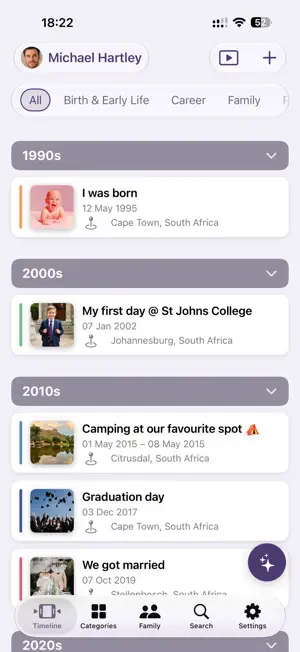
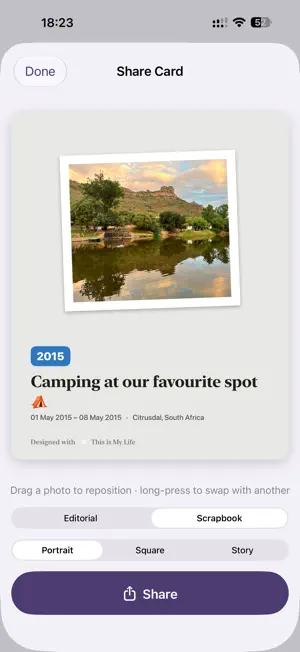
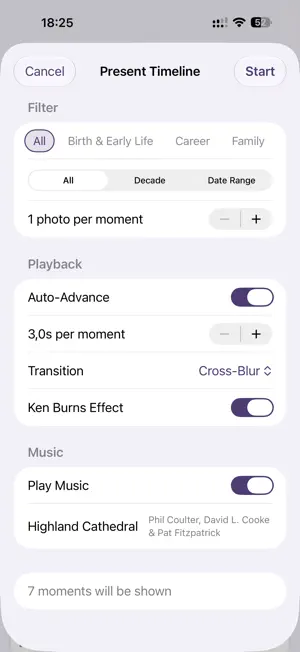
Add the moments that matter: a first day at school, a wedding, a trip, the day a child was born. Each moment holds a title, a date or date range, a place, a few words, and up to four photos. Your moments line up automatically on a beautiful timeline, grouped by decade, so your story reads from the beginning. • Timeline — every moment in order, by decade • Categories — organise moments into the chapters of your life • Family tree — add parents, partners, children and more, and see how everyone connects • Search — find any moment by meaning, not just keywords (on supported devices) • Ask Siri — get a quick answer about your story, or find a moment, right from Siri and Spotlight search (on supported devices) • Present — turn any part of your story into a full-screen slideshow, with music and transitions • Storybook — export your whole story as a printable PDF keepsake • Share cards — turn a moment into a beautiful card for Messages, Instagram, or anywhere Private by design. Your story lives on your device and syncs through your own private iCloud — we don't run servers that store your memories, and we can't read them. Siri and Spotlight access is off by default (but you can turn it on under Settings) and entirely on-device — you choose what's searchable, and anything marked Private is never included. Free to start. Capture your first moments and build your family tree at no cost. Unlock Premium once to remove the limits: unlimited moments, an unlimited family tree, and up to four photos per moment.
What’s new
Version 1.3.0 · Updated July 30, 2026
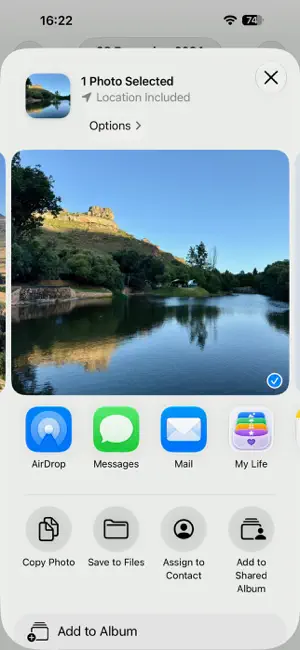
This one is quite a big bump! Moments can now be placed on a map Add a photo and the location fills in from the photo itself, if it has one. Start typing a place and you'll get suggestions, so a moment is pinned to a real location rather than just text. Moment details now show a map below the photos — tap it for a full map you can pan and zoom, and drag the pin if it isn't quite in the right spot. A bigger family tree Great-grandparents and great-grandchildren now appear, taking the tree to seven generations. The tree sizes itself to what's on screen — a small family draws large and clear, a deep one stays legible — and spreads sideways to use the full width. Pinch to zoom and faint arrows show which way to drag for more. Tapping someone re-centres the tree on them. Adding family is clearer too: one field places a person in the tree (parent, child, partner or sibling), and a separate one is simply how you describe them in lists — aunt, cousin, grandparent, whatever fits. A new look for Present Mode Presentations now open on a redesigned keepsake card and finish on a matching closing card, with four cover styles to choose from: Antique Gold, Forest & Brass, Oxblood & Silver, and Midnight & Rose Gold. Captions show the month and year of each moment, and presentations move at a quicker default pace. A quicker start Setting up is three screens instead of four, and the app now looks for an existing story in iCloud before anything else — if it finds one, you go straight in. Signing in with Apple is optional: skip it and sign in later from Settings whenever you like. New installs can also restore from a backup file directly, without waiting on iCloud. Sharing Photos to the app You can now choose the category when sharing a photo from the Photos App. If a photo hasn't finished downloading from iCloud yet, the share screen tells you instead of appearing to do nothing. And if you keep more than one story on your device, a shared photo is filed into whichever story was open when you shared it. Also fixed Siri and Spotlight could answer using a story you had switched away from. Photos could stay as placeholders after switching or restoring a story, until you reopened the app. Backups now keep private moments, photos excluded from presentations, and map locations. Location suggestions no longer hide behind the keyboard, and tapping anywhere on a suggestion selects it. Present Mode's opening card no longer gets cut off in landscape. On iPad: a taller map on moment details, the timeline sidebar stays put when you open a moment with photos, and long-pressing a card no longer opens the neighbouring card's menu. Family tree labels no longer overlap in the PDF storybook.
App privacy
The developer, Brian O'Riordan, reported these privacy practices to Apple.
Data Not Collected
The developer does not collect any data from this app.
Alternatives to This is My Life
Looking for apps like This is My Life? Here are 6 similar apps on the App Store. The highest rated is Olad - One Line A Day Journal (5.0/5), and 5 of the 6 are free to download.
-
 Escapements
-
 Memento.sky: A People Journal
-
 Memochron: Daily Logger
-
 Olad - One Line A Day Journal
5.0
Olad - One Line A Day Journal
5.0
-
 Viraah: Dog Wellness
4.8
Viraah: Dog Wellness
4.8
-
 Gen Z & Gen Alpha Decoder
| App | Rating | Price | Last updated | Compare |
|---|---|---|---|---|
| This is My Life | 5.0 / 5 (1 rating) | Free | July 30, 2026 | |
| Escapements | – | 2.99 USD | Aug 20, 2026 | Compare |
| Memento.sky: A People Journal | – | Free | Oct 1, 2026 | Compare |
| Memochron: Daily Logger | – | Free | Mar 15, 2026 | Compare |
| Olad - One Line A Day Journal | 5.0 / 5 (1) | Free | Jul 1, 2026 | Compare |
| Viraah: Dog Wellness | 4.8 / 5 (5) | Free | Apr 13, 2026 | Compare |
| Gen Z & Gen Alpha Decoder | – | Free | Jun 20, 2026 | Compare |
Compare This is My Life with the top alternatives: ratings, updates, ASO score and keyword gaps →