

Tempea: Planner & Habits
Anton Naumov Productivity iPhoneiPadiPod touch
Tempea: Planner & Habits is a free Productivity app for iPhone and iPad by Anton Naumov. Rated 5.0/5 from 3 ratings. Requires iOS 16.4.
- Rating
- 5.0
- 3 ratings
- Price
- Free
- on the App Store
- Size
- 68 MB
- Age 4+
- Updated
- Oct 15
- 2026 · v1.5.1
Screenshots

About Tempea: Planner & Habits
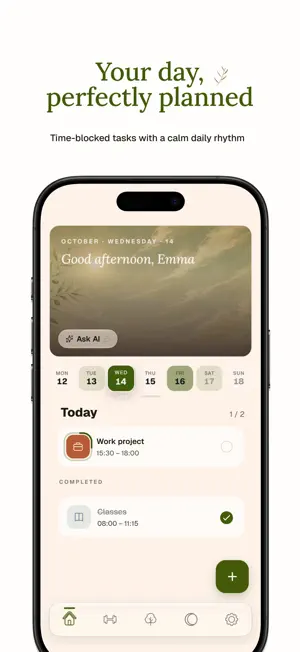
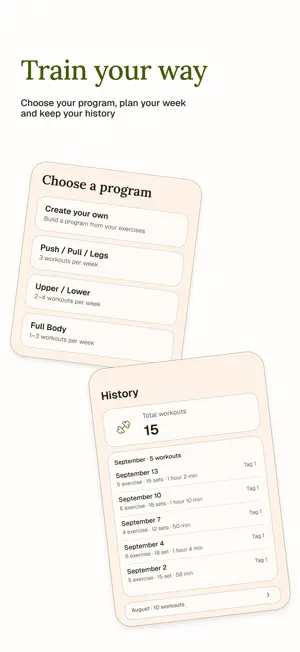
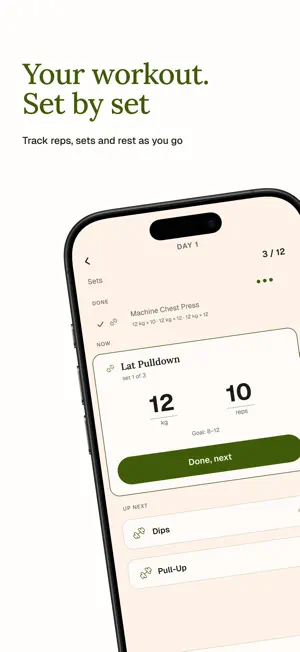
Tempea is a planner and trackers for habits, workouts and your cycle in one app. No more switching between apps. HOME Your day starts here: an interactive banner, a calendar and your tasks. BANNER — scenes instead of text hints At the top of the screen you see scenes that follow one another and tell a single story. - Workouts: a campfire in a ring of stones, where each stone is one workout of your week - Grove: the trees of your habits, and the ones you've completed sway gently - Cycle: the moon with a countdown to your period When you start a workout, the banner switches to the campfire by itself and shows your timer and sets CALENDAR — the whole month at a glance - The calendar expands: the week strip under the banner turns into a full month - The more intense a day's color, the busier that day is PLANNER — tasks for the day - Set a time and duration for every task - Mark what's important and set reminders - Make tasks repeat - Sort tasks into categories and add notes - Drag tasks with your finger: the list scrolls by itself at the edge of the screen - If tasks overlap, swipe the card and tap "Shift": Tempea spreads them out for you GROVE — habit tracker Every habit turns into a tree here. You check it off, and the tree grows. - Each tree goes through 30 growth stages, and once it's fully grown, you replant it in your grove - If you miss a day, the tree wilts, and it only shrinks after the second miss - For each habit you can choose a tree color, a reminder and a unit of measurement - The background changes through the day, and if you touch a tree, it comes to life - Swipe a habit row for quick actions: delete it or set a reminder WORKOUTS — from program to last set Plan a workout and do it right inside Tempea. - Pick a ready-made program or build your own from a large exercise library - Weight, reps and sets go on one screen - The workout runs step by step: you see what's done, what's happening now and what's next - The rest timer sits right in the button and also shows in Dynamic Island and on the Lock Screen - Your week's workouts gather into a ring of stones around the campfire on the Home banner - The history shows what you did and when CYCLE — only what you need - The "days until period" countdown runs on a ring around the moon - Period days are marked as a ribbon, day by day, right in the calendar - Tap today to mark it, and Tempea asks: "How are you feeling?" - When your period is late, you'll see "N days late" - The app shows your current cycle phase and the date of your next period Tempea is not a medical app and is not intended for diagnosis or medical decision-making. WIDGETS — your day on your phone screen New: widgets show your day without opening the app. AI ASSISTANT Pro activates the AI assistant button on the Home tab. Write to it in plain words, and it builds a plan and finds free time for it. - A workout program for your goal: "tone my glutes" or "lose weight by summer". The assistant asks only what's missing - A full week of workouts: sessions land on your free days and hours, and missed ones are moved - A plan for any goal: English, a half marathon, an exam or guitar - "Tennis twice this week": the assistant finds the time itself - Reminder rules in a single sentence - An answer to "When do I have an hour free tomorrow?" - Complex repeats: "Mondays and Thursdays until the end of October" TEMPEA PRO - AI assistant - More habits - More widgets - Custom banners - Progress tab and auto-repeat for workouts - Multiple reminders for one habit and extra units of measurement Tempea Pro is an auto-renewing subscription. Terms of Use: https://www.apple.com/legal/internet-services/itunes/dev/stdeula/ Privacy Policy: https://tempea-privacy.vercel.app/en/
What’s new
Version 1.5.1 · Updated October 15, 2026
Tempea 1.5.1 — Grove, a living Home tab and widgets Our biggest update yet: habits get their own Grove, the Home tab comes alive, and Tempea has widgets for the first time. HOME Interactive banner instead of text hints: - Four scenes: AI, Workouts, Grove and Cycle - The scenes follow one another like a single story: a comet, sparks that turn into sprouts, fireflies gathering into the moon. By day you get a glint of light, seeds and dandelion fluff instead - Workouts: the campfire burns on the Home banner. Each stone in the ring around it is one workout of your week - When you start a workout, the banner switches to the campfire and shows your timer and sets - Grove: the trees of completed habits sway - As you scroll, the banner folds into a capsule with a progress thread - In Pro, you can put your own photo on the AI slide: the menu opens with a long press, you can crop the photo, and "Delete all my data" removes it Calendar and planner: - The Planning tab is gone, so the bar now has 5 tabs - Under the banner, a slim week strip expands into a month - The selected day lifts above the others - The day timeline has been removed from Home - Dragging tasks is easier: the list no longer slides out from under the card, and autoscroll kicks in at the edges of the screen - When you expand a note, the screen scrolls smoothly GROVE — a new section - Every habit check-in grows a tree through 30 growth stages, with a "Grown up" animation and replanting of the finished tree into your grove - The background shifts between morning, day and night, birds and fireflies drift through the scene, the wind blows, and a tap brings a tree to life - If you miss a day, the tree wilts first and only shrinks after the second miss - Each habit has its own tree color, its own reminders and its own unit of measurement - Swipe a habit row to delete it or set a reminder - Creating your first habit triggers the "The grove awakens" transition - Stats now show total check-ins of all time CYCLE - The main number is now "days until period": the countdown runs on a ring around the moon - Period days are marked as a ribbon, day by day, right in the calendar - Tap today to mark it and answer "How are you feeling?" - A late period shows as "N days late" WIDGETS — new - Widgets show your day without opening the app - Cycle: moon, forecast and period check-in - Workouts: "Top Three", "Workout Map", "Latest Record" and a Lock Screen version - Grove: trees on the Home Screen - Smart Stack picks the right widget for the moment, and colors follow your app theme - Pro unlocks more widgets PRO Tempea Pro subscription is here: - AI assistant - More habits - More widgets - Custom banners - Progress tab and auto-repeat for workouts - Multiple reminders for one habit - Extra units of measurement for the habit tracker LOOK - New palette for every theme: headings in text color, accents only on interactive elements - A deep black background in all dark themes - Section headers are now consistent - Settings is a regular tab with colorful tiles We try to make Tempea better and more enjoyable with every update, and we love reading your reviews. Tell us what you like and what's missing: your words help the app grow. Thank you for choosing Tempea!
App privacy
The developer, Anton Naumov, reported these privacy practices to Apple.
Data Linked to You
The following data, which may be collected and linked to your identity, may be used for the following purposes:
- Health & Fitness: Fitness
- Contact Info: Name
- User Content: Other User Content
- Identifiers: User ID
Used for: App Functionality
Data Not Linked to You
The following data, which may be collected but is not linked to your identity, may be used for the following purposes:
- Health & Fitness: Fitness
- User Content: Other User Content
- Identifiers: User ID
Used for: Analytics
Alternatives to Tempea: Planner & Habits
Looking for apps like Tempea: Planner & Habits? Here are 6 similar apps on the App Store. The highest rated is Ma Calendar (5.0/5), and all 6 are free to download.
-
 ACHI
ACHI
-
 Prubi - AI Note Taking Journal
-
 Ma Calendar
5.0
Ma Calendar
5.0
-
 Galka: Tasks & Projects
5.0
Galka: Tasks & Projects
5.0
-
 JoinVia: Reminders to Calendar
-
 DailyArc
| App | Rating | Price | Last updated | Compare |
|---|---|---|---|---|
| Tempea: Planner & Habits | 5.0 / 5 (3 ratings) | Free | October 15, 2026 | |
| ACHI | – | Free | Oct 4, 2026 | Compare |
| Prubi - AI Note Taking Journal | – | Free | Oct 15, 2026 | Compare |
| Ma Calendar | 5.0 / 5 (1) | Free | Apr 21, 2026 | Compare |
| Galka: Tasks & Projects | 5.0 / 5 (1) | Free | Oct 12, 2026 | Compare |
| JoinVia: Reminders to Calendar | – | Free | Oct 17, 2026 | Compare |
| DailyArc | – | Free | Sep 29, 2026 | Compare |