

SplitCircle AI Expense Tracker
SEVENTYTHREE LINES DEVELOPMENT PRIVATE LIMITED Finance iPhoneiPadiPod touch
SplitCircle AI Expense Tracker is a free Finance app for iPhone and iPad by SEVENTYTHREE LINES DEVELOPMENT PRIVATE LIMITED. Requires iOS 15.1.
- Price
- Free
- on the App Store
- Size
- 55 MB
- Age 4+
- Updated
- Oct 22
- 2026 · v1.0.28
Screenshots


About SplitCircle AI Expense Tracker
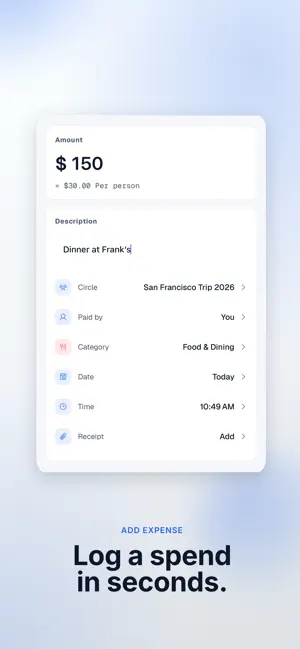
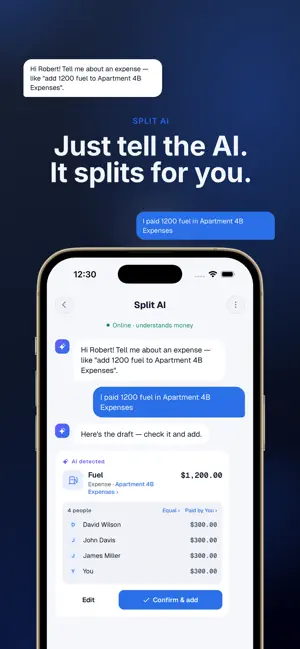
Split Circle is an AI-powered expense manager designed for shared expenses. Split bills, track spending, scan receipts, manage budgets, and settle balances with friends, roommates, couples, families, and travel groups. Powered by AI, Split Circle helps reduce manual work and keeps shared expenses organized in one place. WHY CHOOSE SPLIT CIRCLE? • AI Expense Assistant — Add expenses, ask questions, and manage spending using natural language. • AI Receipt Scanner — Scan receipts and automatically extract amounts, merchants, and dates. • Flexible Bill Splitting — Split expenses equally, by amount, percentage, shares, or individual items. • Simplified Settlements — Reduce the number of payments required to settle group balances. • Budget Management — Create budgets and monitor spending in real time. • Offline Support — Add expenses without an internet connection and sync later. • Multi-Currency Support — Track expenses across different currencies for travel and international groups. • Privacy & Security — Protect your data with Face ID, Touch ID, PIN protection, and biometric authentication. SHARED EXPENSE TRACKING Track expenses across all your circles and keep balances organized in one place. FLEXIBLE BILL SPLITTING • Equal • Exact Amount • Percentage • Shares • Items Support multiple payers and backdated expenses. OFFLINE SUPPORT Add expenses while traveling or when you don't have internet access. Your data syncs automatically when you're back online. SIMPLIFIED SETTLEMENTS Split Circle calculates settlement paths that can reduce the number of transactions between group members. RECEIPT SCANNING Attach photos to expenses. Pro includes OCR receipt scanning that can extract receipt details such as amount, merchant, and date. BUDGET TEMPLATES • Household • Travel • Wedding • Event • Business Trip • Monthly Groceries • Vacation • Birthday Party • Student • Fitness 60+ CURRENCIES Track expenses across different countries and regions. DATA IMPORT Import groups using CSV, including expenses, balances, and members. APP SECURITY • PIN Lock • Face ID • Touch ID • Fingerprint Authentication • Auto-Lock Options PERFECT FOR • Roommates • Friends • Couples • Families • Students • Travel Groups SPLIT CIRCLE PRO • AI Expense Assistant • OCR Receipt Scanning • Itemized Bill Splitting • Recurring Expenses • Personal Budgets • Group Budgets • Budget Approval Inbox • Advanced Analytics SUBSCRIPTION OPTIONS Split Circle is free to use with optional paid plans: • Split Circle Pro Monthly • Split Circle Pro Annual • Split Circle Pro Lifetime • Payment will be charged to your Apple Account at confirmation of purchase. • Subscriptions automatically renew unless auto-renewal is turned off at least 24 hours before the end of the current subscription period. • Your account will be charged for renewal within 24 hours before the end of the current subscription period. • Subscriptions may be managed and auto-renewal turned off in Apple Account Settings after purchase. • Split Circle can continue to be used without a subscription. Apple Standard EULA: https://www.apple.com/legal/internet-services/itunes/dev/stdeula/ Terms of Use: https://split-circle.com/en/terms Privacy Policy: https://split-circle.com/en/privacy
What’s new
Version 1.0.28 · Updated October 22, 2026
Several bug fixes and user interface enhancements have been implemented to optimise the Split Circle experience.
App privacy
The developer, SEVENTYTHREE LINES DEVELOPMENT PRIVATE LIMITED, reported these privacy practices to Apple.
Data Linked to You
The following data, which may be collected and linked to your identity, may be used for the following purposes:
- Usage Data: Product Interaction
- Diagnostics: Crash Data, Performance Data
- Purchases: Purchase History
- Financial Info: Other Financial Info
- Contact Info: Email Address, Name, Phone Number, Other User Contact Info
- Contacts: Contacts
- User Content: Photos or Videos, Other User Content
- Identifiers: User ID, Device ID
Used for: Analytics, App Functionality
Alternatives to SplitCircle AI Expense Tracker
Looking for apps like SplitCircle AI Expense Tracker? Here are 6 similar apps on the App Store. The highest rated is Spending Smarter (5.0/5), and all 6 are free to download.
-
 Splitwell: Split Expenses
-
 Kaudal
-
 PiePlot: Split Bills & Rent
-
 Spending Smarter
5.0
-
 CoinArena
5.0
-
 Saldoo - Shared Expenses
| App | Rating | Price | Last updated | Compare |
|---|---|---|---|---|
| SplitCircle AI Expense Tracker | – | Free | October 22, 2026 | |
| Splitwell: Split Expenses | – | Free | Oct 21, 2026 | Compare |
| Kaudal | – | Free | Oct 21, 2026 | Compare |
| PiePlot: Split Bills & Rent | – | Free | Oct 20, 2026 | Compare |
| Spending Smarter | 5.0 / 5 (1) | Free | Dec 3, 2025 | Compare |
| CoinArena | 5.0 / 5 (9) | Free | Sep 16, 2026 | Compare |
| Saldoo - Shared Expenses | – | Free | Apr 13, 2026 | Compare |