

Pastie Smart Clipboard
Cocoro Properties LLC Productivity iPhoneiPadiPod touch
Pastie Smart Clipboard is a free Productivity app for iPhone and iPad by Cocoro Properties LLC. Requires iOS 26.0. Updated October 14, 2026.
- Price
- Free
- on the App Store
- Size
- 8 MB
- Age 4+
- Updated
- Oct 14
- 2026 · v1.8.4 (220)
Screenshots



About Pastie Smart Clipboard
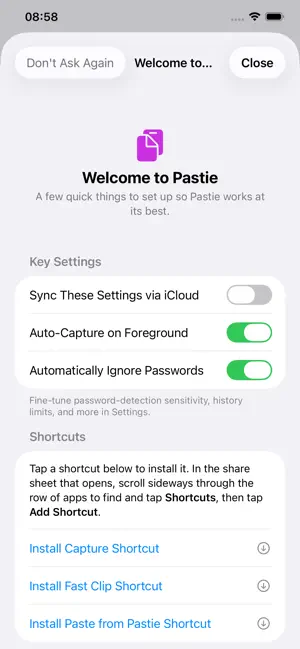
Pastie keeps a running history of everything you copy — text, images, and rich formatting — and syncs it silently across all your iPhones, iPads, and Macs via iCloud. THREE TABS, THREE JOBS • Clips — your automatic running history • Pinned — important items kept permanently, safe from automatic clean-up • Fast — the snippets you reach for constantly, each with a one-letter shortcut for instant paste via Siri or Shortcuts CAPTURE, YOUR WAY Pastie saves your clipboard automatically each time you open the app. Add the Capture Shortcut to your Control Center, a Back Tap gesture, or any Automation to save without opening the app at all. The Share Sheet lets you send text or images from any app straight to Pastie. Already running Pastie Max on a Mac? It picks up anything you copy on iPhone or iPad automatically via Universal Clipboard — no need to even open Pastie on iOS. EASY SETUP A guided Welcome screen walks new users through the handful of settings that matter most — iCloud sync, auto-capture, password protection, and installing the Shortcuts — and stays one tap away afterward if you ever want to revisit it. RICH TEXT, PRESERVED Copy formatted content from Mail, Pages, or any other app and Pastie keeps the formatting alongside the plain text. Paste it back anywhere that supports rich text and the styling comes with it. STAY ORGANIZED Label any clip with a searchable name. Search filters across all three tabs at once. Multi-select handles bulk moves, pins, and deletions in one step. WIDGET & CONTROL CENTER A Home Screen and Lock Screen widget keeps your most recent clips one glance away. A Control Center button captures instantly, and a "Paste from Pastie" Shortcut pastes your top clips without switching apps. SYNC AND BACKUP Everything syncs via iCloud — silently, in the background. Export a .pastie file at any time as a backup; importing merges without ever overwriting existing clips. PRIVACY BY DEFAULT Pastie has a configurable setting that automatically skips content that looks like a password, with adjustable detection sensitivity. Nothing leaves your devices except through iCloud sync under your own account.
What’s new
Version 1.8.4 (220) · Updated October 14, 2026
Settings sync across devices. Each device can now choose whether to sync its settings through iCloud. Clearer Size Limits. Rich-text and file limits now sit together in one Size Limits section. It states that the limits apply per item, with no total storage limit.
App privacy
The developer, Cocoro Properties LLC, reported these privacy practices to Apple.
Data Not Collected
The developer does not collect any data from this app.
Alternatives to Pastie Smart Clipboard
Looking for apps like Pastie Smart Clipboard? Here are 6 similar apps on the App Store. The highest rated is HeyDo: Remind Family & Friends (5.0/5), and all 6 are free to download.
-
 Arkive - Clipboard Manager
-
 HeyDo: Remind Family & Friends
5.0
HeyDo: Remind Family & Friends
5.0
-
 Parakeet: Clipboard & Files
-
 Yank Clipboard Manager
-
 Pip: Clipboard History
-
 eCopy: Clipboard Manager
| App | Rating | Price | Last updated | Compare |
|---|---|---|---|---|
| Pastie Smart Clipboard | – | Free | October 14, 2026 | |
| Arkive - Clipboard Manager | – | Free | Oct 21, 2026 | Compare |
| HeyDo: Remind Family & Friends | 5.0 / 5 (2) | Free | Sep 29, 2026 | Compare |
| Parakeet: Clipboard & Files | – | Free | Sep 16, 2026 | Compare |
| Yank Clipboard Manager | – | Free | Aug 26, 2026 | Compare |
| Pip: Clipboard History | – | Free | Oct 12, 2026 | Compare |
| eCopy: Clipboard Manager | – | Free | Jul 9, 2026 | Compare |