

SnapMind - Screenshot AI
君鹏 林 Productivity iPhoneiPadiPod touch
SnapMind - Screenshot AI is a free Productivity app for iPhone and iPad by 君鹏 林. Requires iOS 15.1. Updated June 10, 2026.
- Price
- Free
- on the App Store
- Size
- 32 MB
- Age 4+
- Updated
- Jun 10
- 2026 · v1.0
Screenshots


About SnapMind - Screenshot AI
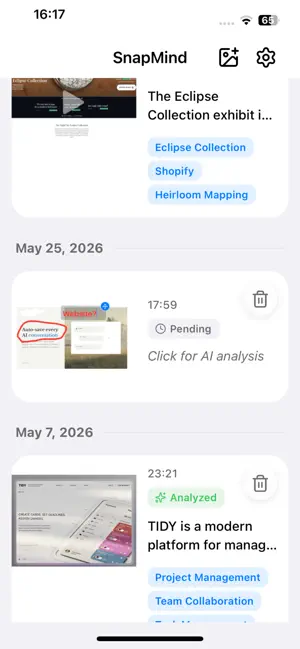
Your Screenshots, Instantly Organized with AI SnapMind captures your screenshots, lets you annotate key points, and uses AI to extract text, summarize content, and categorize everything — automatically. [ CORE FEATURES ] * AI-Powered Analysis Automatically extracts text, generates concise summaries, and assigns smart category tags to every screenshot. Say goodbye to disorganized screenshots forever. * Smart Annotation Mark key areas with drawing tools, cropping, and text overlays before AI analysis. Highlight what matters most. * Cross-Device Sync Seamlessly sync screenshots and analysis between your phone and desktop via local WiFi. Your data, everywhere you go. * Privacy First All data stays on your device. Images are processed through your own AI API — never uploaded to our servers. Your privacy is our priority. * Multi-Language Support Full interface support for English, Chinese, and Japanese with automatic system language detection. * Auto Capture Detects new screenshots instantly and prompts you to annotate and organize on the spot. * Import to Obsidian Export screenshots, annotations, and AI analysis to beautiful Markdown notes, directly appending to your Obsidian vault. [ SMART CATEGORIZATION ] Auto-tagged categories include: - Shopping & Recipes - Code & Development - Work & Study - Travel & Maps - Social Media - And more... [ WHY CHOOSE SNAPSHOTMIND? ] - - 100% Privacy-Focused - Works Offline with Your AI API - Lifetime License Available - Cross-Device Sync (iOS and Desktop Companion) - Beautiful, Intuitive Interface - Fast AI Processing [ AVAILABLE ON MULTIPLE PLATFORMS ] Seamless sync between your mobile device and desktop companion (Mac & PC). Your screenshots follow you everywhere. Start organizing your digital life today. Download SnapMind and never lose important information in your screenshots again. Support: https://snapmind.sugrma.com/ios-support Privacy Policy: https://snapmind.sugrma.com/privacy
App privacy
The developer, 君鹏 林, reported these privacy practices to Apple.
Data Not Collected
The developer does not collect any data from this app.