

NetAnalyzer: Network Tools
vamosnet Utilities iPhoneiPadiPod touch
NetAnalyzer: Network Tools is a free Utilities app for iPhone and iPad by vamosnet. Requires iOS 16.0. Updated October 3, 2026.
- Price
- Free
- on the App Store
- Size
- 9 MB
- Age 4+
- Updated
- Oct 3
- 2026 · v2.5.0
Screenshots


About NetAnalyzer: Network Tools
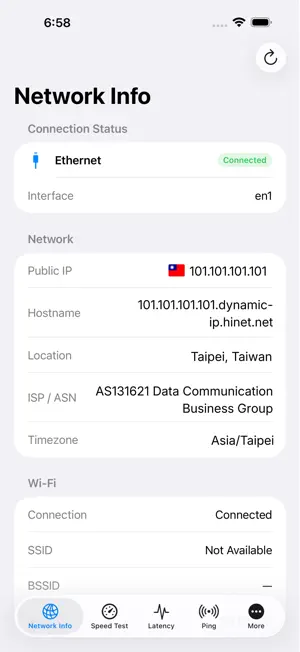
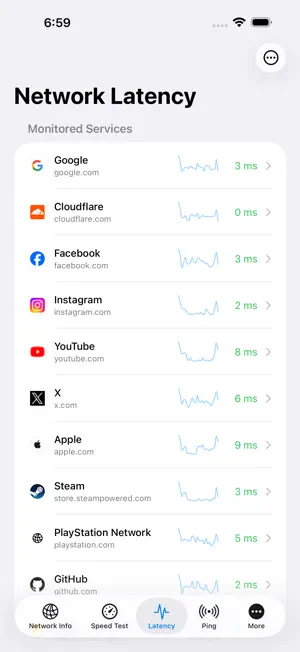
NetAnalyzer is a native network diagnostics app for iPhone and iPad. Diagnose slow or unstable connections, DNS issues, and local-network problems with clear summaries and technical details when you need them. NETWORK TOOLS • Network Info: View connection type, local and public IP addresses, DNS, gateway, and current Wi‑Fi connection information. • Connection Diagnostics: Check a target step by step through local connectivity, DNS, TCP, TLS, and HTTPS response. • Speed Test: Measure download, upload, idle and loaded latency, jitter, and packet loss with summary history. • Ping & Latency Monitoring: Track latency, packet loss, quality, and trends. • DNS Lookup: Query A, AAAA, CNAME, MX, TXT, NS, PTR, and SOA records using system DNS, UDP, DoT, or DoH resolvers. • TCP Port Scan: Test a single port or a common TCP port list. • Whois: Look up domain registration information. • Geo IP: Look up your current public IP or a submitted public IP address for network and approximate location details. • LAN Scan: Discover reachable IPv4 devices on your current local network, with Bonjour/mDNS service discovery. • IPv4 Subnet Calculator: Calculate CIDR, masks, broadcast addresses, and host ranges. PRO FEATURES • Traceroute: Display IPv4 routes and latency hop by hop. • Advanced TCP Port Scan: Scan custom and complete port ranges. • DNS Propagation: Compare DNS responses from 18 public resolvers queried directly from your device. • SSL/TLS Inspector: View certificate chains, system trust, SAN matching, protocol, cipher, and expiry status. • HTTPS Request Tester: Send requests and inspect headers, redirects, and response content. • Wi‑Fi Analysis: View current Wi‑Fi settings, gateway latency, and interface traffic. • Bluetooth Signal Analysis: Passively scan nearby BLE advertisements without connecting or pairing. • IP DNSBL Check: Query 20 built-in blocklists for IPv4 addresses. • No ads with Pro. Terms of Use: https://www.apple.com/legal/internet-services/itunes/dev/stdeula/
What’s new
Version 2.5.0 · Updated October 3, 2026
Add a Wi-Fi QR code generator and a feedback feature. Fixed some known issues.
App privacy
The developer, vamosnet, reported these privacy practices to Apple.
Data Not Collected
The developer does not collect any data from this app.
Alternatives to NetAnalyzer: Network Tools
Looking for apps like NetAnalyzer: Network Tools? Here are 6 similar apps on the App Store. The highest rated is Net-Analyzer: Network Scanner (5.0/5), and all 6 are free to download.
-
 Net-Analyzer: Network Scanner
5.0
Net-Analyzer: Network Scanner
5.0
-
 NoirShield: Encrypted DNS
-
 NetPulse: WiFi & Network Tools
-
 DiagNet: Pro Ping & LAN Scan
-
 WiFi Analyzer・Speed Test
-
 hado99
| App | Rating | Price | Last updated | Compare |
|---|---|---|---|---|
| NetAnalyzer: Network Tools | – | Free | October 3, 2026 | |
| Net-Analyzer: Network Scanner | 5.0 / 5 (1) | Free | Oct 6, 2026 | Compare |
| NoirShield: Encrypted DNS | – | Free | Sep 11, 2026 | Compare |
| NetPulse: WiFi & Network Tools | – | Free | Aug 7, 2026 | Compare |
| DiagNet: Pro Ping & LAN Scan | – | Free | Oct 10, 2026 | Compare |
| WiFi Analyzer・Speed Test | – | Free | Aug 20, 2026 | Compare |
| hado99 | – | Free | Aug 21, 2026 | Compare |