

SongNote: Lyrics & Chords
Yuichi Okazaki Music iPhoneiPadiPod touchMac
SongNote: Lyrics & Chords is a free Music app for iPhone and iPad by Yuichi Okazaki. Requires iOS 15.0. Updated October 24, 2026.
- Price
- Free
- on the App Store
- Size
- 32 MB
- Age 4+
- Updated
- Oct 24
- 2026 · v2.2.0
Screenshots


About SongNote: Lyrics & Chords
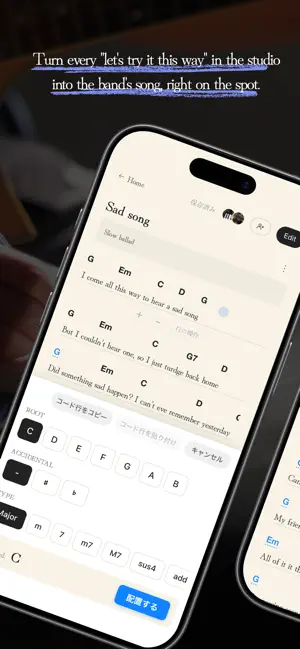
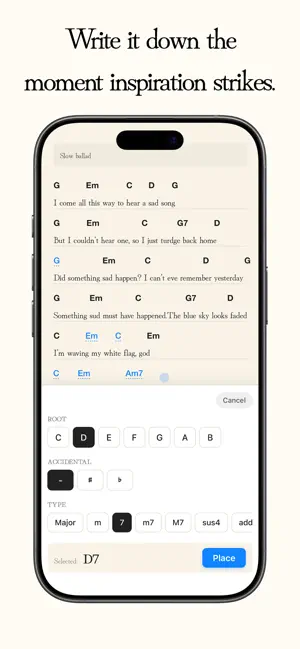
SongNote is the world's simplest songwriting notebook, focused on one thing: writing lyrics and placing chords—without sheet music, MIDI keyboards, samplers, or complicated production tools. It recreates the feel of writing by hand in a paper notebook, so you can jot down words and chords the moment they come to you. Share a song with your bandmates, and when anyone changes a lyric or a chord, it shows up on everyone's screen right away. The "let's try it this way" moments in the studio can become part of the song, together. WRITE TOGETHER WITH YOUR BAND (REAL-TIME SHARING) • Invite bandmates to a song by username or QR code • People you've shared with appear in your Friends list—next time, just tap their icons to invite them all at once • Changes to lyrics and chords reach everyone's screen in seconds • See who has the song open and which line they're writing • While you're playing, SongNote just lets you know there's an update—no interruptions • Keep writing even with a weak signal in the studio; changes sync when you're back online • Stop receiving shares from anyone you don't want to hear from WHAT YOU CAN DO WITH SONGNOTE • Write and edit lyrics freely • Place chords above your lyrics • Move or delete chords • Keep chords connected to lyrics as you edit • Organize your song into sections (Verse, Chorus, Solo, and more) • Copy and paste lines, whole sections, or a row of chords • Paste lyrics from a text file or notes app, and each line lands on its own line • Organize song titles, BPM, and notes • Reorder your songs with a long press • Adjust text size • Use Performance Mode for a clean, readable view, with 10-step auto-scroll that starts from your BPM • Switch between Japanese and English • Undo and redo • Drag lines to reorder them, or select several lines to delete them together • Type any chord (like slash chords) and keep it in My chords • Set the song's key and transpose all chords at once • Comments: leave notes on any line, reply, and mention bandmates • View-only links and invite links to show a song to anyone, or bring bandmates in fast • Notifications for invites, mentions, and updates from your band • Profiles with your part, an about-me, links, and songs "From my notebook" ON IPHONE, IPAD, AND MAC Sign in with the same account and open the same songs on iPhone, iPad, or Mac. Write lyrics on your Mac at home, then read them on your iPhone in the studio. On Mac, you can enter chords from the keyboard. * The Mac version requires a Mac with Apple silicon (M1 or later) and macOS 13 or later. PERFECT FOR • Bands writing new songs together • Anyone who wants the whole band on the same page after a rehearsal • Songwriters who want to keep lyrics and chords together • Guitarists and singer-songwriters creating chord sheets • Anyone who wants a simple songwriting app instead of a complex studio Sign in with Apple or Google is required. SongNote was created to support music made by people—the time spent searching for words, finding chords, and turning an idea into a song. A quiet, simple notebook by your side, and your band's, whenever you write music.
What’s new
Version 2.2.0 · Updated October 24, 2026
SongNote 2.2.0 is a big update that makes writing songs with your band more fun. WHAT'S NEW • Comments: leave notes on any lyric line, reply, and @mention bandmates • Notifications for invites, mentions, and your band's updates and comments (at most once a day per song) • Profiles: your part, an about-me, links, and songs "From my notebook". Tap a member's icon to see theirs • View-only links: show a song to anyone in a browser, no app needed • Invite links: send a link and bandmates join right away • Set the song's key and transpose all chords at once • Share up to 7 songs at a time for free • Smaller improvements
App privacy
The developer, Yuichi Okazaki, reported these privacy practices to Apple.
Data Linked to You
The following data, which may be collected and linked to your identity, may be used for the following purposes:
- Usage Data: Product Interaction
- Contact Info: Email Address, Name
- Contacts: Contacts
- User Content: Photos or Videos, Customer Support, Other User Content
- Identifiers: User ID
Used for: Analytics, App Functionality
Alternatives to SongNote: Lyrics & Chords
Looking for apps like SongNote: Lyrics & Chords? Here are 6 similar apps on the App Store. The highest rated is ptune (5.0/5), and all 6 are free to download.
-
 LyricsNote
-
 LeadSheets: Chords & Setlists
-
 PearTune: Self-Hosted Music
-
 ptune
5.0
ptune
5.0
-
 Scouter Synth
5.0
Scouter Synth
5.0
-
 Loop Breaker - Glow Machine
5.0
Loop Breaker - Glow Machine
5.0
| App | Rating | Price | Last updated | Compare |
|---|---|---|---|---|
| SongNote: Lyrics & Chords | – | Free | October 24, 2026 | |
| LyricsNote | – | Free | Apr 30, 2026 | Compare |
| LeadSheets: Chords & Setlists | – | Free | Oct 24, 2026 | Compare |
| PearTune: Self-Hosted Music | – | Free | Oct 2, 2026 | Compare |
| ptune | 5.0 / 5 (1) | Free | May 6, 2026 | Compare |
| Scouter Synth | 5.0 / 5 (1) | Free | Oct 20, 2026 | Compare |
| Loop Breaker - Glow Machine | 5.0 / 5 (2) | Free | Sep 16, 2026 | Compare |