

Simpic: Photo Cleaner
晨阳 成 Photo & Video iPhoneiPadiPod touch
Simpic: Photo Cleaner is a paid Photo & Video app for iPhone and iPad by 晨阳 成. Rated 5.0/5 from 1 ratings. Requires iOS 14.0. Updated October 18, 2026.
- Rating
- 5.0
- 1 ratings
- Price
- 0.99 USD
- on the App Store
- Size
- 26 MB
- Age 4+
- Updated
- Oct 18
- 2026 · v0.1.4
Screenshots



About Simpic: Photo Cleaner
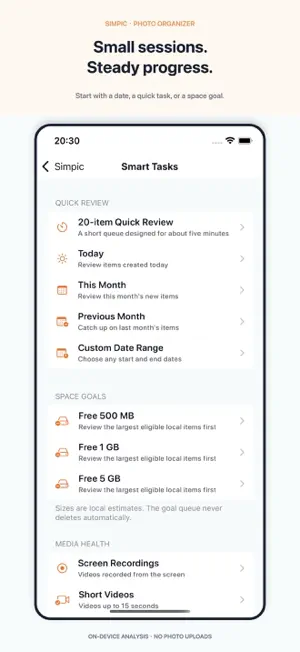
Simpic makes it easier to sort photos, review clutter, and organize your photo library on your device. No account is required, and Simpic does not upload your photos or organizing history. SWIPE TO ORGANIZE • Swipe diagonally to keep an item or place it in Pending Deletion; swipe left or right to browse. • Undo your last action, preview photos, play videos and Live Photos, and add items to albums. • Browse unorganized photos, screenshots, videos, large videos, or a random item. REVIEW BEFORE DELETING • Review suspected duplicates and similar photos, with local image-quality recommendations to help choose what to keep. • Find potentially blurry photos and burst sequences. • Filter Pending Deletion by photos, videos, screenshots, or favorites; sort by date, size, or queue order. • Restore items or confirm deletion through the system photo library. Deleted items are managed by iOS Recently Deleted. SMART TASKS • Organize today, this month, last month, or a custom date range, or start a short review session. • Build a review queue for a space-saving goal, with estimated file sizes. • Review screen recordings, short videos, animated images, Live Photos, large photos, RAW photos, slow-motion videos, and time-lapse videos. • Smart tasks skip favorites, edited or hidden items, previously handled items, and protected albums by default. OFFLINE TOOLS • Screenshot Search: recognize text and QR codes locally, then search or filter possible codes, expired content, and privacy clues. • Library Health & Privacy: review location metadata, potentially sensitive screenshots, edited originals, empty albums, and albums with matching names. • Media Optimization: create an optimized video copy or save a Live Photo as a still image while keeping the original. • Verified Archive: export locally available resources from Pending Deletion to Files or external storage, with a resumable manifest and SHA-256 verification. ALBUMS AND PROGRESS • Create albums, add or remove items, choose shortcut albums, ignore albums, and resume organizing them later. • Use the kept-items album to help preserve recognition of kept items after reinstalling. • Revisit kept items, filter favorites or the last 30 days, track organizing progress and cleanup statistics, and set a daily goal. • Customize home-menu visibility and order, swipe distance, haptics, animations, light/dark appearance, and app icon appearance. Available in English, Simplified Chinese, Traditional Chinese, Japanese, Korean, French, German, and Spanish. Analysis runs on your device. Offline tools do not silently download iCloud-only originals; optional iCloud original downloads are controlled in Settings. Search labels and quality recommendations are suggestions for your review. Space figures are estimates, and no tool automatically deletes originals.
What’s new
Version 0.1.4 · Updated October 18, 2026
This update adds a complete set of on-device photo-library tools: • Smart Tasks: start a review by date, a short session, a space-saving goal, or media type, including screen recordings, RAW photos, and Live Photos. • Screenshot Search: search locally recognized text and QR codes, with filters for possible codes, expired content, and privacy clues. • Library Health & Privacy: review location metadata, potentially sensitive screenshots, edited originals, empty albums, and matching album names. • Media Optimization: create optimized video copies and still-image copies of Live Photos without automatically deleting originals. • Verified Archive: export locally available Pending Deletion resources to Files or external storage, with SHA-256 checks and resumable archiving. • Improved duplicate review: additional visual matching checks, scan progress, full-screen previews, and image-quality reasons for keep recommendations. • Pending Deletion filters and sorting: review by media type or favorites, sort by date or size, and restore or delete only the current selection or filtered results. • Daily organizing goals, cleanup-space statistics, and a customizable home menu. • More reliable keep, undo, album, and restore operations, with clearer failure messages and improved iCloud availability handling.
App privacy
The developer, 晨阳 成, reported these privacy practices to Apple.
Data Not Collected
The developer does not collect any data from this app.
Alternatives to Simpic: Photo Cleaner
Looking for apps like Simpic: Photo Cleaner? Here are 6 similar apps on the App Store. The highest rated is F54 - Manual Cinema Camera (5.0/5), and 2 of the 6 are free to download.
-
 Aftera
-
 F54 - Manual Cinema Camera
5.0
-
 FrameTwin: Dual Format Camera
5.0
-
 Lessr: Compress or Convert
4.3
-
 MarkFrame
5.0
-
 DualCam AI
| App | Rating | Price | Last updated | Compare |
|---|---|---|---|---|
| Simpic: Photo Cleaner | 5.0 / 5 (1 rating) | 0.99 USD | October 18, 2026 | |
| Aftera | – | 0.99 USD | Apr 2, 2026 | Compare |
| F54 - Manual Cinema Camera | 5.0 / 5 (1) | 1.99 USD | Jul 6, 2026 | Compare |
| FrameTwin: Dual Format Camera | 5.0 / 5 (2) | Free | Sep 10, 2026 | Compare |
| Lessr: Compress or Convert | 4.3 / 5 (6) | Free | Nov 5, 2026 | Compare |
| MarkFrame | 5.0 / 5 (2) | 2.99 USD | Oct 14, 2026 | Compare |
| DualCam AI | – | 5.99 USD | Jul 9, 2026 | Compare |