

noesa: AI Chat & Planner
Karen Manukyan Productivity iPhoneiPadiPod touch
noesa: AI Chat & Planner is a free Productivity app for iPhone and iPad by Karen Manukyan. Rated 5.0/5 from 1 ratings. Requires iOS 15.1.
- Rating
- 5.0
- 1 ratings
- Price
- Free
- on the App Store
- Size
- 43 MB
- Age 4+
- Updated
- Oct 27
- 2026 · v1.0.12
Screenshots


About noesa: AI Chat & Planner
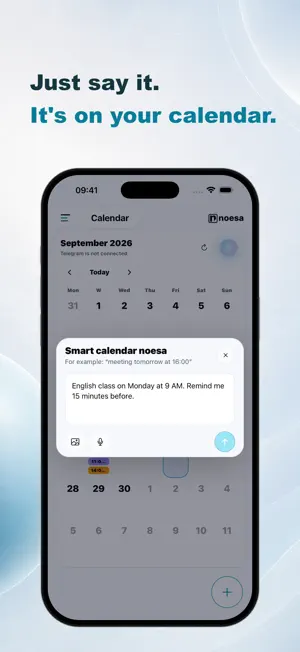
noesa is an AI assistant for work, study and everyday tasks. Edit photos, explore documents, run calculations and create files in one chat. Then turn ideas into action with a calendar, journal and habit tracker. GPT MODELS FOR YOUR TASKS Develop ideas, draft content, explore complex questions and work with code. noesa offers GPT-6 Luna, GPT-6.1 Sol and GPT-6 Astra. Choose a response mode for anything from everyday questions to in-depth analysis, or let noesa pick a model to match your request. Model and mode availability depends on your plan. PHOTOS AND IMAGES Attach a photo and describe an edit: replace the background, remove an unwanted object or try a different style. Create images from a description and refine them in the conversation. Ask AI to explain a photo or help you understand text in an image. DOCUMENTS, SPREADSHEETS AND FILES Upload supported PDFs, documents and spreadsheets. Ask questions about their contents, summarize key points, compare data and prepare materials for work or study. Ask the assistant to create a file you can open and download. PYTHON CALCULATIONS AND WEB SEARCH Delegate calculations, spreadsheet processing and charts to AI, with Python running in an isolated environment. Explore current topics using web search with source links. Follow the activity and tools directly in your chat. FROM A SCHEDULE TO YOUR CALENDAR Upload a file containing your schedule and ask the assistant to extract classes or meetings and add them to your noesa calendar. Check the recognized dates and times instead of entering every event by hand. You can also create events and tasks in everyday language, add notes and set reminders. JOURNAL, NOTES AND HABITS Capture your thoughts, reflect on your day, record your mood and add photos. Track habits and follow your progress. Choose personal entries and other context to help the assistant understand your request. ONE ACCOUNT ON IPHONE AND THE WEB Use noesa in the app and your browser. Explore the assistant's capabilities at https://noesa.ai/en Core features are free with AI usage limits. Mini provides a larger allowance. Document uploads, file creation, Python, web search and model selection are available on applicable paid plans. Features, limits, prices and currency are shown in the app. App Store subscriptions are monthly and renew automatically unless canceled at least 24 hours before the end of the current period. Payment is charged to your Apple Account. Manage or cancel your subscription in your Apple Account settings. AI processing is provided by OpenAI OpCo, LLC with your separate permission. AI can make mistakes: check important information and results. Terms of Use (EULA): https://www.apple.com/legal/internet-services/itunes/dev/stdeula/
What’s new
Version 1.0.12 · Updated October 27, 2026
Get more from Mini: Advanced mode powered by GPT-6.1 Terra is now available for working with text, files and ideas. We have improved attachment handling. Pick up where you left off: noesa remembers your last open section or chat. Journaling is easier, and navigation feels smoother. We have improved loading visuals and the way conversations are displayed when you return to a chat.
App privacy
The developer, Karen Manukyan, reported these privacy practices to Apple.
Data Used to Track You
The following data may be used to track you across apps and websites owned by other companies:
- Purchases: Purchase History
- Identifiers: User ID, Device ID
- Usage Data: Product Interaction
Data Linked to You
The following data, which may be collected and linked to your identity, may be used for the following purposes:
- Purchases: Purchase History
- Contact Info: Email Address, Name
- Identifiers: User ID, Device ID
- Usage Data: Product Interaction, Other Usage Data
- Location: Coarse Location
- Search History: Search History
- Diagnostics: Crash Data, Performance Data, Other Diagnostic Data
- Other Data: Other Data Types
- User Content: Emails or Text Messages, Photos or Videos, Audio Data, Other User Content
Used for: Developer’s Advertising or Marketing, Analytics, Product Personalization, App Functionality
Alternatives to noesa: AI Chat & Planner
Looking for apps like noesa: AI Chat & Planner? Here are 6 similar apps on the App Store. The highest rated is GPTunneL: AI Assistant (5.0/5), and all 6 are free to download.


| App | Rating | Price | Last updated | Compare |
|---|---|---|---|---|
| noesa: AI Chat & Planner | 5.0 / 5 (1 rating) | Free | October 27, 2026 | |
| Zofen | – | Free | Jul 24, 2026 | Compare |
| Chatik.PRO | – | Free | Aug 7, 2026 | Compare |
| GPTunneL: AI Assistant | 5.0 / 5 (1) | Free | Oct 26, 2026 | Compare |
| OfflineGPT: Offline AI Agent | – | Free | Jun 16, 2026 | Compare |
| memory-calendar | – | Free | Oct 25, 2026 | Compare |
| MeetBoard | – | Free | Jul 11, 2026 | Compare |