

Lexorate
ozpr s.r.o. Education iPhoneiPadiPod touch
Lexorate is a free Education app for iPhone and iPad by ozpr s.r.o. Requires iOS 17.0. Updated August 31, 2026.
- Price
- Free
- on the App Store
- Size
- 21 MB
- Age 4+
- Updated
- Aug 31
- 2026 · v1.0
Screenshots
About Lexorate
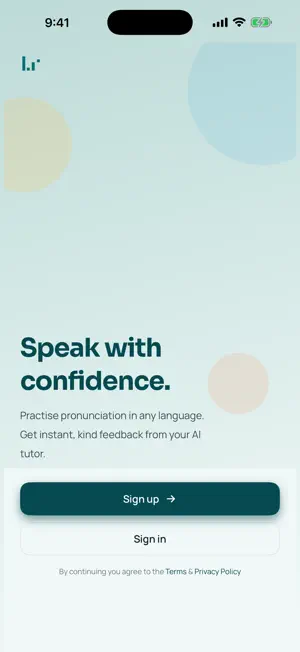
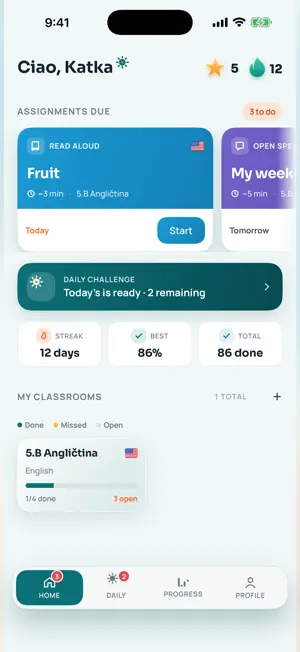
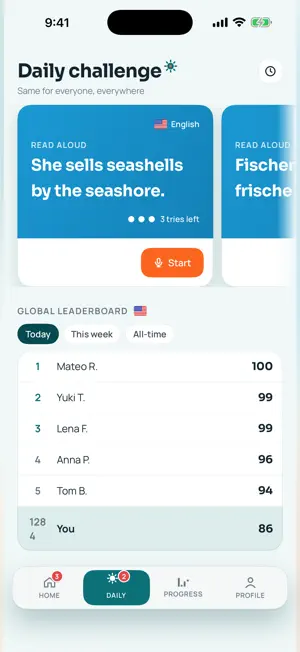
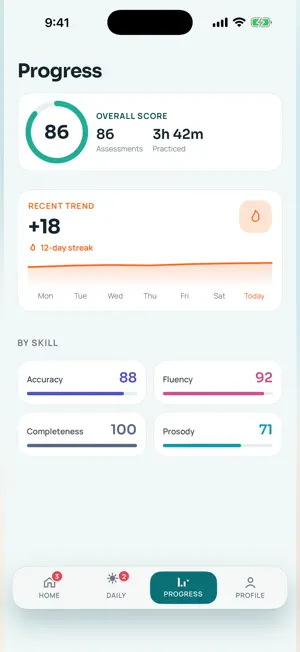
Lexorate helps students speak a new language with confidence. Read a passage, answer a question, or describe a picture out loud — and get instant, word-by-word feedback on how you sound. Powered by on-device speech assessment, Lexorate scores every attempt for accuracy, fluency, completeness, and prosody, then highlights exactly which words and sounds to work on. Listen back to your own recording, try again, and watch your score climb. WHY STUDENTS LOVE IT • Instant pronunciation feedback — every word coloured by how you said it • Three ways to practise — read aloud, answer a prompt, or describe a picture • Daily Challenge — a fresh challenge each day with global leaderboards per language • Streaks & progress — keep your run alive and track your accuracy over time • Replay your recordings — hear yourself and improve attempt after attempt FOR CLASSROOMS • Join your class with a code and get assignments from your teacher • Your best attempt is submitted automatically • Privacy-first leaderboards — appear by first name, or stay anonymous FOR EVERY LEARNER • Sign in with Apple, Google, or Microsoft • Built-in parental consent for younger students, following GDPR • Available in English and Czech LEXORATE BASIC & PLUS Start free, then upgrade for more practice and features. Lexorate offers auto-renewable subscriptions (Basic and Plus, monthly or yearly), shown in the app in your local currency. Payment is charged to your Apple Account at purchase confirmation. Your subscription renews automatically unless you turn off auto-renew at least 24 hours before the end of the current period. Manage or cancel anytime in your Apple Account settings. Terms of Use (EULA): https://lexorate.com/pages/terms
What’s new
Version 1.0 · Updated August 31, 2026
Teachers — let AI draft an exercise: type a topic, tap "Generate with AI", then edit the passage or question before saving Picture exercises can use a photo from your gallery or one from the shared picture library See exactly what students get: preview any library exercise before assigning it, and open the full exercise from an assignment Tap a student on an assignment (or an assignment on a student) to jump straight to their attempts — each opens with the original prompt, scores and transcript Edit your profile — name, home country and native languages — from the account tile Exercise instructions are shown in both the exercise language and your app language Swipe from the left edge to go back everywhere, plus fixes and polish
App privacy
The developer, ozpr s.r.o., reported these privacy practices to Apple.
Data Linked to You
The following data, which may be collected and linked to your identity, may be used for the following purposes:
- Contact Info: Email Address, Name
- User Content: Audio Data
- Identifiers: User ID
Used for: App Functionality
Alternatives to Lexorate
Looking for apps like Lexorate? Here are 6 similar apps on the App Store. The highest rated is Quizzzing: Trivia & Quiz Games (4.5/5), and all 6 are free to download.
-
 Accent Cadence
-
 Quizzzing: Trivia & Quiz Games
4.5
Quizzzing: Trivia & Quiz Games
4.5
-
 SpeechShot
-
 class.room
-
 Read Aloud Easy: Pronunciation
3.0
Read Aloud Easy: Pronunciation
3.0
-
 Quizbowl Trainer
4.1
Quizbowl Trainer
4.1
| App | Rating | Price | Last updated | Compare |
|---|---|---|---|---|
| Lexorate | – | Free | August 31, 2026 | |
| Accent Cadence | – | Free | Sep 21, 2026 | Compare |
| Quizzzing: Trivia & Quiz Games | 4.5 / 5 (6) | Free | Aug 27, 2025 | Compare |
| SpeechShot | – | Free | Jun 19, 2025 | Compare |
| class.room | – | Free | Dec 19, 2024 | Compare |
| Read Aloud Easy: Pronunciation | 3.0 / 5 (2) | Free | Sep 19, 2026 | Compare |
| Quizbowl Trainer | 4.1 / 5 (28) | Free | Feb 1, 2026 | Compare |
Compare Lexorate with the top alternatives: ratings, updates, ASO score and keyword gaps →