

Yubidenwa List 2
Office Yui Asia Limited Medical iPhoneiPadiPod touch
Yubidenwa List 2 is a free Medical app for iPhone and iPad by Office Yui Asia Limited. Requires iOS 16.0. Updated September 28, 2026.
- Price
- Free
- on the App Store
- Size
- 66 MB
- Age 4+
- Updated
- Sep 28
- 2026 · v1.1
Screenshots
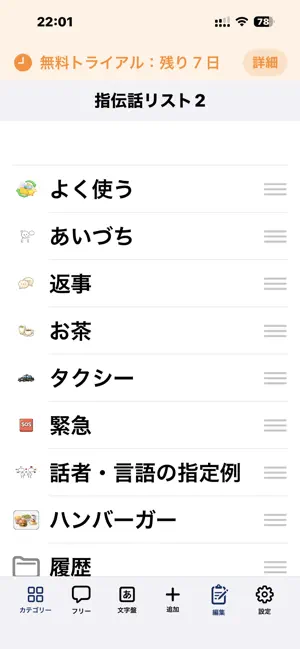

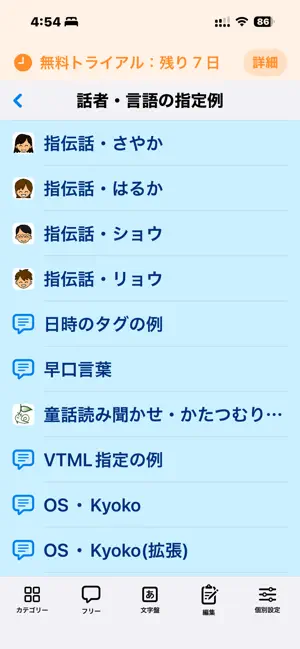
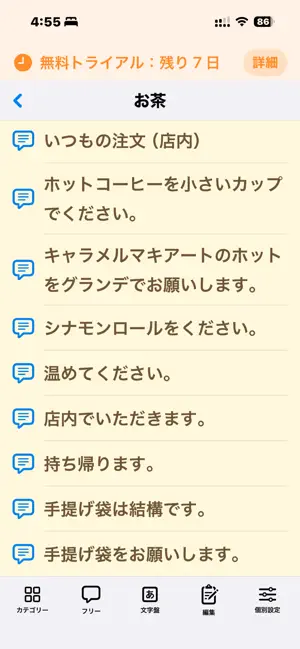
About Yubidenwa List 2
Say what you want. Just tap. Yubidenwa List 2 is a simple yet powerful communication tool that speaks pre-registered phrases aloud with a single tap. But "simple" doesn't mean limited. Perfect for countless situations Can't speak? In a noisy place? Want to communicate in another language? Need a script for customer service? Supporting someone in care? However you use it, the app adapts to you. Key Features Organized by Category Group phrases by scene — "Greetings," "Work," "Emergency" — and even set different voices, font sizes, and colors for each category. Fully Customizable Look Adjust font size, line spacing, background color, text color, and tile/list layout. Make it yours. Free Input Mode Type any phrase on the spot and speak it instantly — no pre-registration needed. Shortcut Integration After speaking, automatically trigger an iOS Shortcut. Control smart home devices, send messages, or kick off any automation. Share & Transfer Data Export categories as .ylc2 files to share with team members or move to a new device in seconds. Accessibility First "Easy Selection Display" mode enlarges buttons and adds scroll controls — designed for switch control, eye tracking, and voice control users. Try all features free for 7 days. Available as a one-time purchase or monthly subscription. Terms of Use (EULA): https://www.apple.com/legal/internet-services/itunes/dev/stdeula/
What’s new
Version 1.1 · Updated September 28, 2026
## Free Input Screen - Text you are currently entering is now preserved. Previously, closing the Free Input screen would clear the text, but now you can reopen it and continue where you left off. - If you clear the text using "Clear" or "Save", the screen will remain empty as intended. ## Shortcuts for Individual Phrases - You can now use `@label@` and `@text@` when specifying a Shortcut. `@label@` is replaced with the phrase label, and `@text@` is replaced with the phrase itself. Example: `shortcuts://run-shortcut?name=@label@&input=text&text=@text@` - You can also use `@label@` and `@text@` within a Shortcut name, for example: `Run @label@`. - Phrases and labels containing Japanese characters now work correctly. Previously, Shortcuts could sometimes fail to launch when Japanese text was included. - Symbols such as `&`, `=`, `?`, and `#` in a phrase are now passed correctly to Shortcuts. ## Character Board - Added "No Scanning" as a scanning option. This is designed for users who select characters directly using Switch Control, touch, or a mouse. When selected, the Start Scanning button is disabled. - Text you are currently entering is now preserved even after closing and reopening the Character Board. Previously, it was cleared when the board was reopened. - When "Use History" is enabled, phrases spoken from the Character Board are now added to the history. ## New Settings - You can now change the title displayed at the top of the category list. Enter your preferred title under "List: Display > Title". Leaving it blank will restore the app name. - The control buttons on the Free Input screen and the full-screen phrase editing screen can now be displayed above the text field. Enable "Place Control Buttons at Top of Screen" under "List: Input Screen". This is especially useful for users of eye tracking, a mouse, or Switch Control. - You can now add spacing to both ends of the toolbar at the bottom of the screen. Enable "Add Spacing to Both Ends of Toolbar" under "List: Display". This can make the buttons at the edges easier to select and is also useful when using Hot Corners. ## Settings Screen Improvements - The jump buttons at the top of the Settings screen now support all settings sections. They automatically wrap according to the screen width, and buttons for modes that are not currently in use are hidden. - We have made the category export process easier to understand. Instructions have been added under "List: Import / Export". Categories can be exported from each category’s settings screen. ## Display and Stability Fixes - If you purchase the app during the trial period, the "“Free Trial: ○ days remaining”" message will no longer be displayed. - Fixed an issue where changes to settings or phrases were sometimes not saved. - Removed unnecessary blank spaces that could appear on screen.
App privacy
The developer, Office Yui Asia Limited, reported these privacy practices to Apple.
Data Not Linked to You
The following data, which may be collected but is not linked to your identity, may be used for the following purposes:
- User Content: Other User Content
- Identifiers: User ID
Used for: App Functionality
Alternatives to Yubidenwa List 2
Looking for apps like Yubidenwa List 2? Here are 6 similar apps on the App Store.


| App | Rating | Price | Last updated | Compare |
|---|---|---|---|---|
| Yubidenwa List 2 | – | Free | September 28, 2026 | |
| FaceSwitch - switch access | – | 9.99 USD | Jan 22, 2026 | Compare |
| SightKey | – | Free | Apr 11, 2026 | Compare |
| Prism AAC Browser | – | Free | Jul 12, 2026 | Compare |
| リハジャーニー | – | Free | May 25, 2026 | Compare |
| Baldies | – | Free | Aug 28, 2026 | Compare |
| d-TMT | – | Free | Jan 20, 2026 | Compare |
Compare Yubidenwa List 2 with the top alternatives: ratings, updates, ASO score and keyword gaps →