

Daymark - Make every day count
宁宇 封 Productivity iPhoneiPadiPod touch
Daymark - Make every day count is a free Productivity app for iPhone and iPad by 宁宇 封. Requires iOS 17.0. Updated October 4, 2026.
- Price
- Free
- on the App Store
- Size
- 13 MB
- Age 4+
- Updated
- Oct 4
- 2026 · v27.0
Screenshots
About Daymark - Make every day count
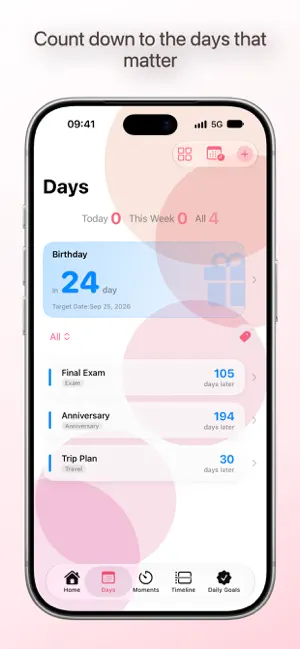
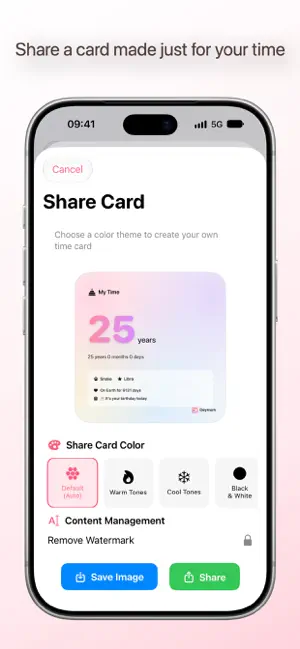
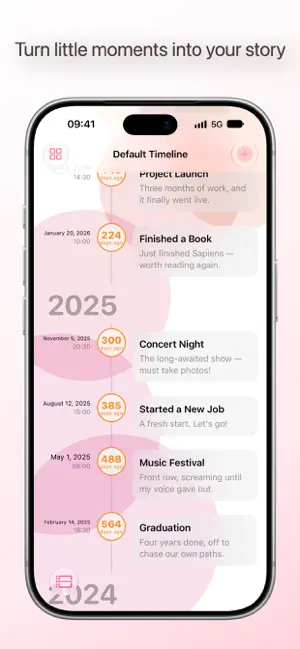
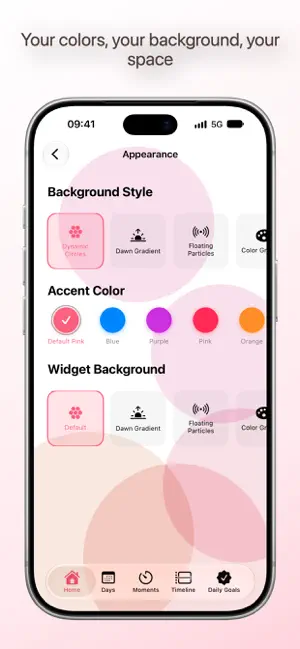
Have you ever felt this way: you want to find a quiet place to count down to important days, but as soon as you open an app, it's full of ads, red dots, and flashy news? With Daymark, there's none of that. It's clean, warm, and simply records time for you. Four core features to accompany you through every moment worth remembering. 【Days】Birthdays, exams, anniversaries, trips... Count down or count up, see it at a glance. Supports lunar calendar, cover images, and categories—turn anticipation into a number you can see. 【Moments】Reminders precise to the second. Boarding, meetings, medicine, meetups... Important moments will never be missed. 【Timeline】String scattered moments into your own story. With text and photos, scroll down the timeline like opening a personal memory book. 【Daily Goals】Check in every day to build good habits. Watch your streak grow day by day—it feels great. New Toolbox to solve your date puzzles. Date calculator, lunar converter, countdown breaker, anniversary calculator, time zone converter, age calculator... Whenever you have a date-related question, open the Toolbox and calculate on the spot. Look up and see your anticipation—desktop widgets fully upgraded. Multiple widgets cover Days, Moments, and Goals. Small size taps straight to details; medium and large sizes show lists at a glance. The "All Overview" widget gives you everything on one screen. Your app should look the way you like. Dawn gradient, floating particles, minimal grid, dynamic circles, star trails, sundial projection... Switch freely between multiple background styles. Choose dark or light mode; some backgrounds look different in each. One tap to change colors and create your own little space. Thoughtfulness hidden in every detail. Card Studio lets you adjust layout and text color to create custom share cards; custom categories, personalized reminders, quiet hours, archive lock, sound customization... Every setting is designed to make recording more comfortable. All data syncs automatically via iCloud, so it won't be lost when you change devices. One-tap share to pass on your anticipation and joy to the people who matter. Daymark, quietly counting the days with you.
What’s new
Version 27.0 · Updated October 4, 2026
27.0 is now available! This major update brings many useful and fun new features, along with significant interface and performance optimizations, hoping to make recording things feel more effortless and natural. [New Features & Experience] Age Card Sharing: Now supports sharing "My Time" cards, integrated into the Days system. If the event category is "Birthday", a birthday button will automatically appear. Card Studio Upgrade: Now supports video export! You can freely configure frame rate and duration to make card backgrounds truly "move". Watermark is now a separate setting and no longer affects card text layout. Real-Time Activities Support: Moments triggered within 10 minutes will display, and elapsed time will remain on the lock screen. You can manually end it after opening the app, with automatic linkage to archived status, making it more worry-free. Shortcuts & Siri Support: You can now add Days, Moments, Goals, and Timeline Moments directly via Siri, and also check countdowns or complete goal check-ins. Days Calendar View: Added a monthly view to see event distribution at a glance, making it easy to quickly locate the whole month's schedule. The Days tab has a new icon. Toolbox: The Toolbox is now available to all users directly. Added three highly practical tools: Time Zone Converter, Age Calculator, and Workday Calculator. Daily Goals Evolution: Added over 30 selectable icons, redesigned details page with clear check-in records and progress. Goal widgets now support interactive check-ins, so you can complete them without opening the app. Home Today Overview & Heatmap: Added a "Today Overview" card and a "Today Check-in" heatmap to see habit tracks at a glance. Home layout fully customizable; modules can be completely hidden, and remaining elements automatically center. Multilingual Support: Added Japanese, Spanish, and Brazilian Portuguese. [Interface & Interaction Optimization] UI Visuals: Every page has been restructured with a fresh look, and the accent color has been expanded extensively! Tab Bar Customization: Added "My Favorites" settings, allowing you to freely control which tabs to show or hide, and supports a toggle to automatically collapse the tab bar. Days is now the default startup page. Appearance & Settings Restructure: Appearance is integrated into the main Settings page, which now uses a list style with unified rounded corners, and sub-pages completely match the Settings style. "About" has been moved next to the Dashboard, and status supports tapping to jump. Added language switching entry, removed "Minimal Display" and its companion "More" page. Widget Customization Enhanced: Widgets support changing backgrounds within the app, and each size can be set individually. Added the iOS 27 "Extra Large Vertical" widget, further optimizing readability. Icon Detail Optimization: Light icons fine-tuned, and dark & transparent icons redesigned. Sorting & Details: Added sorting by time, and new badges in multiple scenarios. Moment details page has clearer information distribution and improved status label readability. Timeline supports keyword search, filtering by with/without image, filtering by year, and added the ability to view the number of days. [Performance & Bug Fixes] Under-the-hood Optimization: Data indexing and sync scheduling optimized, video recording significantly sped up, and background frame rate optimized. Bug Fixes: Fixed issues with notification timing, recurring notifications, text truncation, and failure to follow system settings. [Other Notes] Minimum system requirement is now iOS 17.0. If you find it useful, please leave a good review, and feel free to share your feedback anytime.
App privacy
The developer, 宁宇 封, reported these privacy practices to Apple.
Data Not Collected
The developer does not collect any data from this app.
Alternatives to Daymark - Make every day count
Looking for apps like Daymark - Make every day count? Here are 6 similar apps on the App Store. The highest rated is TickDay - Countdown Widget (5.0/5), and all 6 are free to download.
-
 TickDay - Countdown Widget
5.0
TickDay - Countdown Widget
5.0
-
 Daybird — Countdown Widget
-
 Daymark: Countdowns
-
 好记喵 - 纪念日、日程安排、闹钟提醒
-
 MKeep: Birthday Reminders
-
 When - Then & Next
| App | Rating | Price | Last updated | Compare |
|---|---|---|---|---|
| Daymark - Make every day count | – | Free | October 4, 2026 | |
| TickDay - Countdown Widget | 5.0 / 5 (2) | Free | Sep 23, 2026 | Compare |
| Daybird — Countdown Widget | – | Free | Sep 21, 2026 | Compare |
| Daymark: Countdowns | – | Free | Sep 16, 2026 | Compare |
| 好记喵 - 纪念日、日程安排、闹钟提醒 | – | Free | Oct 9, 2026 | Compare |
| MKeep: Birthday Reminders | – | Free | Sep 12, 2026 | Compare |
| When - Then & Next | – | Free | Oct 8, 2026 | Compare |