

Maccess
Maira Akram Utilities iPhoneiPadiPod touch
Maccess is a free Utilities app for iPhone and iPad by Maira Akram. Requires iOS 17.0. Updated August 15, 2026.
- Price
- Free
- on the App Store
- Size
- 106 MB
- Age 4+
- Updated
- Aug 15
- 2026 · v1.6.0
Screenshots


About Maccess
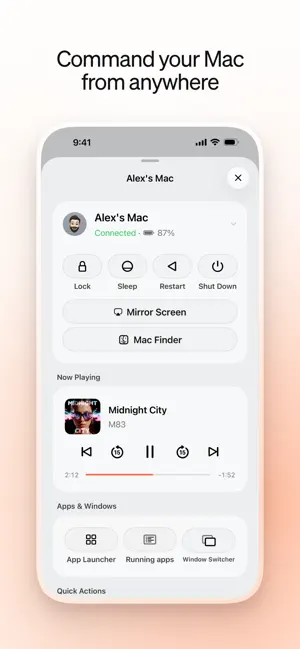
Your Mac, right there in your pocket. Pause the movie playing on your Mac without leaving the couch. Grab a file off your desktop from a coffee shop across town. Ask Mackie to open your presentation before you even sit down. Maccess turns your iPhone into a remote for everything your Mac can do — pairing takes one QR code scan, and every session is end-to-end encrypted. EVERYTHING AT YOUR FINGERTIPS • Trackpad and keyboard — smooth cursor control with multi-touch gestures, plus full text input • Live screen mirroring — watch your Mac's screen on your iPhone in real time • Works anywhere — on your home Wi-Fi, or from anywhere in the world over our cloud relay • Mackie, your AI assistant — talk or type, and Mackie sees your Mac's current state and gets it done • Spotlight search — find and launch anything on your Mac in seconds • Media and volume — play, pause, skip, and adjust volume from your phone • Send to Mac — beam photos and files from your iPhone straight to your desktop • Mac Finder — browse your Mac's files right from your phone • Screenshots — capture your Mac's screen and save it to your iPhone photo library • Apps and windows — see what's open, switch apps, and manage windows • Quick actions — screenshot, mute, keep awake, wake, sleep, and lock BUILT FOR TRUST • End-to-end encrypted with X25519 + ChaCha20-Poly1305 — your keystrokes, screen, and files are never readable by our servers, on local network or over the internet • Sign in with Apple — no passwords, no separate account • Pair in seconds by scanning a QR code REQUIRES THE FREE MACCESS HELPER Maccess works together with Maccess Helper, our free companion app for your Mac. Download it at https://maccess.io/download open it on your Mac, and scan the QR code once — local control over Wi-Fi works right away. MACCESS PRO The essentials are free on your local network. Maccess Pro unlocks remote access over the internet, the Mackie assistant, screen mirroring, Send to Mac, Spotlight search, Mac Finder, Apps & Windows, multiple Macs, advanced trackpad settings, and custom accent colors. Maccess Pro is an auto-renewable subscription: $4.99 per month or $39.99 per year, each with a 7-day free trial. Payment is charged to your Apple Account at confirmation of purchase. Your subscription renews automatically unless cancelled at least 24 hours before the end of the current period. You can manage or cancel your subscription anytime in Settings > Apple Account > Subscriptions. Privacy Policy: https://www.mymaccess.app/privacy Terms of Use: https://www.apple.com/legal/internet-services/itunes/dev/stdeula/
What’s new
Version 1.6.0 · Updated August 15, 2026
Max subscribers can now use PasteBox, a private clipboard hub for text, links, images, and files from your Mac. Mackie now shows live tool progress, keeps voice and text conversations in sync, and verifies Mac task completion, failures, cancellations, and timeouts before reporting a result. This update also adds Finder Places with Quick Look, smarter Spotlight sources, a redesigned multi-touch trackpad, proactive Helper update guidance, in-app support chat, and broad connection, accessibility, and visual refinements.
App privacy
The developer, Maira Akram, reported these privacy practices to Apple.
Data Linked to You
The following data, which may be collected and linked to your identity, may be used for the following purposes:
- Usage Data: Product Interaction
- Purchases: Purchase History
- Contact Info: Email Address, Name
- User Content: Audio Data, Other User Content
- Identifiers: User ID, Device ID
Used for: Analytics, App Functionality