

Orvia Mail: Email Client
PlatinumSky Productivity iPhoneiPadiPod touchMac
Orvia Mail: Email Client is a free Productivity app for iPhone and iPad by PlatinumSky. Rated 5.0/5 from 1 ratings. Requires iOS 17.0.
- Rating
- 5.0
- 1 ratings
- Price
- Free
- on the App Store
- Size
- 65 MB
- Age 4+
- Updated
- Nov 25
- 2026 · v1.1.10
Screenshots
Save to Pinterest
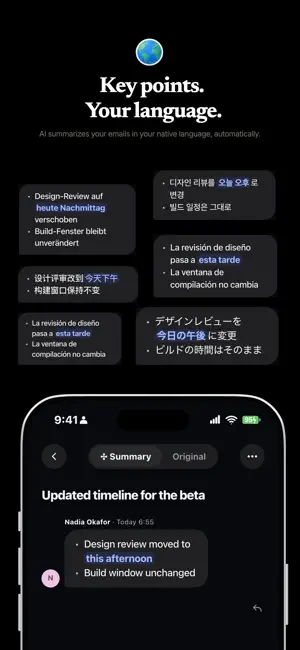
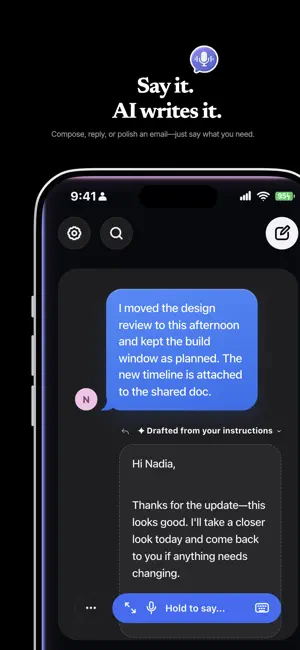

About Orvia Mail: Email Client
Orvia Mail is a calm, focused inbox for iPhone. Bring Gmail, iCloud, Outlook, Microsoft 365, Exchange, QQ Mail, Tencent Enterprise Mail, NetEase 163 and 126, and custom IMAP mailboxes into one place — then read, search, and reply without switching between webmail apps. ONE INBOX • View every account together, or focus on a single mailbox • Optional real-time alerts for new mail, so you don't have to keep the app open • Sort mail into Important, Transactions, and Other • Search, mark read or unread, star, archive, move, and delete • Compose, reply, and forward with CC, BCC, drafts, and attachments • Threaded conversations that stay readable on a phone TALK INSTEAD OF TYPE • Hold the microphone and speak — release to write it into a message or reply • Drag left to send your words as spoken, right to let AI polish them, up to have AI draft for you • Speak a time to snooze a message • Speech recognition runs on your device when supported TRANSLATE, SUMMARIZE, REPLY • Speak in your own language — replies are generated in the language of the email you're answering, with no separate translation step • Translate any message into your language, with one tap back to the original • Reply drafts adapt to the message, with a tone you pick (auto, professional, friendly, or concise) • Summaries and translations follow your app language; replies follow the incoming email • Edit everything before you send READ COMFORTABLY • Rich email keeps headings, lists, links, and tables • Remote images stay blocked until you choose to load them • Cached messages remain readable when connectivity is limited SUPPORTED ACCOUNTS Gmail, iCloud, Outlook, Microsoft 365 / Exchange Online, QQ Mail, Tencent Enterprise Mail / WeCom Mail, NetEase 163 and 126, plus custom IMAP and SMTP servers. Connect Microsoft 365 / Exchange Online with Microsoft sign-in. Exchange Server mailboxes can connect through custom IMAP/SMTP when those services are enabled by your administrator. Orvia Mail is free to use with one mailbox. Additional mailboxes and the AI features above are available through an optional auto-renewing subscription purchased in the app. The subscription price is shown before you buy, and you can manage or cancel it in your Apple Account settings. Purchases and restores use Apple In-App Purchase. Terms of Use: https://orviamail.com/terms Privacy Policy: https://orviamail.com/privacy
What’s new
Version 1.1.10 · Updated November 25, 2026
Today is redesigned: view the last 24 hours, 7 days, or all mail, with clearer sections. Needs Attention is more accurate, interactions are smoother, and deleting and composing are fixed.
App privacy
The developer, PlatinumSky, reported these privacy practices to Apple.
Data Linked to You
The following data, which may be collected and linked to your identity, may be used for the following purposes:
- Usage Data: Product Interaction
- Purchases: Purchase History
- Identifiers: User ID
Used for: Analytics, App Functionality
Data Not Linked to You
The following data, which may be collected but is not linked to your identity, may be used for the following purposes:
- Identifiers: User ID, Device ID
- Contact Info: Email Address
- User Content: Emails or Text Messages
- Diagnostics: Crash Data, Other Diagnostic Data
Used for: Analytics, App Functionality
Alternatives to Orvia Mail: Email Client
Looking for apps like Orvia Mail: Email Client? Here are 6 similar apps on the App Store. The highest rated is CHAMPREP Mail (5.0/5), and all 6 are free to download.
-
 CHAMPREP Mail
5.0
-
 Peep Mail
5.0
-
 Airo Mail
5.0
-
 Mailbux
5.0
-
 Revive Email
5.0
-
 StartMail: Private email
3.2
| App | Rating | Price | Last updated | Compare |
|---|---|---|---|---|
| Orvia Mail: Email Client | 5.0 / 5 (1 rating) | Free | November 25, 2026 | |
| CHAMPREP Mail | 5.0 / 5 (2) | Free | Nov 20, 2026 | Compare |
| Peep Mail | 5.0 / 5 (1) | Free | Nov 23, 2026 | Compare |
| Airo Mail | 5.0 / 5 (1) | Free | Nov 25, 2026 | Compare |
| Mailbux | 5.0 / 5 (1) | Free | Nov 1, 2026 | Compare |
| Revive Email | 5.0 / 5 (2) | Free | Nov 7, 2026 | Compare |
| StartMail: Private email | 3.2 / 5 (6) | Free | Nov 25, 2026 | Compare |