

Hanjjok: PDF & HWP Viewer
CodeSand Co. Ltd. Productivity iPhoneiPadiPod touch
Hanjjok: PDF & HWP Viewer is a free Productivity app for iPhone and iPad by CodeSand Co. Ltd. Requires iOS 15.0. Updated October 30, 2026.
- Price
- Free
- on the App Store
- Size
- 62 MB
- Age 4+
- Updated
- Oct 30
- 2026 · v1.3.0
Screenshots
Save to Pinterest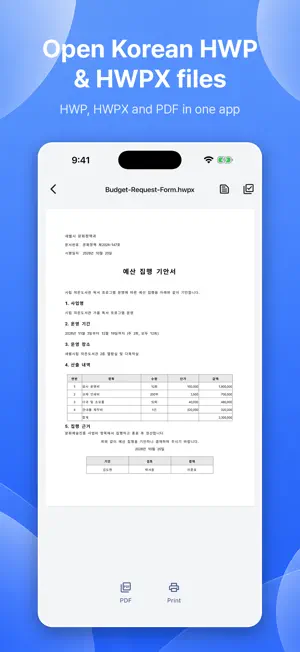


About Hanjjok: PDF & HWP Viewer
Open the HWP and HWPX files you were sent, then turn them into a PDF or print them — from your phone. Hanjjok is a light viewer for HWP and HWPX, the document format used by Korean government offices, public institutions and schools. It is built around a single situation: a file has arrived, you need to read it and do something with it, and there is no PC in front of you. What it does - Opens HWP and HWPX quickly. Pick Hanjjok from the share sheet in KakaoTalk, Mail or Files and the document opens. - Reads PDF as well, so an attachment of either kind lands in the same place. - Prints over AirPrint to any printer your iPhone or iPad can reach. - Converts to PDF in one tap, then passes it on to mail, a messenger or a cloud drive. - Exports only the pages you choose, as a PDF or as images, to share or to print. - Extracts the text of a document so you can copy or share the wording itself. - Detects landscape pages and prints them in landscape without being asked. - Shows a first-page thumbnail, so you can tell which document is which. - Keeps what you opened in one list, and clears out the ones you no longer need. - Handles your documents offline. No account, no sign-up, no cloud sync — every document you open is processed on the device and is not transmitted anywhere. Korean documents on an English device The app follows your device language, so Hanjjok itself reads in English. A Korean font ships inside the app and draws the text in your documents, so Korean should appear as letters rather than empty boxes even on a device with no Korean font installed. Document content is never rewritten or translated — you see the file as it was written. Advertising While a document is open and you are reading it, Hanjjok shows no advertising. An ad appears only at a result action — converting to PDF, printing — and only briefly, and the result follows immediately after. If you would rather not see advertising at all, Remove Ads is a one-time purchase that lasts for the lifetime of the app. You can also watch a single ad to switch advertising off for 24 hours. Support [email protected]
What’s new
Version 1.3.0 · Updated October 30, 2026
Reopen recent documents straight from the home screen, and on iPad see the list and the document side by side. • Documents you opened recently now appear as cards under Recent at the top of the home screen. My documents stays just below. • Clear history lets you choose: Remove from the list only, or Delete the files too. • On iPad, the list sits on the left and the document opens on the right. You can hide the list and bring it back. • On iPad, the viewer shows the page number, page-turn buttons and the zoom level. • PDFs can now be shown two pages side by side on a wide screen — tap 2 pages. • Open a password-protected PDF by entering its password. A PDF opened this way can't be printed yet, but you can still share it. • Fixed: in landscape, the keyboard covered the password dialog. • Other stability improvements. Tell us: Settings → Feedback, or [email protected].
App privacy
The developer, CodeSand Co. Ltd., reported these privacy practices to Apple.
Data Linked to You
The following data, which may be collected and linked to your identity, may be used for the following purposes:
- Contact Info: Email Address
- User Content: Customer Support, Other User Content
Used for: App Functionality
Data Not Linked to You
The following data, which may be collected but is not linked to your identity, may be used for the following purposes:
- Location: Coarse Location
- Identifiers: Device ID
- Usage Data: Advertising Data, Product Interaction
- Diagnostics: Crash Data, Other Diagnostic Data
Used for: Third-Party Advertising, Analytics
Alternatives to Hanjjok: PDF & HWP Viewer
Looking for apps like Hanjjok: PDF & HWP Viewer? Here are 6 similar apps on the App Store. The highest rated is Eisenhower To-Do - MellowTask (5.0/5), and all 6 are free to download.
-
 Eisenhower To-Do - MellowTask
5.0
-
 PDF One - PDFs with Ease
-
 간단한글 - HWP HWPX 뷰어·편집·PDF 변환
-
 Local TTS - AI Voice Reader
4.6
-
 Quick Memo+ToDo - PinDeck
-
 SnapCAD : DWG,DXF,STEP,STL,3MF
| App | Rating | Price | Last updated | Compare |
|---|---|---|---|---|
| Hanjjok: PDF & HWP Viewer | – | Free | October 30, 2026 | |
| Eisenhower To-Do - MellowTask | 5.0 / 5 (3) | Free | Nov 1, 2026 | Compare |
| PDF One - PDFs with Ease | – | Free | Oct 8, 2026 | Compare |
| 간단한글 - HWP HWPX 뷰어·편집·PDF 변환 | – | Free | Oct 23, 2026 | Compare |
| Local TTS - AI Voice Reader | 4.6 / 5 (10) | Free | Sep 28, 2026 | Compare |
| Quick Memo+ToDo - PinDeck | – | Free | Oct 26, 2026 | Compare |
| SnapCAD : DWG,DXF,STEP,STL,3MF | – | Free | Oct 22, 2026 | Compare |