

Squiggle - Draw, Spell & Write
Raymond Yeh Games iPhoneiPadiPod touch
Squiggle - Draw, Spell & Write is a free Games app for iPhone and iPad by Raymond Yeh. Requires iOS 17.0. Updated June 3, 2026.
- Price
- Free
- on the App Store
- Size
- 5 MB
- Age 4+
- Updated
- Jun 3
- 2026 · v1.0
Screenshots


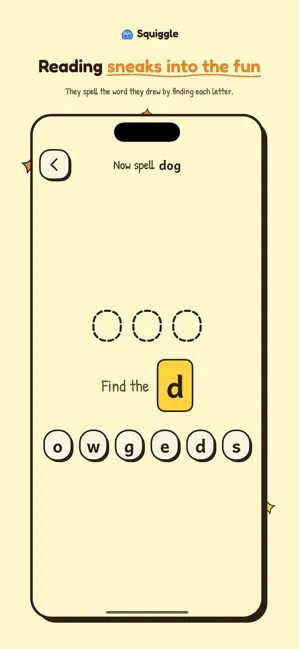
About Squiggle - Draw, Spell & Write
Squiggle is a warm, hand-drawn app for kids ages 3 to 6. Your child picks a word, draws it, spells it letter by letter, then writes it and turns their drawings into little scenes and stories. Calm, child-led play. No timers, no badges, no scores. Just space to focus, at their own pace. Every screen answers one question. Pick a colour, draw the dog, find the letter. There's nothing to get lost in. THE LOOP: DRAW → SPELL → WRITE → PLAY • Draw — Tap a word like "dog" and Squiggle sketches a friendly version, simpler at 3, more detailed at 6. Trace the ghost lines, colour inside the outline, or peek at a pinned reference. Eight crayon colours, one eraser, no menus. • Spell — The word comes back as blank slots. Squiggle calls out one letter at a time; your child finds it among the tiles and taps to place it. One letter at a time — never overwhelming. A wrong tile gently wobbles. We never flash red. • Write — Each letter appears huge in literacy-safe Andika, ready to trace. An "easy" mode adds stroke-order dots; tap it off when they're ready. Encouragement at every letter, not just at the end. • Play — Every finished drawing becomes a sticker. Drag stickers onto a scene — a park, a kitchen, the moon — and build a tiny world that's theirs. MADE FOR LITTLE HANDS • Drawings tuned to your child's age — chunkier lines at 3, finer detail at 6. • Letters use Andika, a typeface designed for pre-readers. • Fingers are first-class; Apple Pencil is supported and feels great. • Every tap target is big and forgiving. • No reading required — every word is paired with a picture. CALM, PRIVATE, PARENT-FRIENDLY • No ads. No third-party trackers. No accounts to start drawing. • We don't collect personal information about your child. • Built to the U.S. Children's Online Privacy Protection Act (COPPA). • A long-press opens the parent dashboard: see this week's drawings, set the age, set a gentle daily time limit, and more. • Drawing, spelling, writing, and scenes work offline. Squiggle is the early-literacy app we wanted for our own kids: quiet, kind, and made with patience and crayon. ——— Squiggle Plus is an auto-renewable subscription: • Weekly — $2.99 / week • Monthly — $5.99 / month (Lifetime is a one-time purchase, not a subscription.) Payment is charged to your Apple Account at confirmation. Subscriptions renew automatically unless turned off at least 24 hours before the end of the period. Manage or cancel any time in your Apple Account settings. Privacy Policy: https://www.squigglepad.com/privacy Terms of Use (EULA): https://www.squigglepad.com/terms
Play today's Queens puzzle
One queen in every row, column and color. A free daily puzzle from Fiplay, same board for everyone. It plays right here, no download.
App privacy
The developer, Raymond Yeh, reported these privacy practices to Apple.
Data Not Collected
The developer does not collect any data from this app.
Alternatives to Squiggle - Draw, Spell & Write
Looking for apps like Squiggle - Draw, Spell & Write? Here are 6 similar apps on the App Store.
-
 ShapeShadow
-
 Cyber Draw Go
-
 Focuscroll - Word Hunt Puzzle
-
 Pixel Popper: Block Shooter
-
 Jigsaw Kingdom: Block Puzzle
-
 Tidy Bloom: Picture Puzzle
| App | Rating | Price | Last updated | Compare |
|---|---|---|---|---|
| Squiggle - Draw, Spell & Write | – | Free | June 3, 2026 | |
| ShapeShadow | – | Free | Mar 12, 2026 | Compare |
| Cyber Draw Go | – | Free | May 18, 2026 | Compare |
| Focuscroll - Word Hunt Puzzle | – | Free | Jan 20, 2026 | Compare |
| Pixel Popper: Block Shooter | – | Free | Sep 22, 2026 | Compare |
| Jigsaw Kingdom: Block Puzzle | – | Free | Aug 17, 2026 | Compare |
| Tidy Bloom: Picture Puzzle | – | Free | Sep 10, 2026 | Compare |