

Money Flow: Budget & Expenses
Matthew Wong Finance iPhoneiPadiPod touchMac
Money Flow: Budget & Expenses is a free Finance app for iPhone and iPad by Matthew Wong. Requires iOS 17.0. Updated November 17, 2026.
- Price
- Free
- on the App Store
- Size
- 23 MB
- Age 4+
- Updated
- Nov 17
- 2026 · v1.13
Screenshots
Save to Pinterest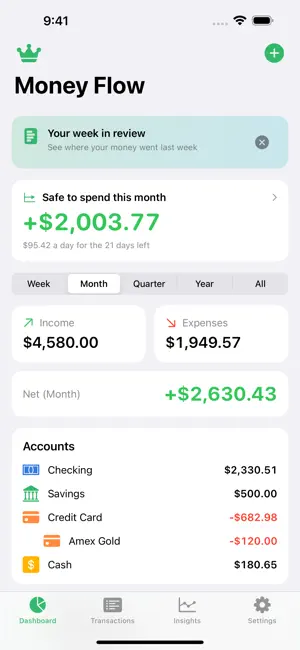


About Money Flow: Budget & Expenses
Track your spending and plan your month without linking a bank. Money Flow brings your transactions, budgets, bills and savings goals together on iPhone, iPad and Mac. ADD YOUR MONEY, YOUR WAY - Record expenses, income and transfers, or import a CSV with column mapping and a preview. - Scan a receipt on iPhone or iPad to suggest its total, merchant and date. Review the results before saving, and select your items on a shared receipt. - Save quick-add templates and use Siri or Shortcuts for entry. UNDERSTAND YOUR MONTH - View income, expenses, account balances and category charts. - Set monthly and category budgets, monitor progress and enable budget alerts. - Track savings goals and review weekly or monthly summaries. - See a Safe to Spend estimate based on the transactions, recurring income, bills and goals you enter. KEEP UP WITH BILLS - Set recurring income or expenses to match weekly, fortnightly, twice-monthly, monthly and other supported schedules. - See upcoming bills and enable reminders. - Money Flow logs due recurring entries when you open the app, including missed occurrences. KEEP CONTROL OF YOUR RECORDS - No bank login or Money Flow account is required. - Your financial records are stored on your device and can sync through your private iCloud account. - Receipt recognition runs on device. Attached receipts can sync through iCloud with your transactions. - Export CSV or Excel, save a backup, and use an optional device-authentication lock. MONEY FLOW PRO - Enjoy Money Flow without ads on iPhone and iPad. - Unlock unlimited user-entered transactions on Mac and premium planning tools across your devices. - Use Spending Explorer to review six calendar months by category or merchant, inspect matching transactions and compare completed months. - Try one hypothetical income or expense in What-if Planner to see its effect on your 90-day forecast without changing your records. - Find your next tool with Your Pro guide and export PDF reports. - Track card-wide reward rates, caps and spending targets using the terms you enter. Estimates depend on your records and do not verify issuer eligibility or payouts. - Set separate payment reminders for cards and loans. Money Flow reminds you; it does not make payments. - Explore a 90-day cash-flow projection, month-end forecasts, year-over-year comparisons, net worth and debt-payoff planning. - Record multiple currencies using daily, locked or custom rates. - Customize accent themes and iPhone/iPad app icons. The iPhone/iPad free tier includes unlimited transactions. Advertising helps support the free tier when you choose Allow ads. Personalized ads are off by default and also require Apple tracking permission. You can continue without ads and change your choice in Settings > Privacy. Pro is available monthly or annually; a 14-day introductory trial is available to eligible subscribers. One subscription covers your devices using the same App Store account. Local prices and eligibility appear before purchase. Pro renews automatically unless cancelled at least 24 hours before the current period ends. Apple handles billing. Manage or cancel your plan in your Apple Account subscription settings. Terms: https://www.apple.com/legal/internet-services/itunes/dev/stdeula/ Privacy: https://mwsupplylimited.github.io/financetracker/privacy.html
What’s new
Version 1.13 · Updated November 17, 2026
Explore your spending and plan ahead with new Money Flow Pro tools. - Spending Explorer: review six calendar months by category or merchant, inspect matching transactions, and compare the last two completed months. - What-if Planner: see how one planned expense or extra income could change your 90-day balance forecast, without adding it to your records. - Your Pro guide: find planning and reporting tools and keep track of the ones you have tried on this device. - Clearer subscription options, with an immediately available way to continue free. - Faster large CSV imports and transaction browsing, with more efficient dashboard calculations. - Correct local calendar dates when importing date-only CSV values, while preserving times and offsets in timestamped entries. Spending Explorer, What-if Planner and other premium tools require Money Flow Pro. Existing subscription prices and the 14-day introductory trial for eligible subscribers are unchanged.
App privacy
The developer, Matthew Wong, reported these privacy practices to Apple.
Data Used to Track You
The following data may be used to track you across apps and websites owned by other companies:
- Purchases: Purchase History
- Location: Coarse Location
- Identifiers: Device ID
- Usage Data: Product Interaction, Advertising Data, Other Usage Data
- Other Data: Other Data Types
Data Linked to You
The following data, which may be collected and linked to your identity, may be used for the following purposes:
- Purchases: Purchase History
- Location: Coarse Location
- Identifiers: Device ID, User ID
- Usage Data: Product Interaction, Advertising Data, Other Usage Data
- Diagnostics: Performance Data
- Other Data: Other Data Types
Used for: Third-Party Advertising, Analytics, App Functionality
Data Not Linked to You
The following data, which may be collected but is not linked to your identity, may be used for the following purposes:
- Diagnostics: Crash Data, Other Diagnostic Data
Used for: Analytics, App Functionality
Alternatives to Money Flow: Budget & Expenses
Looking for apps like Money Flow: Budget & Expenses? Here are 6 similar apps on the App Store.
-
 Chicken Bank: Budget Tracker
-
 Receipt — Expense Tracker
-
 Simple Moneybook
-
 BudgetFox: Budget Planner App
-
 MoneyCubbi: Budget Planner
-
 Cash Flow Max
| App | Rating | Price | Last updated | Compare |
|---|---|---|---|---|
| Money Flow: Budget & Expenses | – | Free | November 17, 2026 | |
| Chicken Bank: Budget Tracker | – | Free | Sep 30, 2026 | Compare |
| Receipt — Expense Tracker | – | Free | Nov 4, 2026 | Compare |
| Simple Moneybook | – | Free | Oct 31, 2026 | Compare |
| BudgetFox: Budget Planner App | – | Free | Oct 12, 2026 | Compare |
| MoneyCubbi: Budget Planner | – | Free | Nov 5, 2026 | Compare |
| Cash Flow Max | – | Free | Jul 11, 2026 | Compare |