

Kido Browser
VIEN TIN HOC XAY DUNG (IIC) Utilities iPhoneiPadiPod touch
Kido Browser is a free Utilities app for iPhone and iPad by VIEN TIN HOC XAY DUNG (IIC). Requires iOS 13.0. Updated July 31, 2026.
- Price
- Free
- on the App Store
- Size
- 24 MB
- Age 17+
- Updated
- Jul 31
- 2026 · v1.0.0
Screenshots



About Kido Browser
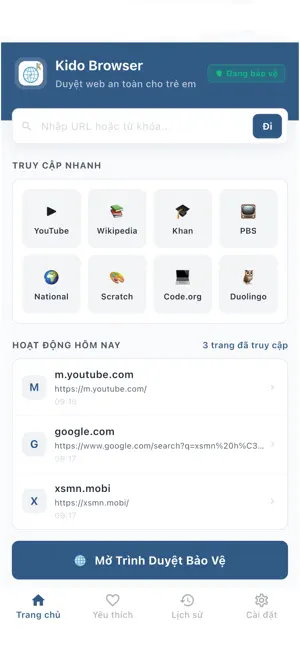
This app is a dedicated safe browser designed to help parents effectively manage and limit the web browsing activities of their children within the application. It ensures that only approved websites can be accessed, providing a secure browsing environment managed through a connected parent account. Designed with safety in mind, the browser allows parents to create personalized web filtering rules that fit different needs, such as educational research, entertainment, or safe exploration. By blocking inappropriate content or distracting websites inside this browser, it helps create a secure online environment and promotes healthy digital well-being. One of the key features of this app is its ability to work within the Kido ecosystem. Browsing permissions and security settings are managed through the separate Kido Parent application, allowing centralized control and seamless synchronization. This makes it especially useful for parental control scenarios, where parents can define whitelisted URLs, set daily browsing limits, and establish schedules for when the browser can be accessed. The app supports multiple web control modes, including always-blocked domains, time-based web restrictions, and category-based access. For example, parents can allow educational portals during study hours while restricting gaming or social media sites. In addition, the app is designed to run efficiently as a primary safe browser for families, ensuring continuous enforcement of safety rules within the app without significantly affecting device performance. It provides a smooth and user-friendly experience, making it easy for children to navigate approved content without technical complexity. Security and reliability are also key priorities. The browser securely enforces the filtering rules defined by the parent. Integration with the "Kido Parent" account system allows for better remote control, especially in family environments where safety is paramount. Terms of Use / EULA: https://www.apple.com/legal/internet-services/itunes/dev/stdeula/
App privacy
The developer, VIEN TIN HOC XAY DUNG (IIC), reported these privacy practices to Apple.
Data Linked to You
The following data, which may be collected and linked to your identity, may be used for the following purposes:
- Browsing History: Browsing History
- Identifiers: User ID, Device ID
Used for: App Functionality
Data Not Linked to You
The following data, which may be collected but is not linked to your identity, may be used for the following purposes:
- Diagnostics: Crash Data, Performance Data
Used for: Analytics
Alternatives to Kido Browser
Looking for apps like Kido Browser? Here are 6 similar apps on the App Store. The highest rated is Private Web Browser - Internet (4.0/5), and all 6 are free to download.
-
 WebsAI
-
 UA Switcher for Safari — Lite
3.8
UA Switcher for Safari — Lite
3.8
-
 Private Web Browser - Internet
4.0
Private Web Browser - Internet
4.0
-
 Private Browser -Safe & Secure
-
 Private Browser: Web Browser
3.7
Private Browser: Web Browser
3.7
-
 HandwrittenNote Chan
4.0
HandwrittenNote Chan
4.0
| App | Rating | Price | Last updated | Compare |
|---|---|---|---|---|
| Kido Browser | – | Free | July 31, 2026 | |
| WebsAI | – | Free | Aug 16, 2026 | Compare |
| UA Switcher for Safari — Lite | 3.8 / 5 (4) | Free | Aug 5, 2026 | Compare |
| Private Web Browser - Internet | 4.0 / 5 (8) | Free | Aug 31, 2026 | Compare |
| Private Browser -Safe & Secure | – | Free | Oct 7, 2026 | Compare |
| Private Browser: Web Browser | 3.7 / 5 (10) | Free | Mar 1, 2026 | Compare |
| HandwrittenNote Chan | 4.0 / 5 (1) | Free | Jul 15, 2026 | Compare |
Compare Kido Browser with the top alternatives: ratings, updates, ASO score and keyword gaps →