

DuoCamRecorder
Sahil Fruitwala Photo & Video iPhoneiPadiPod touch
DuoCamRecorder is a free Photo & Video app for iPhone and iPad by Sahil Fruitwala. Requires iOS 17.0. Updated July 2, 2026.
- Price
- Free
- on the App Store
- Size
- 2 MB
- Age 4+
- Updated
- Jul 2
- 2026 · v1.3.3
Screenshots


About DuoCamRecorder
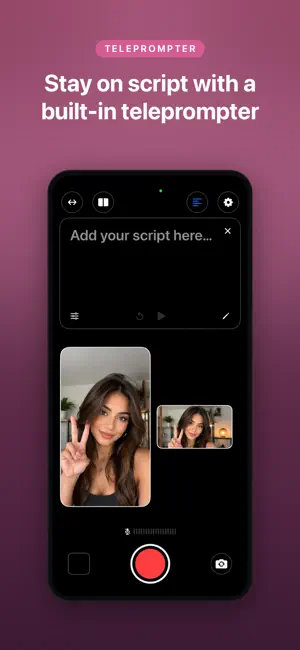
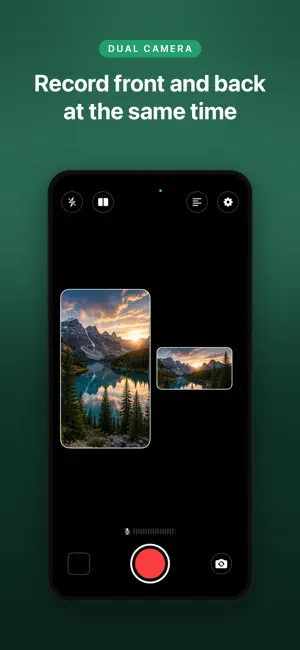
DuoCam lets you record your front and back cameras at the same time — no editing tricks, no second device needed. Whether you're a vlogger capturing your reaction alongside the scene, a creator filming tutorials, or just someone who wants both perspectives in one shot, DuoCam makes it effortless. DUAL CAMERA RECORDING Record front and back cameras simultaneously. Both feeds are saved as individual videos so you have full editing flexibility, or use the built-in picture-in-picture layout to composite them in real time. FLEXIBLE LAYOUTS Switch between Fullscreen mode (one camera fills the screen, the other floats as a PIP) and Side-by-Side mode — right from the top bar, without interrupting your recording. BUILT-IN TELEPROMPTER Type your script directly in the app. The text auto-scrolls over the camera preview so you can speak naturally without breaking eye contact. Adjust font size, scroll speed, and overlay opacity to match your style. PROFESSIONAL CONTROLS • Record at 720p, 1080p, or 4K • Choose 24, 30, or 60 fps — from cinematic film look to buttery smooth motion • Live mic meter so you always know your audio is live • Select any connected audio input — AirPods, external mic, built-in • Countdown timer (3s or 10s) for hands-free recording • Mirror front camera toggle • Save both recordings straight to your Photo Library CLEAN, DISTRACTION-FREE DESIGN The interface gets out of the way when you're recording. Every control is one tap away when you need it, and invisible when you don't. DuoCam Pro unlocks the full feature set with a one-time purchase. No subscription.
What’s new
Version 1.3.3 · Updated July 2, 2026
Added - Video stabilization. Recordings are now stabilized like the stock Camera app. The strongest mode the multi-cam session can afford is chosen automatically (cinematic, falling back to standard) and safely turned off if it would exceed the hardware budget, so recording never fails. Fixed - Tap-to-focus during recording. You can now tap the preview to set focus and exposure while a recording is in progress, not just before it starts. - Continuous autofocus like the stock camera. The camera now stays in continuous autofocus/exposure and re-focuses on its own when the scene changes (for example when your subject leaves the frame). Tapping focuses on a point but keeps tracking instead of locking focus there permanently. - Stop button missed taps. The whole record/stop button is now tappable. Previously taps in the gap between the ring and the stop square could miss — failing to stop, or triggering focus instead.
App privacy
The developer, Sahil Fruitwala, reported these privacy practices to Apple.
Data Not Collected
The developer does not collect any data from this app.
Alternatives to DuoCamRecorder
Looking for apps like DuoCamRecorder? Here are 6 similar apps on the App Store. The highest rated is TRUEFILMx (5.0/5), and all 6 are free to download.
-
 TRUEFILMx
5.0
-
 DualCam: Front & Back Video
5.0
-
 Sidekick: Dual Camera Recorder
4.7
-
 PolaPop: Instant Camera
5.0
-
 DualCamRec
-
 Influencer Kit: Blow Up & Grow
5.0
| App | Rating | Price | Last updated | Compare |
|---|---|---|---|---|
| DuoCamRecorder | – | Free | July 2, 2026 | |
| TRUEFILMx | 5.0 / 5 (2) | Free | Oct 14, 2026 | Compare |
| DualCam: Front & Back Video | 5.0 / 5 (1) | Free | Sep 16, 2026 | Compare |
| Sidekick: Dual Camera Recorder | 4.7 / 5 (12) | Free | Nov 2, 2026 | Compare |
| PolaPop: Instant Camera | 5.0 / 5 (1) | Free | Sep 15, 2026 | Compare |
| DualCamRec | – | Free | Apr 2, 2026 | Compare |
| Influencer Kit: Blow Up & Grow | 5.0 / 5 (1) | Free | Jun 23, 2026 | Compare |
Compare DuoCamRecorder with the top alternatives: ratings, updates, ASO score and keyword gaps →