

Videcho: Add Reverb to Video
Marco Duerrwaechter Music iPhoneiPadiPod touch
Videcho: Add Reverb to Video is a free Music app for iPhone and iPad by Marco Duerrwaechter. Requires iOS 26.0. Updated October 27, 2026.
- Price
- Free
- on the App Store
- Size
- 80 MB
- Age 4+
- Updated
- Oct 27
- 2026 · v2.1.1
Screenshots



About Videcho: Add Reverb to Video
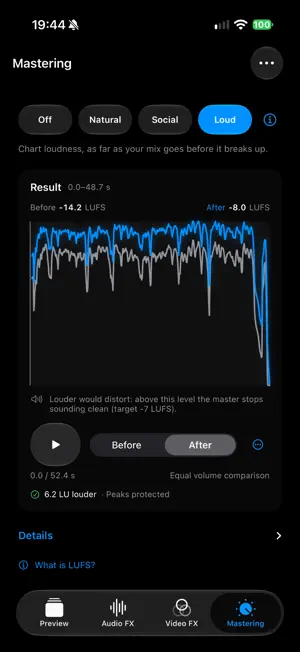
Videcho adds reverb, echo and EQ to your videos and makes quiet clips louder. Import a clip, adjust a few simple controls, and export. That's the whole app. No account. No subscription. No ads. Try Videcho for 7 days. After that, exporting needs a one-time purchase. LOUDER AND CLEARER • Volume boost up to 300%, with a built-in limiter that keeps it clean • Mastering: Natural, Social or Loud. Your clip gets as loud as it can while it still sounds like your mix, measured before every export AUDIO FX • Reverb with one-tap presets (Room, Hall, Large hall and more) or dial it in yourself • Echo and delay for a sense of space • Pick a voice style, or let Auto choose one • Shape the tone with a simple 3-band EQ (bass, mids, treble) • Warm it up with Warmth and Tube Saturation • Even things out with a Compressor and a Doubler VIDEO FX • 17 colour looks, from Warm Vinyl and Cassette to Noir and VHS • A strength dial for every look • Blur, with one-tap Blur in and Blur out EFFECTS ONLY WHERE YOU WANT THEM • Set a keyframe, change the effects, and they change as the clip plays. More reverb while you sing, less while you play. It works for the sound and for the look. SLOWED + REVERB • One tap for the slowed + reverb sound, or for sped up • Or set any speed from 0.5x to 1.5x. Picture and sound stay in sync Hear and see every change live, then export up to 4K at 60 fps. The power button switches all effects off at once, so you can compare with the original. MADE FOR MUSICIANS Recorded a cover, a practice take, or an idea on your phone? The video is fine, it's the sound that lets you down. Videcho fixes that in a few taps: real reverb, real EQ, tuned for voices and instruments. SIMPLE BY DESIGN Open the app, pick a clip, make it better. No sign-up, no learning curve, nothing to manage. Your original clip is never changed. Every effect is just a setting you can reset at any time.
What’s new
Version 2.1.1 · Updated October 27, 2026
Start right away: every effect is open. The 7-day trial now begins when you export your first video. Still a one-time purchase, no subscription.
App privacy
The developer, Marco Duerrwaechter, reported these privacy practices to Apple.
Data Not Collected
The developer does not collect any data from this app.
Alternatives to Videcho: Add Reverb to Video
Looking for apps like Videcho: Add Reverb to Video? Here are 6 similar apps on the App Store. The highest rated is 8D, Slowed & Reverb: Soundlith (4.7/5), and all 6 are free to download.
-
 SingVoicer: Live Vocal Effects
-
 ToneReady
-
 Morb: One Touch Audio Enhancer
-
 8D, Slowed & Reverb: Soundlith
4.7
8D, Slowed & Reverb: Soundlith
4.7
-
 Noise Remover - LALAL.AI
-
 SoundLens: Audio Effects
| App | Rating | Price | Last updated | Compare |
|---|---|---|---|---|
| Videcho: Add Reverb to Video | – | Free | October 27, 2026 | |
| SingVoicer: Live Vocal Effects | – | Free | Sep 11, 2026 | Compare |
| ToneReady | – | Free | Jul 10, 2026 | Compare |
| Morb: One Touch Audio Enhancer | – | Free | Oct 30, 2026 | Compare |
| 8D, Slowed & Reverb: Soundlith | 4.7 / 5 (3) | Free | Oct 21, 2026 | Compare |
| Noise Remover - LALAL.AI | – | Free | Oct 24, 2026 | Compare |
| SoundLens: Audio Effects | – | Free | Oct 6, 2026 | Compare |