

Status Bar Screenshot Maker
Phuc Pham Developer Tools iPhoneiPadiPod touch
Status Bar Screenshot Maker is a free Developer Tools app for iPhone and iPad by Phuc Pham. Rated 1.0/5 from 1 ratings. Requires iOS 18.0.
- Rating
- 1.0
- 1 ratings
- Price
- Free
- on the App Store
- Size
- 4 MB
- Age 4+
- Updated
- Aug 21
- 2026 · v1.1.1
Screenshots
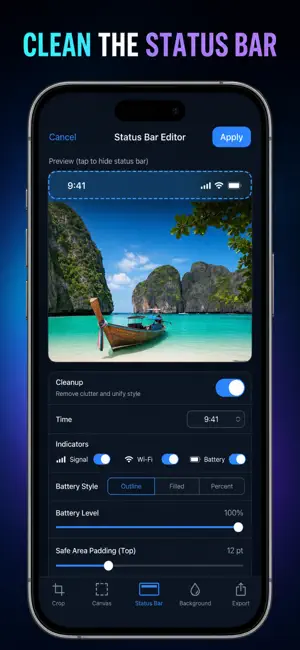


About Status Bar Screenshot Maker
Put a clean, App Store-ready status bar on any screenshot: 9:41 on the clock, full signal, Wi-Fi on, battery full. Import a shot, tap export, done. Most editors make you rebuild the bar by hand. Status Bar knows the geometry. It reads your image's aspect ratio, guesses the device it came from, and draws the matching bar - Dynamic Island, notch, or classic home-button layout - scaled to the exact height Apple uses on that model. 18 device profiles from iPhone SE to iPhone 16 Pro Max and iPad Pro 13". The bar lands pixel-correct on the first try. WHAT YOU GET - A screenshot that looks like it came off a fresh, perfectly charged device - The right bar shape for the right phone, chosen for you the moment you import - Full control of the details: clock text, 0-4 signal bars, Wi-Fi on or off, battery level, charging bolt, battery percentage - Light or dark glyphs so the bar reads on any background - A bar that disappears into your design: leave it transparent, fill it white or black, or eyedrop a color straight out of your own image - Exports at the source image's full resolution, saved to Photos or sent to the share sheet PERFECT FOR - Indie developers prepping an App Store Connect upload - Designers building portfolio and case-study mockups - Marketers making social posts and landing-page hero shots - Anyone tired of a 47% battery and one bar of signal in their promo images WHY NOT JUST CROP THE BAR OFF? Because a cropped shot looks cropped. Apple's own listings, and every polished app page you scroll past, show a full screen with a clean bar at the top. Cropping changes your aspect ratio and can break App Store screenshot sizing. Replacing the bar keeps the frame intact and makes the shot look official. Seven bundled photo canvases are included if you want to try a bar before importing your own, plus a Devices reference showing each model's bar layout and height, and an offline Guide with tips for cleaner shots. PRIVACY Everything runs on your device. Images never leave your phone, there is no account, no upload, and no tracking. The app works fully offline. FULL ACCESS Free lets you edit everything and export one image with a small corner badge. Full Access removes the badge, unlocks bulk export of an entire batch in one tap, and turns on custom bar colors plus the eyedropper. Choose weekly, yearly, or a one-time lifetime purchase. Subscriptions renew until cancelled; lifetime is a single payment. Import your next screenshot, set the clock to 9:41, and export it before your coffee gets cold. Terms of Use (EULA): https://web-levi.web.app/terms Privacy Policy: https://web-levi.web.app/privacy-policy Questions? [email protected]
What’s new
Version 1.1.1 · Updated August 21, 2026
Bug fixes and performance improvements.
App privacy
The developer, Phuc Pham, reported these privacy practices to Apple.
Data Not Collected
The developer does not collect any data from this app.
Alternatives to Status Bar Screenshot Maker
Looking for apps like Status Bar Screenshot Maker? Here are 6 similar apps on the App Store. The highest rated is Status Bar Tidy - Bar941 (5.0/5), and all 6 are free to download.
-
 Status Bar Tidy - Bar941
5.0
-
 Status Bar Studio
5.0
-
 Bezelist: Screenshot Studio
-
 Coucou — Notch Companion
-
 云壳
-
 StackConnect
5.0
| App | Rating | Price | Last updated | Compare |
|---|---|---|---|---|
| Status Bar Screenshot Maker | 1.0 / 5 (1 rating) | Free | August 21, 2026 | |
| Status Bar Tidy - Bar941 | 5.0 / 5 (2) | Free | Apr 16, 2026 | Compare |
| Status Bar Studio | 5.0 / 5 (2) | Free | Nov 1, 2026 | Compare |
| Bezelist: Screenshot Studio | – | Free | Aug 14, 2026 | Compare |
| Coucou — Notch Companion | – | Free | Oct 31, 2026 | Compare |
| 云壳 | – | Free | Jan 9, 2026 | Compare |
| StackConnect | 5.0 / 5 (1) | Free | Jul 10, 2026 | Compare |