

Goals Lock
Sahil Kamble Productivity iPhoneiPadiPod touch
Goals Lock is a free Productivity app for iPhone and iPad by Sahil Kamble. Requires iOS 17.0. Updated June 29, 2026.
- Price
- Free
- on the App Store
- Size
- 10 MB
- Age 4+
- Updated
- Jun 29
- 2026 · v1.1
Screenshots
About Goals Lock
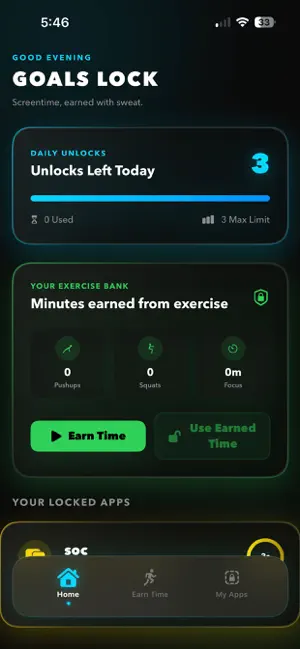
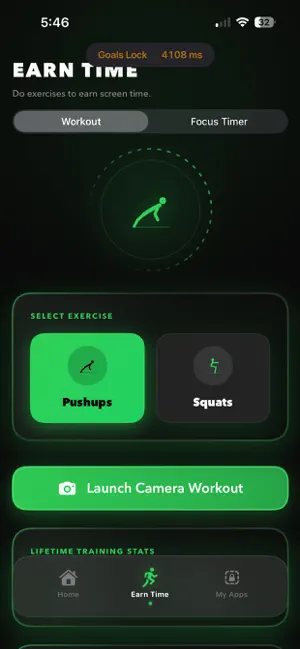
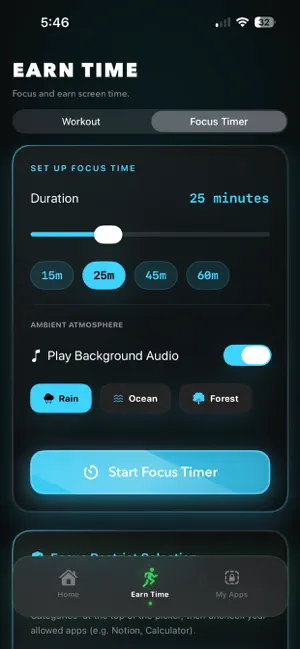
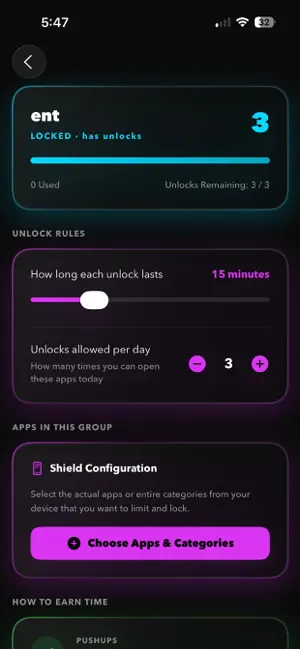
Reclaim your focus, break the scroll loop, and get active. Goals Lock is the ultimate screen time controller that transforms physical movement into digital freedom. Instead of locking yourself out of apps with passive passwords, Goals Lock challenges you to earn your screen time through physical exercises like pushups and squats, tracked in real-time by advanced on-device Vision AI. Whether you want to limit social media scrolling, lock distracting gaming apps during work hours, or build a healthier daily routine, Goals Lock bridges the gap between digital wellness and physical fitness. HOW IT WORKS: CHOOSE YOUR LIMITS: Group distracting apps and categories (social media, entertainment, games) that you want to restrict. SQUAT OR PUSHUP TO UNLOCK: When you need access, place your phone down. The front camera and private, on-device Vision AI will track and count your reps automatically. ENJOY GUILT-FREE ACCESS: Successfully hitting your rep goal unlocks a custom timer session. Once the timer expires, the apps lock back up automatically. ACCUMULATE IN THE VAULT: Don't want to use your minutes immediately? Save your earned exercise minutes in your personal Vault to redeem them whenever you need them. KEY FEATURES: ON-DEVICE VISION AI TRACKER: No manual input or cheating. Place your phone down and let our smart Vision AI count your squats and pushups automatically using your front camera. FOCUS MODE WITH AMBIENT AUDIO: Need to study or work? Start a Focus Session. Block all distractions completely and listen to offline ambient sounds like Rain, Ocean, or Forest to keep you in the zone. STRICT MODE: Prevent impulsive decisions. When Strict Mode is active, you cannot bypass or disable locks instantly, forcing you to stick to your goals. BONUS MINUTES BANK: Convert extra workouts into a reserve of unlockable screen time. NATIVE SCREEN TIME SHIELDING: Powered by Apple's Screen Time API (ManagedSettings) for system-level locking that you cannot simply swipe away or force close. PRIVACY-FIRST AND SECURE: Your privacy is our highest priority: Vision AI processing is executed 100% on-device. Camera frames are analyzed in real-time and immediately discarded. No video, image, or personal data ever leaves your device or is sent to any server. No sign-ups, accounts, or internet connection required. Stop scrolling mindlessly. Turn screen time into healthy habits with Goals Lock. Download now and start earning your digital freedom!
What’s new
Version 1.1 · Updated June 29, 2026
ui and performance improvements
App privacy
The developer, Sahil Kamble, reported these privacy practices to Apple.
Data Not Collected
The developer does not collect any data from this app.
Alternatives to Goals Lock
Looking for apps like Goals Lock? Here are 6 similar apps on the App Store. The highest rated is Uglify Screen Time (5.0/5), and all 6 are free to download.
-
 Spike AI: Productivity Tool
-
 Rock Lock - App Blocker
-
 Uglify Screen Time
5.0
Uglify Screen Time
5.0
-
 Svala: Screen Time Control
-
 Liftora: AI Life Coach
4.9
Liftora: AI Life Coach
4.9
-
 Tether: Focus & Accountability
5.0
Tether: Focus & Accountability
5.0
| App | Rating | Price | Last updated | Compare |
|---|---|---|---|---|
| Goals Lock | – | Free | June 29, 2026 | |
| Spike AI: Productivity Tool | – | Free | Aug 15, 2026 | Compare |
| Rock Lock - App Blocker | – | Free | Sep 30, 2026 | Compare |
| Uglify Screen Time | 5.0 / 5 (1) | Free | Oct 15, 2026 | Compare |
| Svala: Screen Time Control | – | Free | Jul 24, 2026 | Compare |
| Liftora: AI Life Coach | 4.9 / 5 (19) | Free | Oct 5, 2026 | Compare |
| Tether: Focus & Accountability | 5.0 / 5 (8) | Free | Sep 26, 2026 | Compare |
Compare Goals Lock with the top alternatives: ratings, updates, ASO score and keyword gaps →