

MIDI Memos: Recorder + Player
Mayank Sanganeria Music iPhoneiPadiPod touch
MIDI Memos: Recorder + Player is a free Music app for iPhone and iPad by Mayank Sanganeria. Rated 5.0/5 from 2 ratings. Requires iOS 18.0.
- Rating
- 5.0
- 2 ratings
- Price
- Free
- on the App Store
- Size
- 10 MB
- Age 4+
- Updated
- Aug 18
- 2026 · v1.0.5
Screenshots
About MIDI Memos: Recorder + Player
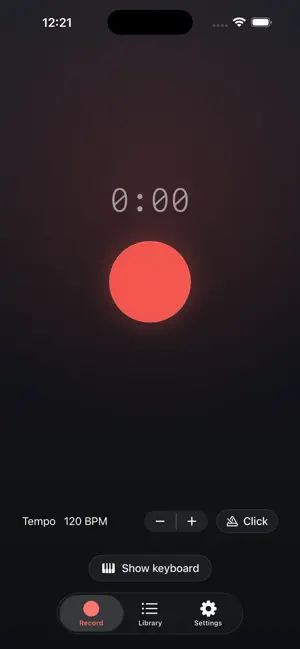
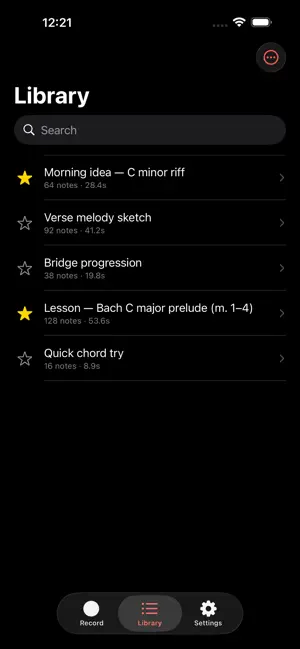
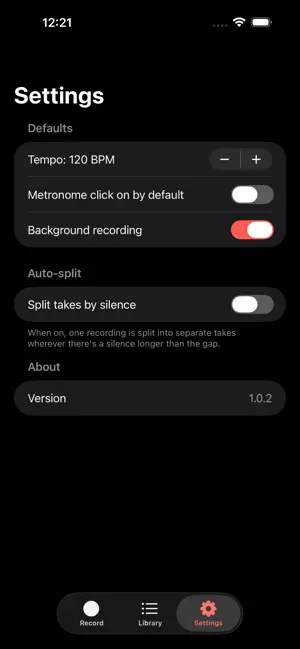
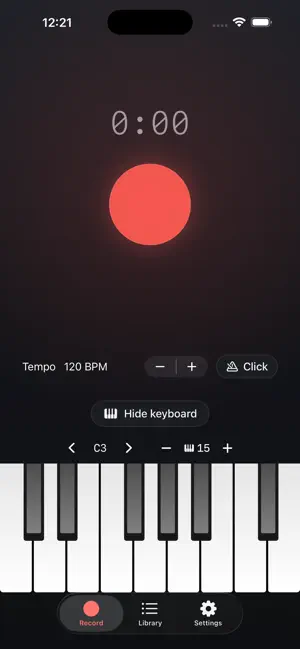
MIDI Memos is the fastest way to capture a musical idea on your iPhone or iPad. One button, one tap, you're recording. Play your MIDI keyboard or tap the built-in on-screen piano. Tap stop. You've got a clean Standard MIDI File ready to share to GarageBand, Logic, Ableton, Cubase, or any DAW. That's it. No setup, no tracks, no menus to navigate. WHAT IT DOES • Records MIDI from any Bluetooth or USB-C MIDI keyboard, controller, or pad • Built-in on-screen piano — set the exact number of keys, slide the starting note one key at a time, and play full-width in landscape • Background recording keeps capturing while the screen is locked or you switch to another app • Optional auto-split breaks a long session into separate takes at the silences (off by default) • A quick summary after each take — see the note count, length, detected key, and tempo, then rename, favorite, or discard it on the spot • Plays back every take through a high-quality piano so you can audition immediately • Optional metronome click during recording • Adjustable tempo (40–240 BPM), embedded in every exported file so it imports at the right tempo • Share .mid files instantly via AirDrop, Files, Mail, Messages, or directly to any DAW • Take library with favorites, search, and a 30-day trash so accidental deletes are recoverable • Universal — works on iPhone and iPad • No accounts, no tracking, no ads WHO IT'S FOR • Songwriters who want to capture a melody before it slips away • Producers who need a quick MIDI sketchpad away from the studio • Pianists and keyboardists practicing on a digital piano who want to log a take • Teachers and students who want a no-friction way to record an exercise • Anyone who has ever thought "I had an idea, but by the time I opened my DAW it was gone" WHY IT'S DIFFERENT Most DAWs are powerful and complex. MIDI Memos is the opposite — a single-purpose utility that does one thing well. There is no project to create, no track to arm, no preset to pick. The big red button is the entire interface. PRIVACY MIDI Memos doesn't collect, transmit, or share any data. Your recordings live on your device. There are no accounts, no analytics, and no tracking. REQUIREMENTS • iOS 18 or later • iPhone or iPad • A MIDI keyboard via Bluetooth or USB is recommended; on-screen keyboard works too
What’s new
Version 1.0.5 · Updated August 18, 2026
Exported memos now keep their name. When you share or save a memo, the file arrives named the way it is in the app — no more long strings of random letters and numbers. Rename a memo and the next export picks up the new name too.
App privacy
The developer, Mayank Sanganeria, reported these privacy practices to Apple.
Data Linked to You
The following data, which may be collected and linked to your identity, may be used for the following purposes:
- Usage Data: Product Interaction
Used for: Analytics
Alternatives to MIDI Memos: Recorder + Player
Looking for apps like MIDI Memos: Recorder + Player? Here are 6 similar apps on the App Store. The highest rated is MIDIx - Physics MIDI Generator (5.0/5), and 5 of the 6 are free to download.
-
 MIDI Scribe
-
 Unstuck: Producer Tips
-
 Derson DSynth Mobile
-
 MIDIx - Physics MIDI Generator
5.0
MIDIx - Physics MIDI Generator
5.0
-
 Insightful Audio Synthesizer
3.0
Insightful Audio Synthesizer
3.0
-
 FretMachine - Guitar Sequencer
5.0
FretMachine - Guitar Sequencer
5.0
| App | Rating | Price | Last updated | Compare |
|---|---|---|---|---|
| MIDI Memos: Recorder + Player | 5.0 / 5 (2 ratings) | Free | August 18, 2026 | |
| MIDI Scribe | – | Free | Jun 9, 2026 | Compare |
| Unstuck: Producer Tips | – | Free | Jul 15, 2026 | Compare |
| Derson DSynth Mobile | – | Free | Jul 6, 2026 | Compare |
| MIDIx - Physics MIDI Generator | 5.0 / 5 (3) | 8.99 USD | Jul 10, 2026 | Compare |
| Insightful Audio Synthesizer | 3.0 / 5 (3) | Free | Jul 7, 2026 | Compare |
| FretMachine - Guitar Sequencer | 5.0 / 5 (1) | Free | Jul 1, 2026 | Compare |