

I On It: AI Voice Reminders
YUSUF HAZERHAN COMEZ Productivity iPhoneiPadiPod touchMacApple Watch
I On It: AI Voice Reminders is a free Productivity app for iPhone and iPad by YUSUF HAZERHAN COMEZ. Requires iOS 18.0. Updated August 26, 2026.
- Price
- Free
- on the App Store
- Size
- 13 MB
- Age 4+
- Updated
- Aug 26
- 2026 · v2.2.1
Screenshots


About I On It: AI Voice Reminders
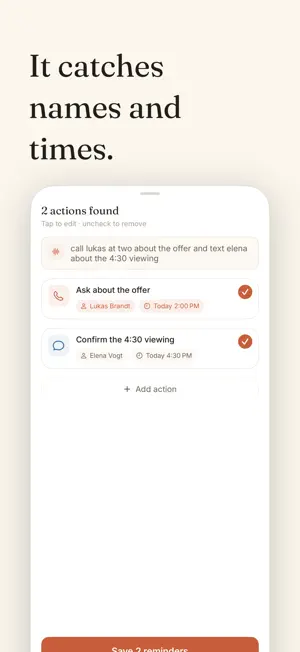
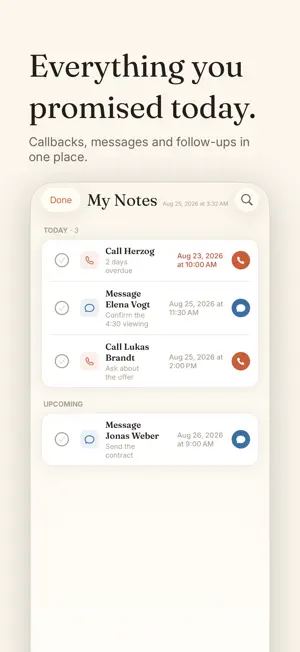
Voice notes that become reminders, calls, and messages — automatically, on your device. Say it out loud. I On It uses on-device AI to pull out: • Who — the person involved • What — the action to take • When — the exact time or deadline Then one tap to call or send a message. Reminders sync two-way with Apple Reminders and Calendar, show up in widgets on your Home Screen and Lock Screen, and travel to your iPad, Mac, and Apple Watch. HOW IT WORKS Speak naturally: "Remind me to call Sarah tomorrow at 3 pm" or "Send a message to John about the meeting." On iPhones with Apple Intelligence, I On It understands your intent entirely on-device: no internet needed, and your notes never leave your phone. On other devices you choose what happens. Leave cloud processing off and I On It stays fully offline. Turn it on and complex notes get help from the cloud — only when you allow it. FEATURES • Voice notes with smart extraction (who, what, when) • Multiple action items from a single note • One-tap calling and text messages • Two-way sync with Apple Reminders and Calendar • Recurring reminders and location-based reminders • Follow-up reminders so you never lose touch with people • Search and Ask AI across all your notes • Daily brief of what's ahead • Home Screen and Lock Screen widgets • Lock Screen Live Activity countdown • Apple Watch quick capture • Share text from any app straight into I On It • Sync across iPhone, iPad, Mac, and Apple Watch with iCloud • Works offline, fully on-device • No account required to get started — Subscription — On It Pro is available as an auto-renewable subscription: • Pro Monthly — $7.99 per month • Pro Annual — $59.99 per year Payment is charged to your Apple ID account at confirmation of purchase. The subscription automatically renews unless it is canceled at least 24 hours before the end of the current period. You can manage or cancel your subscription in your App Store account settings after purchase. Terms of Use (EULA): https://www.apple.com/legal/internet-services/itunes/dev/stdeula/ Privacy Policy: https://ionit.app/en/privacy
What’s new
Version 2.2.1 · Updated August 26, 2026
• Fixed a bug where the Pro screen sometimes didn't open after you finished your first action. • Stability and reliability improvements.
App privacy
The developer, YUSUF HAZERHAN COMEZ, reported these privacy practices to Apple.
Data Linked to You
The following data, which may be collected and linked to your identity, may be used for the following purposes:
- Purchases: Purchase History
- Contact Info: Email Address
- Identifiers: User ID
Used for: App Functionality
Data Not Linked to You
The following data, which may be collected but is not linked to your identity, may be used for the following purposes:
- Usage Data: Product Interaction
Used for: Analytics
Alternatives to I On It: AI Voice Reminders
Looking for apps like I On It: AI Voice Reminders? Here are 6 similar apps on the App Store.
-
 Vocia – Voice Notes & Tasks
-
 Dayline Time Tracker
-
 Brainy: AI Memory & Reminders
-
 AfterSnap: AI Photo to Action
-
 Typeflow: AI for Every App
-
 Origami: AI Calendar Assistant
| App | Rating | Price | Last updated | Compare |
|---|---|---|---|---|
| I On It: AI Voice Reminders | – | Free | August 26, 2026 | |
| Vocia – Voice Notes & Tasks | – | Free | Sep 10, 2026 | Compare |
| Dayline Time Tracker | – | Free | May 29, 2026 | Compare |
| Brainy: AI Memory & Reminders | – | Free | Sep 17, 2026 | Compare |
| AfterSnap: AI Photo to Action | – | Free | Oct 15, 2026 | Compare |
| Typeflow: AI for Every App | – | Free | Aug 24, 2026 | Compare |
| Origami: AI Calendar Assistant | – | Free | Sep 12, 2026 | Compare |