

聽閱 ReadAloud
Ka Hei MAK Book iPhoneiPadiPod touch
聽閱 ReadAloud is a free Book app for iPhone and iPad by Ka Hei MAK. Requires iOS 17.0. Updated October 10, 2026.
- Price
- Free
- on the App Store
- Size
- 4 MB
- Age 4+
- Updated
- Oct 10
- 2026 · v1.3.2
Screenshots


About 聽閱 ReadAloud
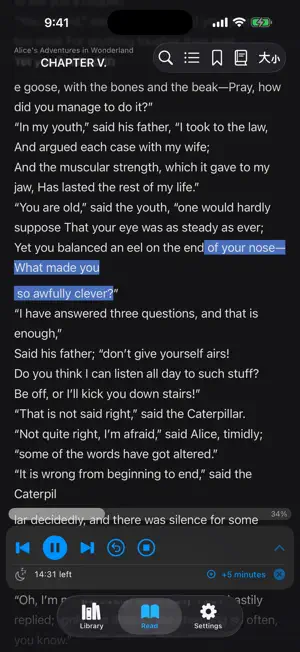
Turn any text into a hands-free audiobook. ReadAloud reads EPUB, PDF, and TXT files in Cantonese, Mandarin, or English using Apple's high-quality on-device voices — perfect for commuting, exercising, or resting your eyes. READING + LISTENING, TOGETHER Two reading modes that adapt to how you want to consume content: • Voice + Reading — see the full text with the current sentence highlighted as it's being read. • Listen-Only — distraction-free karaoke view showing the previous, current, and next sentences in large text. Ideal for closing your eyes and just listening. SUPPORTED FORMATS • EPUB (2 & 3) — automatic chapter detection • PDF — text extraction with chapter inference • TXT — plain text with smart chapter splitting • Clipboard — paste any article instantly • Printed pages — photograph a book or document and ReadAloud recognises the text on your device, then reads it aloud. Scanned PDFs with no text layer can be recognised the same way. Nothing is uploaded. MULTILINGUAL VOICES Switch between three voice languages — each remembers its own speed: • Cantonese (zh-HK) — 阿成, 善怡, and more • Mandarin (zh-CN / zh-TW) — 冬梅 (Liaoning), 浩浩 (Shaanxi), 盼盼 (Sichuan), 美嘉 (Taiwan), and others • English (en-US / en-GB / en-AU / en-IN) — Samantha, Daniel, Karen, and any installed English voice TRADITIONAL — SIMPLIFIED Built-in OpenCC engine converts between scripts at the word level — much more accurate than character-by-character mapping. Switch instantly without re-importing your book. SMART READING EXPERIENCE • Sentence-level highlighting that follows the voice • Auto-scroll keeps the spoken text in view • "Return to reading position" floating button when you scroll away • Tap-and-hold any text: read from here, look it up in the dictionary, translate it, highlight it, or fix how a word is pronounced • Highlights in four colours, with notes, exportable as Markdown • Edit a chapter's text when an import needs proofreading • Search within books with jump-to-result • Auto-detected chapters with table of contents • Background audio: keep listening with the screen locked • Built-in sleep timer (15 / 30 / 45 / 60 / 90 min) with soft fade-out CUSTOMISE EVERYTHING • Font size, line spacing, font family (serif, rounded, monospaced) • Three themes: dark, light, sepia • Orientation lock (auto / portrait / landscape) • Per-language playback speed • Voice gender preference (auto, male, female) 100% PRIVATE ReadAloud was built around a simple principle: your reading is none of our business. • No accounts, no sign-up, no login. • No analytics, no tracking, no ads. • Nothing you import, read, or listen to is ever sent anywhere. • All books and progress stay on your device. Delete the app and everything is gone. • The app only uses the network when you open the optional free book library and choose a book to download. BUILT FOR CHINESE READERS Many TTS apps cater only to Mandarin. ReadAloud is built by a Hong Kong developer with Cantonese readers in mind. Optimised tokenisation for traditional Chinese, comma-level phrase highlighting that keeps up with natural Cantonese rhythm, and a dedicated voice picker that surfaces "粵語 (香港)" voices first if your default is Cantonese. FREE, NO ADS, NO CATCH No ads. No subscription. No analytics, no tracking, no account. There is no "pro" tier — every reading and listening feature described above is free for everyone, permanently. That also means the app earns nothing on its own, while hosting the free book library and its downloads costs real money. If ReadAloud is useful to you, Settings has a completely optional "Support the developer" section. Supporters get an exclusive app icon and a thank-you mark — that is all it unlocks. Nothing else is ever locked, and the app will never interrupt you to ask. Developed and maintained by Heion Technologies — feedback welcome at [email protected]. Privacy Policy & Support: https://heiontech.com/readaloud
What’s new
Version 1.3.2 · Updated October 10, 2026
Clearer listening, and two ways to get a book ready. • Reading on the iPhone speaker with the screen locked no longer crackles. The same voice is handed to the speaker in longer pieces, instead of the synthesizer's very short buffers. • A ZIP that contains one TXT file can be imported. Archives with no TXT, more than one TXT, or an unsafe path are refused. • Repeated sentences that show up across many chapters can be reviewed and removed. Nothing is deleted until you choose it, and you can undo straight away.
App privacy
The developer, Ka Hei MAK, reported these privacy practices to Apple.
Data Not Collected
The developer does not collect any data from this app.
Alternatives to 聽閱 ReadAloud
Looking for apps like 聽閱 ReadAloud? Here are 6 similar apps on the App Store. The highest rated is iRead: Read Aloud EPUB Reader (5.0/5), and all 6 are free to download.
-
 TTS Reader: Read Aloud
-
 沉浸阅读-读书、阅读
-
 iRead: Read Aloud EPUB Reader
5.0
-
 3ook.com Li3rary
5.0
-
 點點閱: 15分鐘實用書摘要
-
 BookFun - 悦读
| App | Rating | Price | Last updated | Compare |
|---|---|---|---|---|
| 聽閱 ReadAloud | – | Free | October 10, 2026 | |
| TTS Reader: Read Aloud | – | Free | Jun 17, 2026 | Compare |
| 沉浸阅读-读书、阅读 | – | Free | Mar 6, 2026 | Compare |
| iRead: Read Aloud EPUB Reader | 5.0 / 5 (1) | Free | Oct 7, 2026 | Compare |
| 3ook.com Li3rary | 5.0 / 5 (1) | Free | Aug 28, 2026 | Compare |
| 點點閱: 15分鐘實用書摘要 | – | Free | Jul 25, 2026 | Compare |
| BookFun - 悦读 | – | Free | Jul 23, 2026 | Compare |
Compare 聽閱 ReadAloud with the top alternatives: ratings, updates, ASO score and keyword gaps →