

OPOS
EASY TECHNOLOGY COMPANY FOR CREATING PHONE AND COMPUTER APPLICATIONS LIMITED Business iPhoneiPadiPod touch
OPOS is a free Business app for iPhone and iPad by EASY TECHNOLOGY COMPANY FOR CREATING PHONE AND COMPUTER APPLICATIONS LIMITED. Requires iOS 17.0.
- Price
- Free
- on the App Store
- Size
- 30 MB
- Age 4+
- Updated
- Oct 31
- 2026 · v1.24
Screenshots


About OPOS
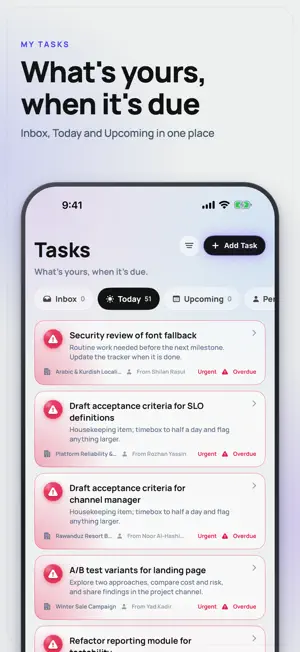
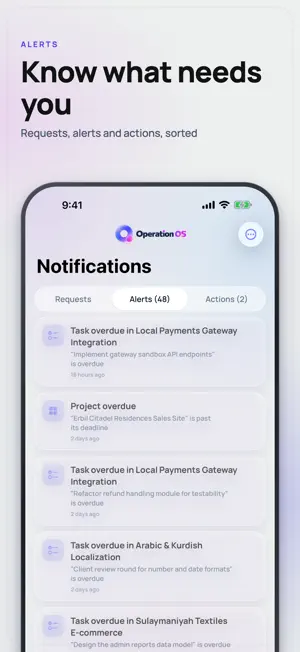
OPOS — Operation OS OPOS is a live operations workspace for teams that run real work, not just talk about it. See every office, every active task, who is working right now, what is blocked, and what is overdue — all from one clear operational command center. Built for modern teams that move fast, manage multiple offices, and need full visibility across daily work. Live Operations Dashboard The Home tab gives you a real-time view of your entire operation: • View every active office in one place • Track task progress with live status indicators • See who is working on what right now • Spot overdue tasks, blocked stages, and hand-offs • Follow a live events feed for task starts, completions, and updates • Monitor daily workspace KPIs Native Voice and Video Calls OPOS includes built-in calling designed for real operational teams. • Native incoming call experience • Background audio support • Voice and video calls for teams • Live captions • Call recording with transcription and playback • Group call grid layout • Audio route selection for speaker, AirPods, and Bluetooth devices Keep conversations connected to the work they belong to. Office-Based Chat Every office has its own dedicated channel. Messages, files, task updates, and call invites stay organized by office, so teams do not have to search through a generic inbox to find the right conversation. Light and Dark Mode OPOS supports full system appearance settings. Choose Light Mode, Dark Mode, or follow your device settings. Dashboards, calls, chat, and tasks all adapt automatically. Privacy and Safety OPOS is designed with privacy and control in mind. • Workspace-based data separation • On-device live captions during calls • Message reporting and blocking tools • In-app Privacy Policy and Terms access • One-tap account deletion from Profile Your workspace stays organized, controlled, and secure. Multiple Workspaces Work across more than one organization from a single app. Switch between workspaces from your profile while keeping sessions, tasks, notifications, and office data separate. Designed in Kurdistan, Built for the World OPOS is made by Easy Technology Company. It is right-to-left aware, Arabic-friendly, and designed for real-world operations — from office teams to field teams working on slow networks, bright screens, and demanding daily workflows. Try OPOS for free using “Try demo as guest” on the sign-in screen and explore a fully populated workspace with no account required.
What’s new
Version 1.24 · Updated October 31, 2026
A fresh look: the new Aurora design across the whole app, in Light and Dark. New app icon and wordmark. Team bar on Home: drag the + onto a teammate to hand them a task, and search now finds people too. Office tiles on Home show the right task counts. The create-office button is hidden for people who can't create offices.
App privacy
The developer, EASY TECHNOLOGY COMPANY FOR CREATING PHONE AND COMPUTER APPLICATIONS LIMITED, reported these privacy practices to Apple.
Data Not Collected
The developer does not collect any data from this app.
Alternatives to OPOS
Looking for apps like OPOS? Here are 6 similar apps on the App Store. The highest rated is Pocket Check: Never Forget (5.0/5), and all 6 are free to download.
-
 Pocket Check: Never Forget
5.0
-
 Menula – Restaurant Menus
-
 ClientOS | Sales & CRM
-
 MoneyOS | Your Finance System
5.0
-
 Solo Quests
3.7
-
 Vision - Productivity & Focus
5.0
| App | Rating | Price | Last updated | Compare |
|---|---|---|---|---|
| OPOS | – | Free | October 31, 2026 | |
| Pocket Check: Never Forget | 5.0 / 5 (1) | Free | Aug 12, 2026 | Compare |
| Menula – Restaurant Menus | – | Free | Sep 29, 2026 | Compare |
| ClientOS | Sales & CRM | – | Free | Oct 27, 2025 | Compare |
| MoneyOS | Your Finance System | 5.0 / 5 (2) | Free | Jun 27, 2026 | Compare |
| Solo Quests | 3.7 / 5 (3) | Free | May 2, 2025 | Compare |
| Vision - Productivity & Focus | 5.0 / 5 (2) | Free | Feb 9, 2026 | Compare |
Compare OPOS with the top alternatives: ratings, updates, ASO score and keyword gaps →