

Fullcount: AI Inventory
James Griggs Business iPhoneiPadiPod touch
Fullcount: AI Inventory is a free Business app for iPhone and iPad by James Griggs. Requires iOS 18.0. Updated June 16, 2026.
- Price
- Free
- on the App Store
- Size
- 19 MB
- Age 4+
- Updated
- Jun 16
- 2026 · v1.0.3
Screenshots


About Fullcount: AI Inventory
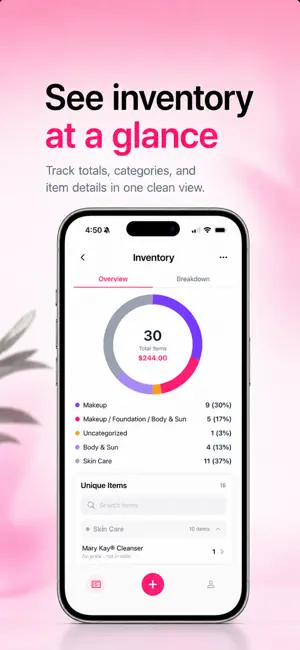
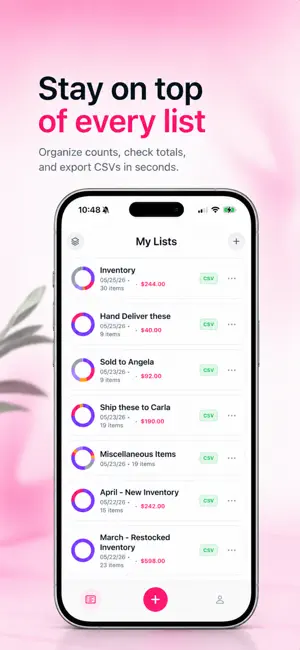
Stop counting by hand. Fullcount uses AI to instantly count items in a photo, placing numbered markers on every detected item so you can see exactly what was counted — and correct anything that wasn't. AI COUNTING WITH NUMBERED MARKERS Point your camera at a shelf, bin, pallet, or pile and let Fullcount do the work. In seconds, AI detects every item and places a numbered marker on each one — giving you a transparent, reviewable count you can trust. TAP-TO-EDIT MARKERS No AI is perfect, and Fullcount doesn't pretend otherwise. Tap any numbered marker to rename the item, adjust its quantity, or remove it entirely. Add markers for anything the AI missed. Every correction is fast, direct, and yours to make on the spot. ORGANIZED LISTS, CATEGORY CHARTS, AND COMBINED VIEWS Every count saves to a named list with totals, categories, dates, and a full item breakdown. The inventory dashboard displays a category donut chart so you can see your stock composition at a glance. Combine multiple lists into one consolidated view for a complete picture across locations, sessions, or product groups. BULK EXPORT AS CSV AND PHOTOS When it's time to share or file your count, export a ZIP containing CSV files with item names, SKUs, and counts — plus annotated or clean versions of your photos. Hand it off to a spreadsheet, email it to a client, or archive it for audit purposes. Built for warehouse teams, retail stores, resellers, and estate-sale professionals, Fullcount turns a photo into a professional inventory record in the time it used to take just to find a clipboard. Download Fullcount and start counting everything, instantly. Privacy Policy: https://fullcount-legal.pages.dev/privacy Terms of Use: https://fullcount-legal.pages.dev/terms
What’s new
Version 1.0.3 · Updated June 16, 2026
Smarter counting: a new point-based detection mode dramatically improves accuracy on dense, repetitive items. Toggle 'Smart Count' in Settings. Plus stability improvements and bug fixes.
App privacy
The developer, James Griggs, reported these privacy practices to Apple.
Data Linked to You
The following data, which may be collected and linked to your identity, may be used for the following purposes:
- Contact Info: Email Address, Name
Used for: App Functionality
Data Not Linked to You
The following data, which may be collected but is not linked to your identity, may be used for the following purposes:
- Surroundings: Environment Scanning
Used for: App Functionality
Alternatives to Fullcount: AI Inventory
Looking for apps like Fullcount: AI Inventory? Here are 6 similar apps on the App Store. The highest rated is BlueCollarCam (5.0/5), and all 6 are free to download.
-
 Vesna
Vesna
-
 Simple Inventory: ReStocker
-
 Dropt - AI Research Assistant
-
 Simple Task Assigner
-
 BlueCollarCam
5.0
BlueCollarCam
5.0
-
 Stack Enable
4.0
Stack Enable
4.0
| App | Rating | Price | Last updated | Compare |
|---|---|---|---|---|
| Fullcount: AI Inventory | – | Free | June 16, 2026 | |
| Vesna | – | Free | Jul 14, 2026 | Compare |
| Simple Inventory: ReStocker | – | Free | Oct 13, 2026 | Compare |
| Dropt - AI Research Assistant | – | Free | May 23, 2026 | Compare |
| Simple Task Assigner | – | Free | Sep 23, 2025 | Compare |
| BlueCollarCam | 5.0 / 5 (13) | Free | Oct 20, 2026 | Compare |
| Stack Enable | 4.0 / 5 (1) | Free | Jul 23, 2026 | Compare |