

Focusify: Habits & Tasks
Aiden Jacobs Productivity iPhoneiPadiPod touch
Focusify: Habits & Tasks is a free Productivity app for iPhone and iPad by Aiden Jacobs. Rated 5.0/5 from 3 ratings. Requires iOS 26.0.
- Rating
- 5.0
- 3 ratings
- Price
- Free
- on the App Store
- Size
- 13 MB
- Age 4+
- Updated
- Oct 22
- 2026 · v1.8
Screenshots


About Focusify: Habits & Tasks
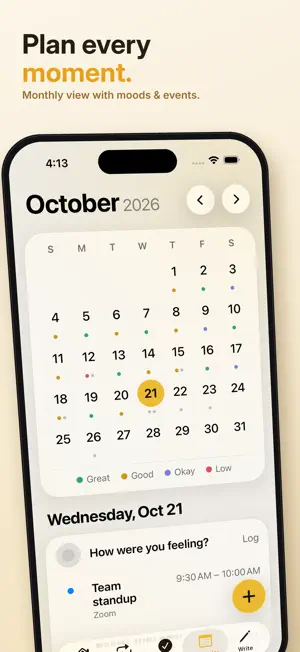
Focusify: Habits, Tasks & Goals Focusify is the all-in-one productivity app that makes self-improvement actually fun. Whether you're building better habits, staying on top of your tasks, or chasing long-term goals, Focusify keeps you organized, motivated, and rewarded every step of the way, all while respecting your privacy by never collecting your data. Productivity Meets Gamification Earn XP for every habit you complete and every task you check off. Level up, unlock achievements, and build streaks that keep you coming back day after day. Focusify turns your daily routine into a game you'll want to win. Habit Tracking Build lasting habits with daily, weekday, weekly, and monthly tracking, streak counters, and milestone rewards. Choose from pre-built habit packs like Morning Routine, Fitness, and Mental Health, or create your own with custom colors and emojis. Hit 7, 30, 100, or 365-day streaks and watch your XP soar. Task Management Stay on top of everything with a full-featured task manager. Set priorities, due dates, and tags. Filter and sort your list your way, and never miss a deadline with overdue warnings and smart reminders. Your Apple Reminders sync automatically, so everything lives in one place. Calendar & Countdown Events View your schedule at a glance with a clean monthly calendar. Add and manage events, import directly from Apple Calendar, and mark any event as a Countdown to see a live days-remaining badge right on your Today screen. Swipe to navigate months and days with ease. Home Screen Widgets Keep Focusify on your home screen with four widgets: Habits, Tasks, Calendar, and Countdown. The Countdown widget lets you pin a specific event so you always know exactly how many days away it is. Notes & Journal Capture thoughts, ideas, and reflections with freeform notes and a built-in daily journal. The redesigned journal editor is clean and full-screen, inspired by Apple Journal. On iOS 17.2 and later, tap the sparkles button to pull in suggestions from your day, workouts, locations, and more. Recaps & Insights Track your progress over time with detailed stats. View weekly, monthly, yearly, or all-time recaps of your habit completion rates, tasks finished, mood trends, journal entries, and XP earned, so you always know how far you've come. Mood Tracking Log how you're feeling each day directly from the calendar tab. See your mood history over time and connect how you feel to what you've been doing. Achievements Unlock 25 unique achievements across Common, Uncommon, Rare, Epic, and Legendary tiers. From completing your first habit to maintaining a 365-day streak, every milestone is worth celebrating. Smart Reminders Never forget a habit or miss a deadline. Set custom reminders for any habit or task and let Focusify keep you on track without the mental load. Why Focusify? Most productivity apps feel like a chore. Focusify feels like progress. It's built for people who want to show up for themselves every day, and actually enjoy doing it. Download Focusify today and start building the life you want, one XP at a time.
What’s new
Version 1.8 · Updated October 22, 2026
Five app styles Pick the look that suits you in Customize: Liquid Glass, Editorial, Bold, Terminal or Soft, each in light and dark. Liquid Glass is the default and uses your accent color. A fresh new design Today, Habits, Tasks and Calendar have been redesigned, and every add and edit screen has been rebuilt to match your style. Habits on specific days Choose exactly which days a habit runs, like Monday, Wednesday and Friday. On its days off it moves out of the way, and your streak keeps going. Rearrange your habits Tap Reorder on the Habits tab and drag your habits into any order. Today and your widgets follow it too. Made for iPad and iPhone Duo On iPad and an unfolded iPhone Duo, Focusify now uses the extra space: a two column Today, a 7 day habit tracker, the calendar and your day side by side, and notes you can edit right next to the list or expand to full screen. Jump straight there Tap a countdown or event on Today to open that day in the Calendar. Fixes and improvements • Goal habits only count as done once you reach the goal. One tap on a habit with a goal of 10 no longer completes it for the day. • Streaks only grow on days you hit your goal. • Habit reminders only go off on the days a habit is scheduled. • Reminders for habits you deleted no longer keep going off.
App privacy
The developer, Aiden Jacobs, reported these privacy practices to Apple.
Data Not Collected
The developer does not collect any data from this app.
Alternatives to Focusify: Habits & Tasks
Looking for apps like Focusify: Habits & Tasks? Here are 6 similar apps on the App Store. The highest rated is Möbius Sync Pro (4.0/5), and 5 of the 6 are free to download.
-
 Atomic Task
1.0
-
 UnTask - One at a time
-
 Sakti Gemas
-
 Timix - A Modern Timer
3.5
-
 Enfluenso
-
 Möbius Sync Pro
4.0
| App | Rating | Price | Last updated | Compare |
|---|---|---|---|---|
| Focusify: Habits & Tasks | 5.0 / 5 (3 ratings) | Free | October 22, 2026 | |
| Atomic Task | 1.0 / 5 (1) | Free | Oct 27, 2026 | Compare |
| UnTask - One at a time | – | Free | Jul 27, 2026 | Compare |
| Sakti Gemas | – | Free | Oct 29, 2026 | Compare |
| Timix - A Modern Timer | 3.5 / 5 (6) | Free | Sep 25, 2026 | Compare |
| Enfluenso | – | Free | Aug 17, 2024 | Compare |
| Möbius Sync Pro | 4.0 / 5 (27) | 4.99 USD | Oct 28, 2026 | Compare |