

Wander: Map any journey
J Maher Photo & Video iPhoneiPadiPod touch
Wander: Map any journey is a free Photo & Video app for iPhone and iPad by J Maher. Rated 5.0/5 from 1 ratings. Requires iOS 26.0.
- Rating
- 5.0
- 1 ratings
- Price
- Free
- on the App Store
- Size
- 18 MB
- Age 4+
- Updated
- Sep 29
- 2026 · v1.8
Screenshots



About Wander: Map any journey
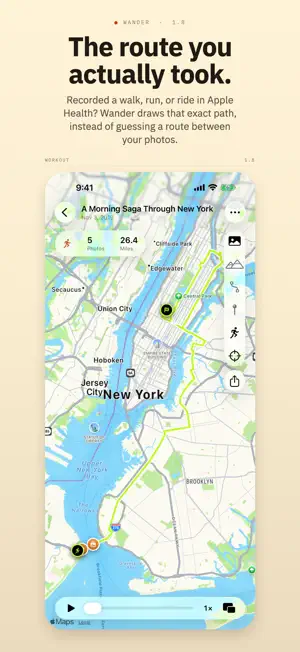
Wander turns the photos from any journey into the route you traveled. Pick the geotagged photos from a stroll, a hike, a bike ride, a road trip, even a flight, and Wander draws the route between every stop in capture order: locked to real streets and trails on land, a clean line across water or sky. Replay it, tap any pin for the photo you took there, and share the result. FEATURES • Photos to route: pick your geotagged photos and Wander builds the path, sorted by capture time and snapped to streets and trails. • Journeys you never saved: Wander can search your photo library for days that look like one and offer them back. It runs on your device and reads only each photo's date and location, never the photos themselves. • The route you actually took: if you recorded a walk, run, ride, or hike in Apple Health while you shot the photos, Wander draws the path it recorded instead of guessing between them. It never writes to Health. • Choose photos your way: filter your library by a day or a date range, jump to a place, or draw a circle on the map to grab everything you shot there. • Every kind of journey: mark any leg as running, cycling, hiking, driving, a train, a boat, or a flight. Wander reads the clues and suggests one. You decide. • Waypoints and Places: shape a route through somewhere you didn't photograph, or set one as your start or end so a train trip draws from the station. Save the spots you use often, like home or a trailhead, and drop one onto any Wander in a tap. • Notes and tags: write a note on a whole Wander, or on any stop, leg, or waypoint, and tag them however you think. Your Logbook searches both. • Weather: look up the conditions and temperature your journey happened in, stop by stop, from the moment each photo was taken. • People: add whoever shared the journey, from Contacts or on the spot. Attach them to a whole Wander or one leg, and browse every journey you've taken together. • Photo pins and replay: every photo becomes a pin you can tap, and pressing play walks a marker along the route with each stop's photo alongside. • Timeline: your journey stop by stop, where you can edit a leg's activity, its people, or a waypoint in place. • Elevation chart: see how high you climbed, read from your photos' GPS altitude and synced to playback. • Insights: lifetime totals across everything you've wandered, from distance and photos to your busiest month. • Logbook: every Wander saves automatically with a fun auto-generated name. Organize with folders, or Smart Folders that fill themselves from rules: runs with Ben but not Sam, anything tagged "coast". • Find it fast: your Wanders turn up in Spotlight search, and "Create a Wander" works from Siri, Shortcuts, or the Action Button. • Built for everyone: Reduce Motion and Transparency, Dynamic Type, higher-contrast pins, and full VoiceOver, including an audio graph of your elevation. • Never lose a Wander: your library backs up to your own iCloud Drive, daily if you like. Deleted ones wait 30 days in Recently Deleted. • On iPhone and iPad: universal, with your Logbook syncing privately across your devices through your own iCloud, not our servers. • Share: send any Wander as a card with the route, the stats, a featured photo, and an optional elevation chart. Frame it with a drag and a pinch; standard or satellite, light or dark, portrait, square or landscape. PRIVATE BY DESIGN • No account, no sign-up. • Your photos never leave your device. Wander reads the ones you choose right where they are and builds the route on device. • No tracking, no ads, no analytics. • What little leaves your device is a coordinate answering something you asked for: Apple Maps for directions and place names, Apple Weather if you look up weather, an elevation service if you look up a height. Never a photo. Wander uses your photos' capture time and location to draw your route. Photos without either are skipped. Go Wander.
What’s new
Version 1.8 · Updated September 29, 2026
Wander 1.8 is about the journeys you already took: the ones sitting in your photo library unsaved, the ones your watch recorded, and the places you keep going back to. NEW • Suggested Wanders. Wander can look through your photo library for days that look like a journey you never saved, and offer them back to you. The search runs entirely on your device and reads only the date and location saved with each photo, never the photos themselves. Suggestions learn from the Wanders you have already saved, so they fit the distances and the days you actually cover. • The route you actually walked. If you recorded a walk, run, ride, or hike in Apple Health while you were taking your photos, Wander offers to draw the path your workout recorded instead of guessing a route between them. A toggle shows the whole recording, including the stretch before your first photo and after your last. Nothing is ever written to Health. • Places worth keeping. A saved place now holds a note, a category, and a list of every Wander you have been there on. Add one by searching, by dropping a pin, or by tapping a shop or a park the map already knows. Link a waypoint to a place, and rename the place to rename it everywhere. • On this day. Your Logbook resurfaces a Wander from this day in an earlier year, with a Home Screen widget and optional anniversary reminders. • Start from a workout. The photo picker can show just the photos you took during a recorded workout, and a single photo along one is now enough to make a Wander. IMPROVED • Tap anything to see it whole. Stops, legs, waypoints, and places each have their own screen now, with Edit in the corner when you want to change something. • One map for finding anywhere. Search the map itself and results appear as pins where you are looking, with your saved places and this Wander's waypoints as layers you can tap. • Search that says why it matched. Every result carries a line naming where your term was found, and a search of your notes now reaches every note on a Wander. • Deleting is no longer forever. Places and people wait in Recently Deleted for 30 days, the way Wanders already did. Restoring one onto a name or a spot something else has taken offers to merge them. • A new launch screen, and buttons throughout the app in the same Liquid Glass as the rest of iOS 26. FIXED • Editing a waypoint's position and its time together no longer drops the time. • Adding or removing a photo keeps a dated Start or End waypoint's times. • Stopping a workout redraw partway leaves the Wander exactly as it was. • A journey that crossed time zones westward is drawn in the order you traveled. • Emptying Recently Deleted, and the first search of a large library, are both far lighter on memory. Private by design: no account, no ads, no tracking. Your Logbook syncs through your own iCloud, not our servers. Go Wander.
App privacy
The developer, J Maher, reported these privacy practices to Apple.
Data Not Linked to You
The following data, which may be collected but is not linked to your identity, may be used for the following purposes:
- Location: Precise Location
Used for: App Functionality
Alternatives to Wander: Map any journey
Looking for apps like Wander: Map any journey? Here are 6 similar apps on the App Store. The highest rated is PhotoTrail: Photo Travel Diary (5.0/5), and all 6 are free to download.
-
 PhotoTrail: Geotag & Trip Map
-
 PhotoTrail: Photo Travel Diary
5.0
-
 Grainera: Retro Film Camera
-
 VidSquash: Storage Cleaner
5.0
-
 PhotoTrail Photo Map&Organizer
-
 Poimi - Photo Album Curation
5.0
| App | Rating | Price | Last updated | Compare |
|---|---|---|---|---|
| Wander: Map any journey | 5.0 / 5 (1 rating) | Free | September 29, 2026 | |
| PhotoTrail: Geotag & Trip Map | – | Free | Oct 11, 2026 | Compare |
| PhotoTrail: Photo Travel Diary | 5.0 / 5 (3) | Free | Feb 4, 2026 | Compare |
| Grainera: Retro Film Camera | – | Free | Jul 29, 2026 | Compare |
| VidSquash: Storage Cleaner | 5.0 / 5 (2) | Free | Aug 3, 2026 | Compare |
| PhotoTrail Photo Map&Organizer | – | Free | Apr 27, 2026 | Compare |
| Poimi - Photo Album Curation | 5.0 / 5 (2) | Free | Oct 15, 2026 | Compare |