

StatementSnap: Bank Converter
KRISHNA PINNAMANENI Finance iPhoneiPadiPod touchMac
StatementSnap: Bank Converter is a free Finance app for iPhone and iPad by KRISHNA PINNAMANENI. Requires iOS 17.0. Updated October 21, 2026.
- Price
- Free
- on the App Store
- Size
- 5 MB
- Age 4+
- Updated
- Oct 21
- 2026 · v1.10
Screenshots

About StatementSnap: Bank Converter
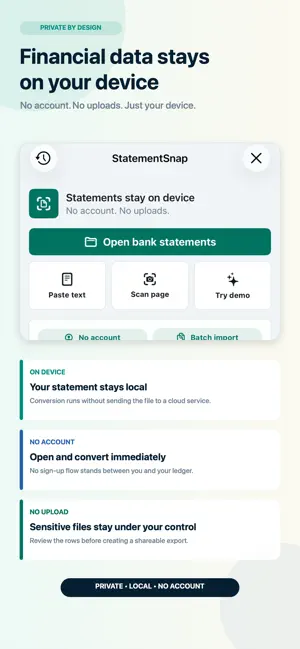
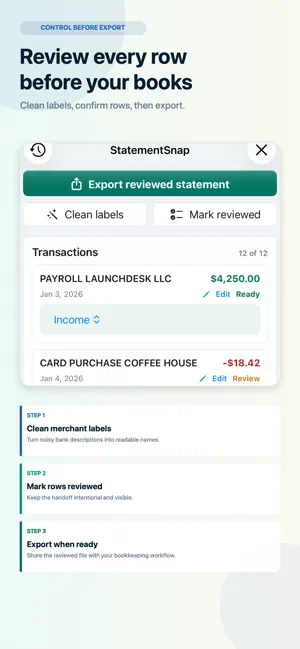
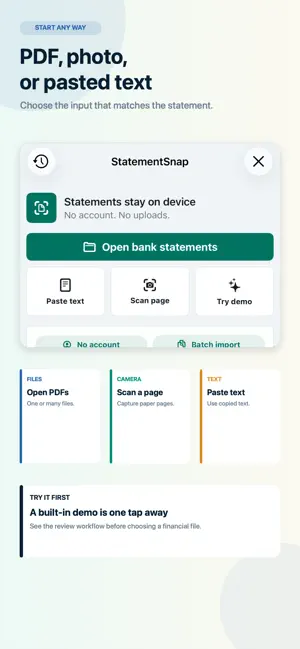
Turn bank statements into editable spreadsheets and accounting files, privately on your iPhone. Open supported files, batch-import statements, paste text, or scan a page with the camera. Import bank and card statements, review the extracted transactions, and save files for your bookkeeping workflow. StatementSnap processes statement content on your device without requiring a bank connection or StatementSnap account. REVIEW BEFORE APPLYING CHANGES • Compare current values with proposed merchant-label and category changes. • Edit suggestions, choose individual rows, and approve your selection. • Inspect original source text, extraction confidence, and warnings. • Record customer review separately from extraction confidence. Relevant edits reopen review. • Restore removed rows and undo the latest bulk approval while preserving later changes. KEEP YOUR SAVED WORK • Reopen projects with their edits, approvals, and statement-check history. • Search and rename saved projects. • Review exact-source repeat imports before creating another copy, or reopen the saved project. • New imports preserve earlier saved projects. • See save failures and retry without discarding work held in memory. CHECK STATEMENTS AND COVERAGE • Confirm account details, statement periods, and opening and closing balances against the original. • Resolve review flags and balance differences before confirming a statement. • Keep confirmation and reopening history when the underlying evidence changes. • Track monthly statement coverage and inspect missing or overlapping periods. • Compare consecutive closing and opening balances after confirming account, dates, currency, and printed balances. These checks help verify imported statements. They do not replace an independent accounting ledger or close your books. EXPLORE SPENDING • View outgoing totals and largest merchants by account and month. • Inspect recurring-payment suggestions and supporting transactions. • Confirm or dismiss recurring patterns yourself. • Review possible transfers between your accounts before excluding confirmed pairs from operating totals. EXPORT FOR YOUR NEXT STEP • CSV, Bookkeeping CSV, Excel, TSV, and JSON. • QuickBooks-compatible CSV for manual upload, with account review and guidance. • Xero- and Zoho-compatible CSV, plus OFX, QFX, QBO, and QIF. • Conversion Proof and summarized audit reports. PRIVATE BY DESIGN Statement conversion, search, review, and export run locally. Statement text, transaction rows, account numbers, merchant names, and amounts are not uploaded for processing. You choose where to save or share exported files. StatementSnap is a conversion and organization utility. It does not provide financial, accounting, tax, or legal advice. Review exported data before relying on it. Reviewer names are customer-entered, not authenticated signatures. QuickBooks is a trademark of Intuit Inc. Xero is a trademark of Xero Limited. StatementSnap is not affiliated with or endorsed by either company.
What’s new
Version 1.10 · Updated October 21, 2026
More control over your statements and saved work. • Compare original values with suggestions, edit individual proposals, and approve only what you choose. • Keep review decisions separate from extraction confidence and source evidence. • Reopen saved projects, review repeat imports, and retain earlier work when importing another statement. • Restore removed rows and undo the latest bulk approval while preserving later edits. • Record statement checks and compare consecutive balances with explicit customer confirmation. • Improved navigation, saving feedback, export guidance, and walkthrough controls. Existing CSV, TSV, and Excel column layouts remain compatible. On iPhone, saved projects are no longer automatically removed after the twentieth project. Large-text layouts keep review, import, and spending controls reachable.
App privacy
The developer, KRISHNA PINNAMANENI, reported these privacy practices to Apple.
Data Not Collected
The developer does not collect any data from this app.
Alternatives to StatementSnap: Bank Converter
Looking for apps like StatementSnap: Bank Converter? Here are 6 similar apps on the App Store.
-
 KardOne Merchant HUB
-
 Spend Smartly
-
 Bank Statement Converter Excel
-
 Card Statement CSV
-
 Pilo: Budget & Expense Tracker
-
 Stmnt
Stmnt
| App | Rating | Price | Last updated | Compare |
|---|---|---|---|---|
| StatementSnap: Bank Converter | – | Free | October 21, 2026 | |
| KardOne Merchant HUB | – | Free | Apr 22, 2026 | Compare |
| Spend Smartly | – | Free | May 25, 2026 | Compare |
| Bank Statement Converter Excel | – | Free | Aug 25, 2026 | Compare |
| Card Statement CSV | – | Free | Mar 14, 2026 | Compare |
| Pilo: Budget & Expense Tracker | – | Free | Aug 11, 2026 | Compare |
| Stmnt | – | Free | Sep 4, 2026 | Compare |